For anyone wanting to work with inch units, please add the following line in your code (for example, in the FormCreate event).
GlobalValueUnit := euInch;
WPTools Version 9 supports the localization of the texts which are used for filters and error messages and also the localization of the provided property dialogs.
Steps to update the dialog language in WPTools:
We start with a simple form:
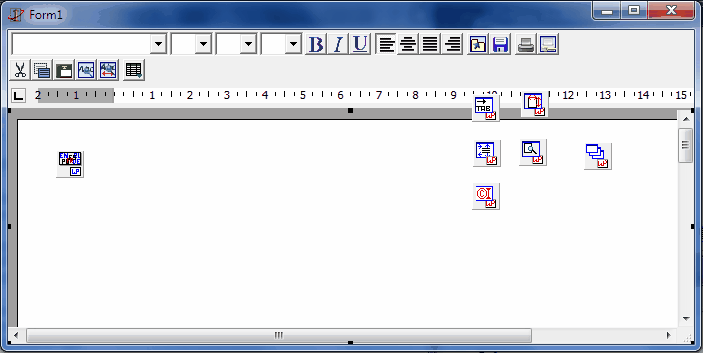
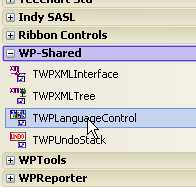
Now we add the component TWPLanguageControl to the form
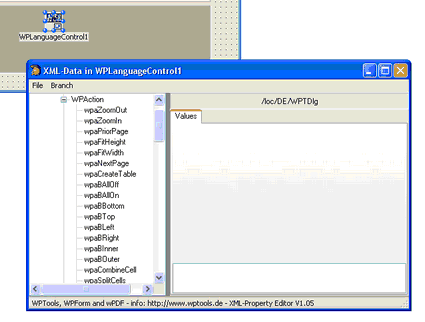
A double click opens the XML editor.
Here we can load the language file WPLocalization_2013.xml which is provided under Demos \ B)_Localization \ XMLSources.
Close the form with File/OK.
If you need to update a project you can also merge(!) in the new XML data which was added in WPTools 6 or WPTools 8.
If you need to translate the XML please save the EN branch into a different file. Now you can use an editor such as Notepad++ to edit that file. You need to rename <EN>...</EN> to a different language shortcut.
Please note that the properties Active, AutoLOadString and AutoSaveStrings are not supported in WPTools 5, 6 or WPTools 8.
Here we need to create a COM interface like this:
Add the units WPUtil, WPActnStr to the uses clause.
To active use this code in the OnCreate event of the form:
procedure TForm1.FormCreate(Sender: TObject);
begin
WPLangInterface := TWPLocalizationInterface.Create(WPLanguageControl1);
WPLanguageControl1.GlobalLanguage := 'DE';
WPLocalizeLoadForms := TRUE;
WPTools_LoadVCLStrings;
WPTools_LoadActionStrings;
WPToolbar1.ShowHint := true;
end;
In the OnDestroy event add this:
procedure TForm1.FormDestroy(Sender: TObject);
begin
WPLangInterface.Free;
end;
Done: We have hints in German:
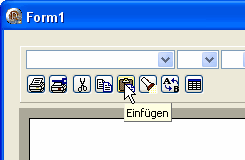
And Dialogs, too:
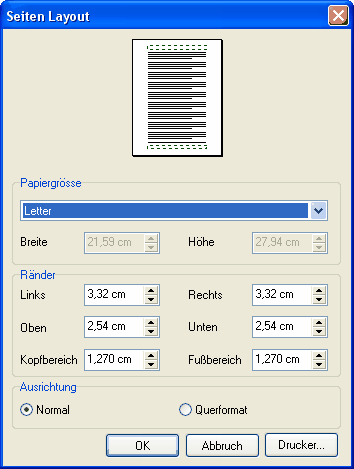
To change the language at runtime use code like this:
WPLanguageControl1.GlobalLanguage := 'DE';
WPLocalizeLoadForms := TRUE;
WPTools_LoadVCLStrings; // from unit WPUtil
WPTools_LoadActionStrings; // from unit WPActnStr
You need to create the TWPLanguageControl and the Interface on the Form which is created first in the project.
If necessary You can put it into a Datamodul.
How does the localization work?
In WPTools Version 9 we are using a localization interface which is defined as:
IWPLocalizationInterface = interface
['{A12EF1F7-E592-4483-855F-67E28332AFC5}']
// This method can be used to save the menu items and captions
on a certain form. If you use the TWPLocalizeForm class you don't need
to care about that. }
procedure SaveForm(
const Name: string;
Form: TWinControl;
Menus, Captions, Hints: Boolean);
// Load all Components on a certain TForm. }
procedure LoadForm(
const Name: string;
Form: TWinControl;
Menus, Captions, Hints: Boolean);
// This method saves a string list under a certain name. The string list has to use
the syntax NAME=xxx\n }
procedure SaveStrings(
const Name: string;
Entries: TStrings;
Charset: Integer);
// Loads back the string(s) saved with WPLangSaveStrings }
function LoadStrings(
const Name: string;
Entries: TStrings;
var Charset: Integer): Boolean;
// Method to save a certain string. To save multiple strings use WPLangSaveStrings
procedure SaveString(
const Name, Text: string;
Charset: Integer);
// Loads back a string saved with WPLangSaveString
function LoadString(
const Name: string;
var Text: string;
var Charset: Integer): Boolean;
end;
This interface is implemented by the TWPLanguageControl. The TWPLocalizeForm (implemented in unit WPUtil, it is the anchestor of all localizable dialogs) automatically uses this interface through the instance of the TWPLocalizationInterface class which must be created by your code: WPLangInterface := TWPLocalizationInterface.Create(WPLanguageControl1);