File Webform1.aspx.cs
|
The "using" sequence |
|
using System; using System.Collections; using System.ComponentModel; using System.Data; using System.Drawing; using System.Web; using System.Web.SessionState; using System.Web.UI; using System.Web.UI.WebControls; using System.Web.UI.HtmlControls; |
|
link assembly "wPDF" (from assembly wPDF3.DLL - please add to references) |
|
using wPDF; using WPDynamic;
namespace RTF2 { |
|
The event is executed by ASP |
|
public class WebForm1 : System.Web.UI.Page { private void Page_Load(object sender, System.EventArgs e) {
|
|
We create a RTF2PDF instance |
|
RTF2PDF pdf = new RTF2PDF(); string password = "SomePrivatePassword" try { // Load the license from file which is not in the www path pdf.SetLicense("@FILE@" + password,"C:\\Windows\\rtflicense.dat",0); |
|
clear all properties and set the default font |
|
pdf.Memo.TextCursor.Clear(); pdf.Memo.CurrAttr.SetFontface("Verdana"); |
|
create the header text
|
|
pdf.Memo.TextCursor.InputHeader(0,"",""); pdf.Memo.CurrAttr.SetFontSize(8); pdf.Memo.TextCursor.InputImage( "c:\\inetpub\\wwwroot\\adr.png",0); pdf.Memo.CurrObj.ScaleSize(0,567*2,0); // Scale to height = 2 cm pdf.Memo.CurrPar.Alignment = 2; // right pdf.Memo.CurrPar.SpaceAfter = 30; // Distance between image and line pdf.Memo.TextCursor.InputString("\r",0); // one line pdf.Memo.CurrPar.Borders = 2; // Top Border pdf.Memo.CurrPar.ParASet( (int)WPDynamic.WPAT.BorderWidth, 30 ); // 1pt border width |
|
create the footer text
|
|
pdf.Memo.TextCursor.InputFooter(0,"",""); pdf.Memo.CurrAttr.SetFontSize(8); // Current Date pdf.Memo.TextCursor.InputFieldObject( "DATE","\\@ \"dd. mmmm yyyy\"",""); pdf.Memo.TextCursor.InputString(", ",0); pdf.Memo.TextCursor.InputFieldObject("TIME","",""); // right tab in margin, dot filling pdf.Memo.TextCursor.InputTabstop(true,0xFFFF,1,1);
pdf.Memo.TextCursor.InputString("\t",0); pdf.Memo.TextCursor.InputFieldObject("PAGE","",""); pdf.Memo.TextCursor.InputString("/",0); pdf.Memo.TextCursor.InputFieldObject("NUMPAGES","",""); pdf.Memo.CurrPar.Borders = 2; // Top Border |
|
create some text, in this case just a table.
|
|
// Fill the body pdf.Memo.TextCursor.GotoBody(); pdf.Memo.CurrAttr.SetFontSize(10); pdf.Memo.TextCursor.InputString( "\rThis Table was created in ASP.NET ",0); pdf.Memo.CurrAttr.IncludeStyles(1); // <<bold
pdf.Memo.TextCursor.InputParagraph(0,""); pdf.Memo.TextCursor.InputParagraph(0,""); pdf.Memo.CurrAttr.ExcludeStyles(1); // >>bold
pdf.Memo.TextCursor.AddTable("",3,4,true,0,false, false);
|
|
Add text after the table. |
|
// Create a new paragraph AFTER the table (mode=2) pdf.Memo.TextCursor.InputParagraph(2,""); pdf.Memo.TextCursor.InputParagraph(2,"");
pdf.Memo.TextCursor.InputString( "Click to see the C# source: ",0); |
|
Create an icon. When user clicks on it the C# source is opened!
|
|
pdf.Memo.TextCursor.InputImage( "c:\\inetpub\\wwwroot\\cs_logo.png",0); pdf.Memo.CurrObj._SetObjType(100); pdf.Memo.CurrObj.ScaleSize(567,0,0); // Scale to width = 1 cm pdf.Memo.CurrObj.LoadFromFile( "c:\\inetpub\\wwwroot\\WebForm1.aspx.cs"); |
|
Add some paragraphs store current attributes |
|
pdf.Memo.TextCursor.InputParagraph(2,""); pdf.Memo.TextCursor.InputParagraph(2,""); int save_ca = pdf.Memo.CurrAttr.CharAttrIndex; |
|
add some text and modify the writing mode |
|
pdf.Memo.TextCursor.InputString( "This is the RTF data for the table:\r",0); pdf.Memo.CurrAttr.SetFontSize(8); pdf.Memo.CurrAttr.SetFontface("Courier New"); |
|
Now save the current text as RTF and insert it here as ANSI text.
|
|
pdf.Memo.LoadFromString( pdf.Memo.SaveToString(false, "RTF-nobinary"), true, "ANSI" ); |
|
Restore current writing mode |
|
// We restore the character attributes used before pdf.Memo.CurrAttr.CharAttrIndex = save_ca; |
|
and add an icon to open this document in RTF format. |
|
// And create an icon to attach the RTF source pdf.Memo.TextCursor.InputString("\r\rClick to open the document: ",0); pdf.Memo.TextCursor.InputImage("c:\\inetpub\\wwwroot\\rtf_logo.png",0); pdf.Memo.CurrObj._SetObjType(100); pdf.Memo.CurrObj.ScaleSize(567,0,0); // Scale to width = 1 cm |
|
We create a stream, save the document to this stream and load it into the "RTF" icon. |
|
System.IO.Stream str = new System.IO.MemoryStream(); pdf.Memo.SaveToStream( new WPDynamic.Stream2WPStream(str) ,false,"RTF"); pdf.Memo.CurrObj.LoadFromStream("Document.RTF", new WPDynamic.Stream2WPStream(str)); |
|
Select the "in memory" PDF creation mode on web server (requires "Internet Server" License) |
|
pdf.PdfCreator.PDFFile = "memory"; pdf.PdfCreator.FontMode = 0; // embed all fonts! try { |
|
Reformat the text |
|
pdf.Memo.ReformatAll(false,false); |
|
And create PDF |
|
pdf.Print(); |
|
Initialize the HTTP headers. |
|
// remove any output Response.Clear(); // Add new header Response.ContentType = "application/pdf"; Response.AddHeader("Content-Type", "application/pdf"); // Set a file name which is displayed Response.AddHeader("Content-Disposition","inline;filename=PortableDocument.pdf"); // Write the PDF data Response.Clear(); |
|
and use "ResultBuffer" to assign the Response |
|
Response.BinaryWrite(pdf.ResultBuffer); |
|
} catch { Response.Write("Internal Error in PDF Creation"); } } finally { pdf.Dispose(); // Don't forget! Response.End(); }
}
#region automatically created code [...] } } |
|
|






File test.aspx contains a single line:
<%@ Page Language="c#" Debug="true" Codebehind="/WebForm1.aspx.cs" AutoEventWireup="false" Inherits="RTF2.WebForm1" %>
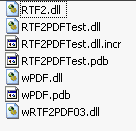
To work with ASP.NET please copy the engine DLL (RT2PDF03.DLL) and the DLL wPDF.DLL into the directory bin.
In our demo the \bin directory contains:
The file in the root directory (wwwroot) are
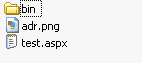
Note: Often only the compiled DLL (here RTF2.DLL) is required for the ASP program. The other files which may be created by your developing tool are not created and can confuse the web server. The one line test.aspx mentioned above was enough to start this program!