<?xml version="1.0" encoding="windows-1250"?>
<layout>
<!-- Image selection for all toolbars which do not have an own <images/> tag-->
<images default="STDBUT" disabled="STDBUT_DIS"/>
<style btnframe="0" hoverframe="0"/>
<main>
<!-- This is the main toolbar -----------------------------
force large mode with: large=1, small mode with large=0
for standard flat buttons use: btnframe=1 hoverframe=2
for old style buttons use: btnframe=6 hoverframe=2
(can be set in "style")-->
<ToolBar ShowCaption="0">
<Button image="16" wpa="New"/>
<Button image="17" wpa="DiaOpen"/>
<Button image="18" wpa="DiaSave"/>
<_Button image="18" wpa="Close"/>
<Button image="31" wpa="DiaPrint"/>
<_Button image="32" wpa="Print"/>
<Button image="33" wpa="DiaPrinterSetup"/>
<Button image="28" wpa="DiaPreview"/>
<Text wpa="FontSelection"/>
<dropdownlist width="150" Image="-1" text="Arial" wpa="font"/>
<dropdownlist Image="-1" wpa="fontsize"/>
<!-- for colors use params: crx=2 crx1=18 cry=15 cry1=19 to
select the rectangle to show the current color.
To specify the rectangle in 24X24 images use lcrc etc-->
<dropdown Image="46" wpa="fontcolor"/>
<dropdown Image="47" wpa="fontbgcolor"/>
<dropdown Image="45" wpa="parcolor"/>
<Check Image="1" wpa="Bold"/>
<Check Image="2" wpa="Italic"/>
<Check Image="6" wpa="Underline"/>
<Check Image="5" wpa="Strikeout"/>
<Check Image="3" wpa="SuperScript"/>
<Check Image="4" wpa="SubScript"/>
<!-- sub toolbar, must be inside of 'subitems'. It inherits the images !-->
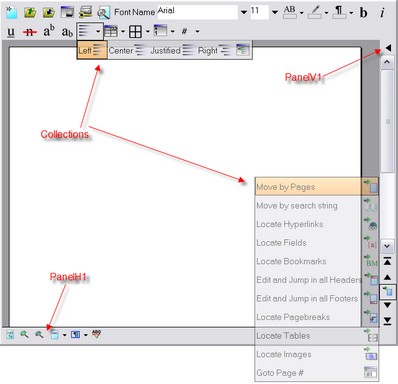
<Collection>
<subitems ShowCaption="1">
<Radio Image="12" wpa="Left"/>
<Radio Image="13" wpa="Center"/>
<Radio Image="14" wpa="Justified"/>
<Radio Image="15" wpa="Right"/>
<!-- Paragraph property dialog-->
<Button Image="59" wpa="DiaParagraphProp" ShowCaption="0"/>
</subitems>
</Collection>
<!-- Subtoolbar to create and manipulate table.-->
<Button image="56" wpa="CreateTable">
<subitems>
<Button image="64" wpa="InsRow"/>
<Button image="65" wpa="DelRow"/>
<Button image="66" wpa="InsCol"/>
<Button image="67" wpa="DelCol"/>
<!-- split / combine horizontally-->
<Button image="68" wpa="CombineCell"/>
<Button image="70" wpa="SplitCells"/>
<!-- Insert Table Dialog-->
<Button Image="58" wpa="DiaINSTable"/>
</subitems>
</Button>
<!-- sub toolbar for borders-->
<dropdown image="73">
<subitems>
<Check Image="73" wpa="BAllOn"/>
<Check Image="72" wpa="BAllOff"/>
<Check Image="75" wpa="BOuter"/>
<Check Image="74" wpa="BInner"/>
<Check Image="76" wpa="BLeft"/>
<Check Image="77" wpa="BRight"/>
<Check Image="78" wpa="BTop"/>
<Check Image="79" wpa="BBottom"/>
<Button Image="58" wpa="DiaParagraphBorder"/>
</subitems>
</dropdown>
<!-- numbering, bullets and indents-->
<Button image="89" wpa="DiaBulletOutlines">
<subitems>
<check image="39" wpa="Numbers "/>
<check image="38" wpa="Bullets"/>
<Button image="41" wpa="IncIndent"/>
<Button image="42" wpa="DecIndent"/>
</subitems>
</Button>
<!-- Insert fields and symbols. Uses command WPDLL_COM_DATA_INPUT-->
<dropdown image="-1" caption="#" ShowCaption="1">
<subitems>
<Button image="-1" wpa="InsertTextFieldPAGE" caption="#"/>
<Button image="-1" wpa="InsertTextFieldNUMPAGES" caption="##"/>
</subitems>
</dropdown>
</ToolBar>
<!-- The panel in the lower left corner-->
<PanelH1 ShowCaption="0">
<button image="24" wpa="zoom100"/>
<button image="25" wpa="ZoomIn"/>
<button image="26" wpa="ZoomOut"/>
<Collection wpa="DropDownLayoutModes" image="31">
<subitems>
<button image="23" wpa="layoutnormal"/>
<button image="21" wpa="zoomwidth"/>
<button image="22" wpa="zoomfullpage"/>
<button image="20" wpa="zoomdoublepage"/>
</subitems>
</Collection>
<Collection wpa="DropDownShowModes" image="31">
<subitems size="30">
<check image="144" wpa="showcr"/>
<check image="140" wpa="showTableGrid"/>
<check image="142" wpa="showfields"/>
<check image="141" wpa="showformulas"/>
<check image="143" wpa="showbookmarks"/>
<check image="146" wpa="ShowHyperlinks"/>
<-check image="145" wpa="ShowSPANCodes"/>
<check image="147" wpa="ShowHiddenText"/>
<!-- some custom drawing-->
<check image="136" wpa="ShowFoldLine"/>
<check image="135" wpa="ShowAddressArea"/>
<!-- toggle display of ruler etc-->
<-check image="-1" wpa="ShowHRuler"/>
<-check image="-1" wpa="ShowVRuler"/>
<-check image="-1" wpa="ShowGutter"/>
</subitems>
</Collection>
<check image="107" wpa="spellasyougo"/>
</PanelH1>
<!-- The panel besides this one, reserved to be used as tabset only-->
<PanelH2>
</PanelH2>
<!-- cannot be modified -->
<!-- The Panel in the right upper corner, can be used for info menu-->
<PanelV1 columns="1" ShowCaption="0">
<Button image="97">
<!-- create popup menu-->
<menu caption="About" hint="This shows a popup menu!">
<menu caption="PCC package file" wpa="DiaMessageBox"
param="Loaded from file Buttons.PCC!"/>
<menu name="about" caption="This APP"/>
<-menu wpa="DiaWPAbout"/>
<-menu wpa="DiaWPDebug"/>
</menu>
<menu caption="Rulers">
<menu caption="Horizontal" wpa="ShowHRuler"/>
<menu caption="Vertical" wpa="ShowVRuler"/>
</menu>
<menu wpa="SelectLanguage">
<menu caption="German" wpa="SelectLanguage" param="DE"/>
<menu caption="English" wpa="SelectLanguage" param="EN"/>
</menu>
<menu wpa="DiaSpellOptions"/>
<menu name="exit" caption="Exit"/>
</Button>
</PanelV1>
<!-- The panel in the lower right corner - for navigation-->
<PanelV2 columns="1" showcaption="0">
<Button image="90" wpa="movefirst"/>
<Button image="91" wpa="moveprior"/>
<Collection wpa="findmodes">
<!-- inherit image from menu-->
<subitems columns="4" size="30" showcaption="1">
<radio Image="108" wpa="movesel_page"/>
<radio Image="109" wpa="movesel_lastsearch"/>
<radio Image="110" wpa="movesel_hyperlink"/>
<radio Image="112" wpa="movesel_field"/>
<radio Image="113" wpa="movesel_bookmark"/>
<radio Image="114" wpa="movesel_headers"/>
<radio Image="115" wpa="movesel_footers"/>
<-radio Image="116" wpa="movesel_footnote"/>
<radio Image="117" wpa="movesel_pagebreak"/>
<radio Image="118" wpa="movesel_table"/>
<radio Image="119" wpa="movesel_image"/>
<-radio Image="117" wpa="movesel_section"/>
<button Image="121" wpa="goto_page"/>
<-button Image="121" wpa="goto_movesel"/>
</subitems>
</Collection>
<Button image="93" wpa="movenext" hint="next"/>
<Button image="94" wpa="movelast" hint="last"/>
</PanelV2>
</main>
</layout>