Manage reporting template
Overview
| a) | This interface has basic functions to initialize the template editor and start reporting. |
| b) | The property RecordSet makes it easy to create a list in MS Access by using a DAO RecordSet interface. |
| c) | This interface manages an internal pre-template. This pre template is used to create a reporting template from all groups, bands and fields which are marked to be obligatory. Optional groups and bands can be selected by the user. A dialog box will show the available elements in this pre-template as drag&drop repository. Internally the template is managed as XML file - it can also be saved and loaded in this format. |
Please see the introduction "Reporting".
Description
This interface can be accessed through the property Report. It allows the preparation of a reporting template definition with obligatory and optional groups, bands and fields.
Please don't forget to activate the double editor and the reporting support: SetEditorMode( EditorMode.wpmodDoubleEditor, EditorXMode.wpmodexReporting|...) The second editor can be hidden using: wpdllInt1.Memo2.Hidden = true; |
This definition is internally managed as a XML structure, it can be loaded from XML and saved to XML. When the XML structure is used to create a reporting template, a copy of the XML data is attached to the template.
Report.InitTemplate(Filename,Mode)
By simply calling the method InitTemplate the template is prepared in the upper editor. The user can then add optional fields, adjust text attributes or type in some text.
InitTemplate function parameters:
| Filename: | This is an optional filename. If specified the template (NOT the xml data!) will be loaded from this file. This can be usefull to load the initial paragraph style list. If starting with "@", this parameter is used to set the caption for the pre-template form. |
| Mode: | If bit 1 is set, the template in the editor #1 will be initialized using the XML data (which was loaded or created). Otherwise, in case a file name was specified, only the report template will be loaded. In this case it is recommended to also set bit 2 to avoid out of sync XML data. |
If bit 2 is set, the engine will load the XML from the report template and overwrite the information stored in the report object.
If bit 3 is set, the pre-template form (also called repository) will be displayed. Once this form was displayed the methods ShowTemplate and ShowResult will automatically show and hide this form.
Examples:
Load a pre-template and create a raw report template
Report.LoadFromFile("c:\\groups_and_fields.xml");
Report.InitTemplate("@A new report",1+4);
Load a previously created template (RTF or WPT format) & show the repository form
Report.InitTemplate("c:\\a_report_template.rtf",2+4);
Only set caption for pre-template form (must be already displayed)
Report.InitTemplate("@a new caption",0);
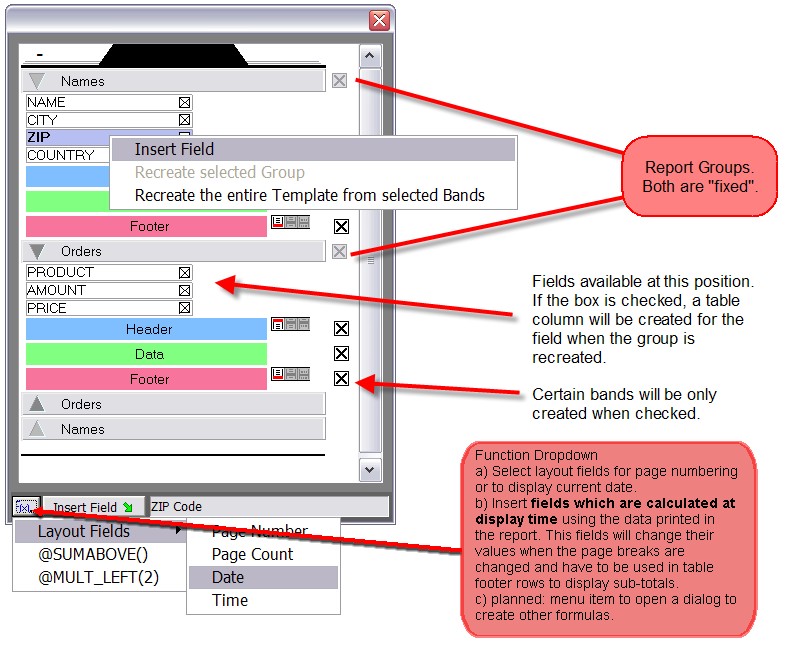
"Repository Form":
This special dialog can be displayed in stay-on-top-mode to insert fields and to update the template using a changed selection of the optional bands. This dialog internally updates the XML structure, so the selection of bands and fields can also be saved back to XML.
Properties |
Methods |