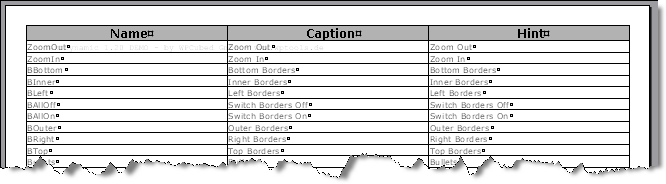
We want to show all the wpa actions nicely formatted in the editor.
To the event handler of a newly created button we add this code to create a table in the editor.
// Now clear the text
WPDLLInt1.Clear();
// We need these interfaces for text creation
IWPMemo Memo = WPDLLInt1.Memo;
IWPTextCursor TextCursor = Memo.TextCursor;
IWPAttrInterface AttrHelper = WPDLLInt1.AttrHelper;
IWPParInterface CurrPar = Memo.CurrPar;
// set all margins, do not change page size
Memo.PageSize.SetPageWH(-1,-1,360,360,360,360);
// We want to use 2 different character styles
AttrHelper.Clear();
AttrHelper.SetFontface("Verdana");
AttrHelper.SetFontSize(11);
AttrHelper.IncludeStyles(1); // bold
int headerchars = AttrHelper.CharAttrIndex;
AttrHelper.Clear();
AttrHelper.SetFontface("Verdana");
AttrHelper.SetFontSize(8);
int bodychars = AttrHelper.CharAttrIndex;
// and add a one row table
TextCursor.AddTable("WPA",3,1,true,0,false,false);
// Now add one row after the other
string n = "",c ="",h ="";
for(int i=0; i<1000;i++)
{
if (!WPDLLInt1.Memo.wpaGetCaption(i,ref n, ref c, ref h)) break;
TextCursor.CPMoveNextRow(true); // down and create
TextCursor.CPTableColNr = 0;
CurrPar.SetText(n, bodychars);
TextCursor.CPTableColNr = 1;
CurrPar.SetText(c, bodychars);
TextCursor.CPTableColNr = 2;
CurrPar.SetText(h, bodychars);
}
// add text to the header row
TextCursor.CPTableRowNr = 0;
TextCursor.CPTableColNr = 0;
CurrPar.SetText("Name", headerchars);
CurrPar.Alignment = 1;
CurrPar.ParShading = 30;
TextCursor.CPTableColNr = 1;
CurrPar.SetText("Caption", headerchars);
CurrPar.Alignment = 1;
CurrPar.ParShading = 30;
TextCursor.CPTableColNr = 2;
CurrPar.SetText("Hint", headerchars);
CurrPar.Alignment = 1;
CurrPar.ParShading = 30;
// and reformat
Memo.Reformat();
This is the created table: