The WPDLLInt object is the central part of the TextDynamic word processing component. It publishes some methods to initialize the control and several interfaces. Most important are the interfaces Memo and Memo2.
To load the the DLL use SetDLLName
To initialize the engine and set Your License keys use EditorStart
To initialize the editor and select the editing mode (single editor, split screen...) use SetEditorMode.
The interface Memo is used to access and program the editor #1.
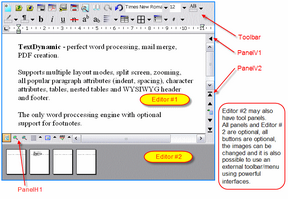
The TextDynamic control also includes a secondary editing engine. It can be use to display thumbnails, display the result of a reporting or mail merge process or it can be used to display the same text as Editor #1 at a different location and zoom setting ("splitscreen").
The second engine can be programmed through interface Memo2.
Since in certain modes the user can work freely with both editors, You can use interface CurrMemo to program the editor which is currently active. The objects Memo, Memo2 and CurrMemo all include the properties and methods of the in case of IWPMemo interface.
The interface IWPMemo publishes sub interfaces to change the font and paragraph attributes of the text (TextAttr, CurrAttr, CurSelAttr), to move the cursor and insert text or data (TextCursor). It includes methods to load and save the text (LoadFromFile ...), methods modify the behavior and display of the editor (SetBProp, SetIProp) and properties to change the layout and display. (LayoutMode, WordWrap, AutoZoom).
Use TextDynamic to edit database memo fields,
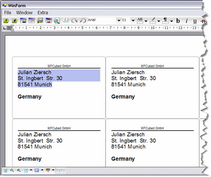
you can use Memo.LabelDef to quickly create, edit and print labels.
|
or for full featured word processing:
|
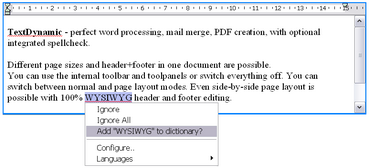
Work with the powerful mail merge, create documents under program control using the TextCursor API or the optional reporting.
Quick Links:
| • | You can access Memo.PageSizes to format the text to let it fit into a series of rectangles. Each page can be retrieved easily as a metafile. |
| • | To convert the text to PDF using the integrated PDF converter |
| • | To prepare and send e-mails use the property Mapi. |
| • | In one package we deliver an OCX to be used in Visual Basic 6, MS Access or Visual FoxPro (or other development tools with a decent Active X support) and a .NET assembly (written in C#) to be used in dotNET applications (C#, VB.NET, Delphi.NET). The source for the .NET assembly is provided with the license. |
| • | For Syntax Highlighting see Memo.TextCommandStr |
| • | Also see "Categories", "Tasks", "Mailmerge" and "Reporting" |
TextDynamic Product Pages .NET / OCX
In both cases the word processing is performed by an optimized native windows DLL, the TextDynamic kernel. When using the OCX please specify the path to the DLL in property DLLName.
When using .NET you can please use the static method SetDLLName(string) as early as possible in the program (before InitializeComponent):
WPDynamic.WPDLLInt.SetDLLName("S:\\Appname\\WPTextDLL01.dll");
This loads and fixes the engine DLL in memory. It will be used for all the editors created by the application and unloaded only when the application closes or UnloadDLL was explicitly called.
We tried to make the OCX and the .NET control work as similar as possible. But we also added some exclusive utility classes and methods to the .NET library which provide a very tight integration. So the control works nicely with .NET framework Streams and preserves the PNG data loaded into .NET Pictures objects.
The interfaces (IWPMemo, IWPTextCursor, ...) are the same in the .NET assembly and in the OCX. This makes it possible to make the source code exchangeable. In this reference we mainly include examples developed in C#.
Usually you will access the interfaces like this:
IWPMemo Memo = wpdllint1.Memo;
IWPTextCursor TextCursor = Memo.TextCursor;
TextCursor.InputText("Hello World");
Memo.Reformat();
wpdllint1.ReleaseInt(TextCursor); // Please use ReleaseInt to avoid problems caused by the garbage collector!
wpdllint1.ReleaseInt(Memo);
The events published by this control however are implemented differently. While the OCX uses an event interface the .NET wrapper of course uses delegates. The parameter list of this delegates has been slightly modified to make the integration perfect.
The PDF manual includes an introduction which shows how to create a "first" application in C#, VB.NET and VB6. It also shows how to use the important method SetLayout to load the file which contains the description of the user interface (in TextDynamic everything can be configured, the order of the buttons, captions and images).
The method SetEditorMode is used to switch the different tool panels on and off, it is also used to activate spell check, PDF export and other optional features. (The options must be included in license).
When using the registered version you need to set your license key using the method EditorStart.
The following interfaces are supported by TextDynamic:
Name |
Published by |
Notes |
Memo Memo2 CurrMemo |
Main editing interface |
|
TextCursor IWPMemo.TextCursor |
Create text by code, move cursor |
|
PdfCreator |
create PDF files |
|
IWPMemo.SpellCtrl |
Modify the setup of the optional spellcheck engine. |
|
IWPMemo.MAPI |
reserved to create and and send e-mails. |
|
PageSize IWPMemo.PageSize |
Change document page size |
|
CurrObj CurrSelObj IWPMemo.CurrObj IWPMemo.CurrSelObj Events: OnFieldEnter OnFieldLeave OnHyperlink OnTextObjectMouse OnLoadExtImage OnBeforeSaveImage OnAfterSaveImage OnTextObjectGetText OnEnumTextObj |
Modify images and other objects, such as hyperlink and mail-merge tags. |
|
CurrPar IWPMemo.CurrPar |
Modify current paragraph. Change text and set paragraph properties. |
|
_ |
CurrStyle IWPMemo.CurrStyle |
Modify current style to change paragraph properties. |
Modify the current writing mode or change the selected text. |
||
_ |
CurrParAttr IWPMemo.CurrParAttr Event OnEnumParOrStyle Event OnCreateNewCell |
Modify font attributes of all characters in current paragraph. |
_ |
CurrStyleAttr IWPMemo.CurrStyleAttr |
Modify font attributes defined by current style. |
_ |
IWPFieldContents.FieldAttr |
Modify font attributes of mail merge field. |
_ |
IWPParInterface.CharAttr() |
Modify font attributes of certain character in paragraph. |
_ |
IWPMemo.CurrAttr |
Modify the current writing mode |
_ |
CurrStyleAttr IWPMemo.CurrStyleAttr |
Modify font attributes defined by current style. |
IWPMemo.PrintParameter |
Modify print options. |
|
|
Event OnEnumDataBlocks |
Manage header and footer texts. |
|
Event OnFieldGetText |
Mailmerge - replace fields with text or images. |
|
Event OnButtonClick |
Provide code for custom actions added to internal toolbars. |
|
Modify appearance of hyperlinks and other "special" text. |
||
Property Report |
Create and manage a report DB-Description. Show report template editor. |
|
Property Memo.LabelDef |
Edit, preview and print mailing labels. |