Interface to modify a numbering style.
Description
This interface is provided by GetNumberStyle. It can be used to create and modify numbering styles.
GetNumberStyle can also be used to add new number styles. To do so pass -1 als first parameter ID.
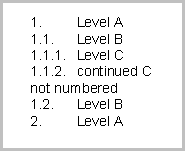
The following C# code will initialize legal outline numbering and also create some example text.
IWPMemo memo = wpdllInt1.CurrMemo; IWPParInterface par = memo.CurrPar; IWPTextCursor cursor = memo.TextCursor; IWPNumberStyle style; // Create legal numbering outline for (int i = 1; i < 10; i++) { style = memo.GetNumberStyle(-1,0,i); if(style!=null) { style.Mode = 3; // arabic style.TextA= "."; // after text = "." style.TextB= ""; // before text = "" style.Indent = 720; // 1/2 inch indent style.LegalNumbering = true; //1.1.1 mode } } // Create numbered text cursor.InputParagraph(0,""); par.SetText("Level A",0); // Optional // par.IndentLeft = 720; // par.IndentFirst= -720;
|
par.NumberLevel = 1; cursor.InputParagraph(0,""); par.SetText("Level B",0); par.NumberLevel = 2; cursor.InputParagraph(0,""); par.SetText("Level C",0); par.NumberLevel = 3; cursor.InputParagraph(0,""); par.SetText("continued C",0); par.NumberLevel = 3; cursor.InputParagraph(0,""); par.SetText("not numbered",0); par.NumberLevel = 0; cursor.InputParagraph(0,""); par.SetText("Level B",0); par.NumberLevel = 2; cursor.InputParagraph(0,""); par.SetText("not numbered",0); par.NumberLevel = 0; par.SetText("Level A",0); par.NumberLevel = 1; // Reformat an paint memo.ReformatAll(false,true); |
Result:
|
Properties |
Methods |