Applies to
Declaration
procedure InputRowStart(Mode: Integer);
Description
Start a new row. This is only possible after InputTable or after InputRowEnd.
Parameters |
Mode |
Bit 1: Add borders to all cells. |
This VB.NET example creates a table with merged cells and alternated use of paragraph styles:
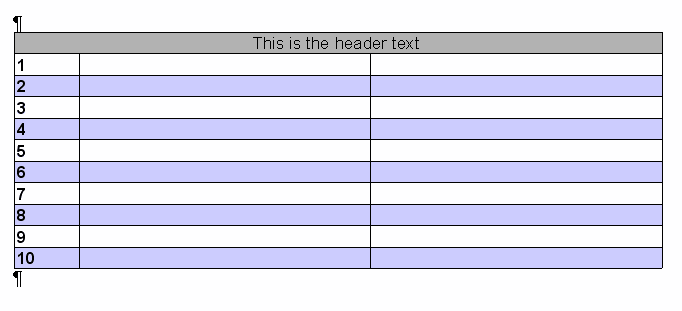
Dim Memo As IWPMemo
Dim TextCursor As IWPTextCursor
Dim Cell As IWPParInterface
Memo = WpdllInt1.Memo
TextCursor = Memo.TextCursor
Cell = Memo.CurrPar
'Initialize Styles
Dim headsty As String = "TableHeaderStyle"
Memo.SelectStyle(headsty)
Memo.CurrStyle.ParColor = WpdllInt1.ColorToRGB(Color.Black)
Memo.CurrStyle.ParShading = 30 ' 30% shading
'Style for odd rows (is empty)
Memo.SelectStyle("DataOdd")
'Style for even rows (shaded)
Memo.SelectStyle("DataEven")
Memo.CurrStyle.ParColor = WpdllInt1.ColorToRGB(Color.Blue)
Memo.CurrStyle.ParShading = 20 ' 20% blue
'Use the default attributes
Memo.CurrAttr.Clear()
'Create a table
TextCursor.InputTable(0, "")
TextCursor.InputRowStart(1) ' with border
' Now 3 cells merged as two one
TextCursor.InputCell("This is the header text", headsty)
Cell.Alignment = 1 'center
TextCursor.InputCell("", headsty)
Cell.IsColMerge = True
TextCursor.InputCell("", headsty)
Cell.IsColMerge = True
TextCursor.InputRowEnd()
' Now some rows below, 3 columns each
Dim i As Integer = 1
Dim sty As String
While i <= 10
If (i And 1) = 0 Then
sty = "DataEven"
Else
sty = "DataOdd"
End If
TextCursor.InputRowStart(1)
TextCursor.InputCell(i, sty)
Cell.ParASet(WPAT.COLWIDTH_PC, 10 * 100) ' 10%
Cell.ParAAddBits(WPAT.CharStyleON, 1) 'Bold
Cell.ParAAddBits(WPAT.CharStyleMask, 1) 'Bold
TextCursor.InputCell("", sty)
Cell.ParASet(WPAT.COLWIDTH_PC, 45 * 100) ' 45%
TextCursor.InputCell("", sty)
Cell.ParASet(WPAT.COLWIDTH_PC, 45 * 100) ' 45%
TextCursor.InputRowEnd()
i = i + 1
End While
' Exit the table
TextCursor.InputParagraph(2, "")
'Display the text
Memo.ReformatAll(False, True)
Category