The RTF2PDF ActiveX interface can be used very similar to the .NET Interface.
Note: In VB6 you will have to execute command #1305 to export the text, the method "Print" is overridden by VB6.
Here we included some simple VB / VBS examples:
In Visual Basic 6 we created this form:
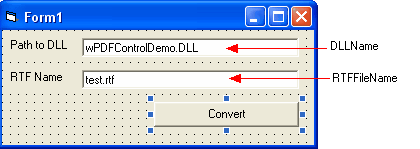
For to launch the example code.
To make it compatible to VBS we create the ActiveX at runtime.
From the button we call the following code. It uses the old style "commands" which were used until RTF2PDF V3.5 was released.
Private Sub Command1_Click()
' Initiate the OCX
Set PDF = CreateObject("wPDF_X01.PDFControl")
' Start Engine, last param =LIC_CODE
If PDF.StartEngine(DLLNAME.Text, "LIC_NAME", "LIC_KEY", 0) Then
' Start a PDF document
If PDF.BeginDoc(Replace(RTFFileName.Text, ".rtf", ".pdf"), 0) Then
' Before RTF2PDF V3.5 you would have used this commands:
PDF.ExecIntCommand 1000, 0 ' init RTF conversion
PDF.ExecStrCommand 1002, RTFFileName.Text ' load RTF file
PDF.ExecIntCommand 1100, 0 ' convert it
' Finish PDF creation
PDF.EndDoc
PDF.StopEngine
Else
MsgBox "Cannot start PDF file"
End If
Else
MsgBox "Cannot load RTF2PDF Engine from " + DLLNAME.Text
End If
End Sub
With RTF2PDF V3 we can use the integrated interfaces which make it easy to not only convert a file but also change it before the conversion.
Private Sub Command1_Click()
' Initiate the OCX (if it is not already on the form)
Set PDF = CreateObject('wPDF_X01.PDFControl')
' Start Engine, last param =LIC_CODE
If PDF.StartEngine(DLLNAME.Text, "LIC_NAME", "LIC_KEY", 0) Then
' Load the file, TRUE would insert/append it
If PDF.Memo.LoadFromFile(RTFFileName.Text, False, "AUTO") Then
PDF.PDFCreator.PDFFile = Replace(RTFFileName.Text, ".rtf", ".pdf")
' Convert it
' VB6 does not let us call PDF.PDFCretor.Print so we use a command instead
PDF.ExecIntCommand 1305, 0
' Finish PDF creation
Else
MsgBox "Cannot load RTF file " + RTFFileName.Text
End If
PDF.StopEngine
Else
MsgBox "Cannot load RTF2PDF Engine from " + DLLNAME.Text
End If
End Sub
We added some code to replace some text and select landscape orientation
If PDF.Memo.LoadFromFile(RTFFileName.Text, False, "AUTO") Then
' replace text
PDF.Memo.TextCursor.ReplaceText "[NAME]", "Julian Ziersch", True, False, False, True
' Chage Pagesize
PDF.Memo.PageSize.Landscape = True
.....