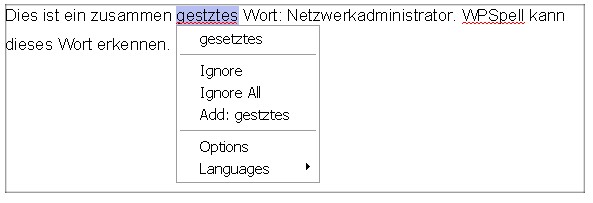
WPTools comes with an integrated spell check interface which can be used by the third party product Addict Spell our own product WPSpell.
This screen shots show the spell-as-you-go feature with WPSpell and Addict Spell 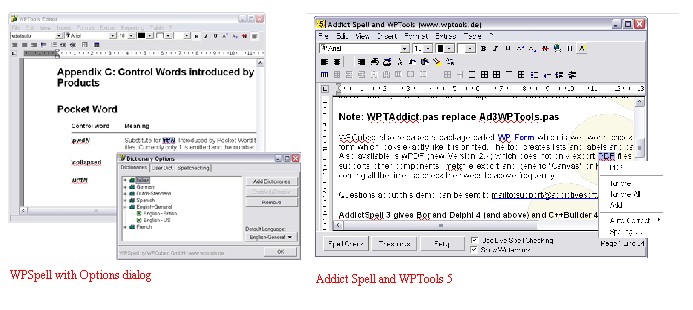
To activate the spell check interface all you have to do:
•with Addict Spell: add unit WPTAddict to the project and use the WPTools spell check actions.
•with WPSpell:
| 1. | Drop the component TWPSpellController  (activate symbol WPSEPLL in file WPINC.INC to compile it into the WPTools package) (activate symbol WPSEPLL in file WPINC.INC to compile it into the WPTools package) |
| 2. | Set the property WPSpellController1.Active to TRUE |
| 3. | Add the unit wpspell_link to the uses clause |
| 4. | Use the command WPRichText1.StartSpellCheck() to start/stop spellcheck |
•with WPSpell: (demo version)
Just add the unit wpspell_link to the uses clause. You cannot create an instance of the spellcheck controller since it loaded at runtime from the demo DLL.
Advantages of WPSpell
•Spellcheck while typing
•WPSpell has been esspecially tailored to work with WPTools.
•Traditional spellcheck dialog
•Support for spellcheck during input (curly underlines + popup dialog)
•With WPTools Version 9: instant update of spellcheck markers when switching languages
•Use multiple dictionaries
•Low overhead - dictionaries are not completely loaded into memory (although this option exists, too)
•Setup information automatically stored in INI file or registry
•Dictionary compiler included
•Optional compond word checking with German dictionary
•Very fast dictionary routines
•Complete source code for spellcheck engine included with registered version. The engine has been rewritten to make best use of the latest compiler technology.
In the editor two properties are of interest for spellchecking:
SpellCheckStrategie, possible values are wpspCheckInInit (default), wpspCheckInPaint and wpspCheckInInitAndPaint. We recommend to use wpspCheckInInitAndPaint with WPSpell.
ViewOption flag wpTraditionalMisspellMarkers: If this flag is active instead of the big underlines ( ) smaller lines are drawn under misspelled words: