To use the component with C++Builder 2009, XE or later please install the setup for the respective Delphi version.
In the package options please change the Linker option to create HPP files, LIBS, OBJs and HPP.
If you already have a working WPTools 8 Installation, please make a backup and install WPTools 9 over it.
Then re-build your WPTools 8 Package.
Create a package with C++Builder 2007
Go to Project Options > Delphi Compiler > Other options
In the 'Additional options' box, enter
-LUDesignIDE
Under Options / Directories
make sure the edit "Intermediate Ouput" is clear, otherwise the OBJ will not be created in the wptools VCL directory.
Leave the 'Use these packages when compiling' box empty.
Compile.
This is described in the CB2007 help system. Search in the Index for "Delphi packages (C++)"
Create a package with C++Builder XE2 .....
Create a new package with File / New / ..
Add the file wptools_reg.pas to the package
Change the package options, under "Description" select "Designtime only"
In the package options, under "Delphi Compiler/Compiling", "Other Options" add
-LUDesignIDE
(Otherwise you get the message "unit not found: DesignIntf.dcu)
Then please add this Packages to "required" - usually found under CBuilder\lib\win32\Release
designide.bpi .... includes the designtime support
vcldb.bpi .... includes VCL.DBCTRLS.OBJ
Possibly also required, depending on C++Builder version
bindcomp.bpi .... includes DATA.BIND.EDITORS.OBJ'
bindengine.bpi .... also DATA.BIND.EDITORS.OBJ'
vclwinx.bpi
Under Options / Directories
make sure the edit "Intermediate Ouput" is clear, otherwise the OBJ will not be created in the wptools VCL directory.
Then do a BuildAll - if you get a message of a not resolvable external symbol
"'[ILINK32 Error] __fastcall Wpctrmemo::TWPCustomRtfEdit..."
you probably have an older WPTools Installation in your Seartch- or Library Path.
Please also make sure you do NOT include an older WPTools package (under required)
After the package compiled ok, click right in the Project explorer and Install it.
Programming
In general you can use the same techniques in BCB as you use in Delphi
But please note that the dot '.' usually has to be replaced by the arrow '->' to access any objects.
Instead of Txx.Create you usually use new.
Procedures can be called without () in Delphi, for C++ please always add ().
Speciality: Instead of TWPCustomRTFEdit.CreateDynamic use
edit = new TWPCustomRTFEdit(nil);
edit._MakeDynamic();
Troubleshooting:
If you get a linker error 'unresolved external' please make sure the WPTools units are found, but only one time (no duplicates), in the library and in the include path. Please deactivate the use of runtime packages.
You will need this unit aliases in Your project options:
System;Xml;Data;Datasnap;Web;Soap;Vcl;Vcl.Imaging;Vcl.Touch;Vcl.Samples;Vcl.Shell
C++Builder 5 and 6
We added BPK files which can be compiled in C++Builder 5 and 6 as packages. If there is a problem (Your setup is different than on the reference machine) you can install the file WPTools_Reg.PAS as a new component into a new package.
You will have to add the vcl and vclx package - otherwise the message "filename.obj was not found" will be displayed.
Please make sure the VCL, VCLIMG, VCLJPG and DesignIDE packages (bpi) are added in Project options under "required".
For database supportVCLDB is also required. If you have BCB-Standard you can activate the switch NODB in the file WPINC.INC
When C++Builder compiles the RTFEngine it creates HPP files.
C++Builder 2006 and later:
You must select Project | Options | Pascal Compiler | Other Options and then add -LUDesignIDE for the compiler to work correctly. Otherwise the message DesignIntf not found will pop up.
C++Builder 5 and C++Builder 6:
You will need to make this change to the 'Option Source', the XML makefile for the package:
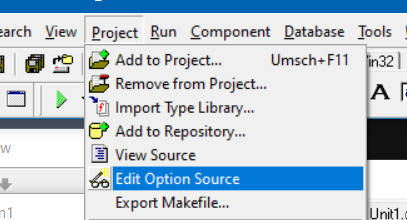
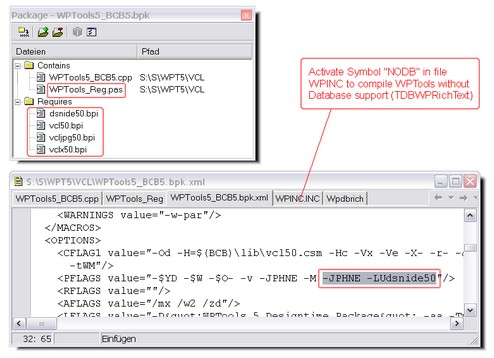
It is -LUdsnide50 for C++Builder 5 and -LUDesignIDE for C++Builder 6
The include code must be
{$IFDEF DELPHIXE}
,DesignIntf, DesignEditors
{$ELSE}
{$IFDEF VER130} // C++Builder 5
, DsgnIntf
{$ELSE} // C++Builder 6
, DesignIntf, DesignEditors
{$ENDIF}
{$ENDIF}