To create text paths simply use the TWPRTFStorage component.
In its property 'Links' you have to create an item for each TWPRichText in the chain.
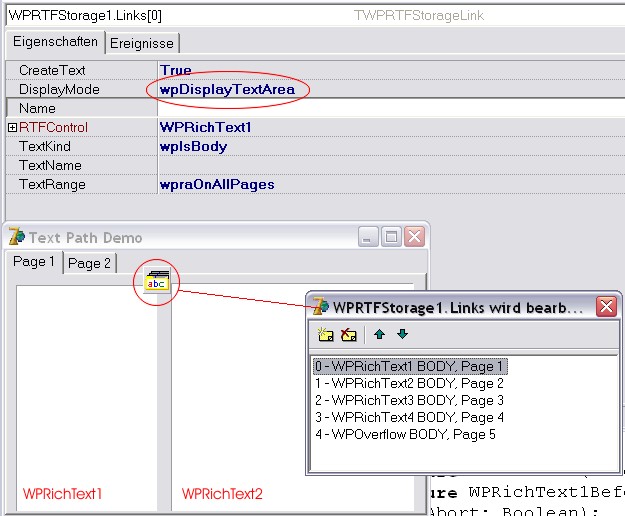
The following initialization is required:
procedure TWPTextPathDemo.FormCreate(Sender: TObject);
begin
// All path objects need the window handle - otherwise we cannot
// use our broadcasting system
WPRichText1.HandleNeeded;
WPRichText2.HandleNeeded;
WPRichText3.HandleNeeded;
WPRichText4.HandleNeeded;
WPRichText1.InputString('This is a text path. Please create new pages with Ctrl+CR'+#13);
WPRichText1.CPPosition := MaxInt;
// Settings for all TWPRichText
WPRichText1.EditBoxModes := [wpemLimitTextWidth,wpemLimitTextHeight];
WPRichText1.EditOptions := [wpNoHorzScrolling,wpNoVertScrolling];
WPRichText2.EditBoxModes := [wpemLimitTextWidth,wpemLimitTextHeight];
WPRichText2.EditOptions := [wpNoHorzScrolling,wpNoVertScrolling];
WPRichText3.EditBoxModes := [wpemLimitTextWidth,wpemLimitTextHeight];
WPRichText3.EditOptions := [wpNoHorzScrolling,wpNoVertScrolling];
WPRichText4.EditBoxModes := [wpemLimitTextWidth,wpemLimitTextHeight];
WPRichText4.EditOptions := [wpNoHorzScrolling,wpNoVertScrolling];
end;
In the BeforeEditBoxNeedFocus event we use this code:
procedure TWPTextPathDemo.WPRichText1BeforeEditBoxNeedFocus(Sender: TObject;
var Abort: Boolean);
begin
PageControl1.ActivePageIndex := 0;
end;
procedure TWPTextPathDemo.WPRichText3BeforeEditBoxNeedFocus(Sender: TObject;
var Abort: Boolean);
begin
PageControl1.ActivePageIndex := 1;
end;
In the OnMouseDown event of the page control we remove the focus from the editors:
procedure TWPTextPathDemo.PageControl1MouseDown(Sender: TObject;
Button: TMouseButton; Shift: TShiftState; X, Y: Integer);
begin
// The WPRichText must loose the focus - otherwise it is not possible
// to switch to a different page
PageControl1.SetFocus;
end;