WPTools Version 9 stores the text in a paragraph tree. The paragraphs are connected using the property 'NextPar'. Some paragraph types require that contents paragraphs are stored on a deeper level, as children paragraphs. For example tables are created that way.
You can use this feature to separate the text into different sections. (Don't mix up with the text sections described here)
These sections can be useful if you need to use one editor to edit or display the text which is stored in different locations, for example different database fields or even database records. It is even thinkabele to use WPTools similar to a database grid!
We created demo which showshow this can be done. You find this demo in the directory SubParagraphs.
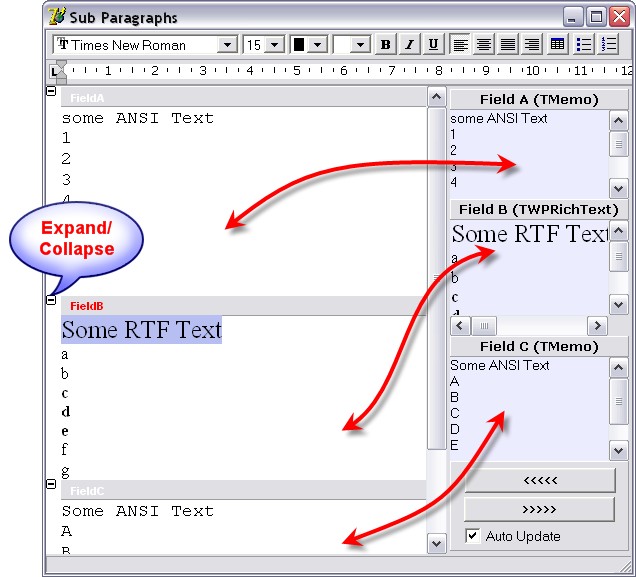
The demo shows how to use the paint line event to show the gray header bands. It also contains the code which moves the text from and to the main editor or the fields.
This code is executed when '<<<<' is pressed:
procedure TWPSubParDemo.LoadDataClick(Sender: TObject);
var par: TParagraph;
block: TWPRTFDataBlock;
mem: TMemoryStream;
s: string;
charattr_for_ANSI: Cardinal;
begin
mem := TMemoryStream.Create;
AllText.LockScreen;
try
AllText.Clear;
// AFTER the clear we calculate our ANSI character property
AllText.AttrHelper.Clear;
AllText.AttrHelper.SetFontName('Courier New');
AllText.AttrHelper.SetFontSize(1000);
charattr_for_ANSI := AllText.AttrHelper.CharAttr;
// and now create the text
AllText.CheckHasBody;
block := AllText.ActiveText;
par := block.FirstPar;
par.ASet(WPAT_ParProtected, 1);
par.Name := 'FieldA';
par.ParagraphType := wpIsXMLTopLevel;
s := FieldA.Text;
// SetAllText creates a sub paragraph when the first #13#10 is found!
if s <> '' then par.SetAllText(#13 + #10 + s, charattr_for_ANSI); // The first ANSI Text
par.NextPar := TParagraph.Create(block);
par := par.NextPar;
par.ParagraphType := wpIsXMLTopLevel;
par.ASet(WPAT_ParProtected, 1);
par.Name := 'FieldB';
par.ASet(WPAT_CharFontSize, 900);
FieldB.SaveToStream(mem, 'WPTOOLS');
mem.Position := 0;
par.LoadFromStream(mem, 'AUTO', '', [wploadpar_AsChildrenPar]); // The formatted Text
par.NextPar := TParagraph.Create(block);
par := par.NextPar;
par.ParagraphType := wpIsXMLTopLevel;
par.ASet(WPAT_ParProtected, 1);
par.Name := 'FieldC';
s := FieldC.Text;
if s <> '' then par.SetAllText(#13 + #10 + s, charattr_for_ANSI); // The last ANSI Text
finally
mem.Free;
AllText.UnLockScreen(true);
end;
end;
This code is executed when '>>>>' is pressed:
procedure TWPSubParDemo.PostDataClick(Sender: TObject);
var par, cpar: TParagraph;
mem: TMemoryStream;
begin
par := AllText.FirstPar;
while par <> nil do
begin
if par.ParagraphType = wpIsXMLTopLevel then
begin
if par.Name = 'FieldA' then
begin
FieldA.Text := par.GetAllText(false, false);
end
else if par.Name = 'FieldB' then
begin
FieldB.LockScreen;
try
// This code uses AppendParCopy() to copy the text --------------------
FieldB.Clear;
cpar := par.ChildPar;
while cpar <> nil do
FieldB.BodyText.AppendParCopy(cpar);
FieldB.CheckHasBody;
// The code uses a stream to copy the text ----------------------------
// this will be useful if you need to save to a blob field!
{mem := TMemoryStream.Create;
try
if par.SaveToStream(mem, true, 'WPTOOLS') then
begin
mem.Position := 0;
FieldB.LoadFromStream(mem, 'WPTOOLS', true);
end
else FieldB.Clear;
finally
mem.Free;
end;}
finally
FieldB.UnLockScreen(true);
end;
end
else if par.Name = 'FieldC' then
begin
FieldC.Text := par.GetAllText(false, false);
end;
end;
par := par.NextPar; // do NOT use "next" here
end;
end;