WPCubed Product Support

Ann: WPViewPDF V3.11 - ActiveX, .NET, VCL, 32 + 64bit

support

18.12.2015: V3.26'

  • fix rare problem when saving to new PDF
  • fix a memory leak problem which occurred on rare PDF files

12.12.2015: V3.26

  • watermarks are now clipped by BBox property
  • support for grayscale indexed color space
#34 ♥ 0
56.2k Views 3 links 2 users read 16 min
support

25.9.2015: V3.25.4.9'

  • fix problem with prediction decoder which was not defining BitsPerComponent

18.9.2015: V3.25.4.9'

  • in rare cases embedded images in CCITT fax compression were not read completely

9.9.2015: V3.25.4.9

  • fix problem with sometimes visible hairline stripes around rectangles.
  • fix problem with screen update after programmatic page selection.
  • After moving a page the new current page is the first page which was moved.
#33 ♥ 0
support

30.8.2015: V3.25.4.8''

  • accept * as character for a PDF name
  • experimental: interprets code EI in embedded images also if not proceeded by whitespace

when SetGlobalParameter('LazyDecodeEI=1') was used

  • GOTOPREV was not working when the end of the last page was visible.

17.8.2015: V3.25.4.8'

  • fix for prediction decoding for 1 bit data
  • update to 1 bit image decoding to avoid inverse display
  • change in standard GDI renderer to fix problem with subset fonts
#32 ♥ 0
support

6.8.2015: V3.25.4.8

  • Patterns are now not filled anymore. There are PDF files which draw pattern over the page which would otherwise erase the contents
  • fix problem with XREF syntax used by few PDF files
  • fix problem with PDF files consisting of appended singular PDF files
  • SetGlobalParameter("LoadAllEncodingNames=1") activates the use of names to locate glyphs in fonts. This works better in some PDF files but can cause in problems if the names were not correct (which we sometimes saw)
#31 ♥ 0
support

28.7.2014: V3.20.1

  • fix save problem which occurred in few PDF files when objects were entirely empty
#30 ♥ 0
support

20.7.2014: V3.20

WPViewPDF now includes integrated and very fast JBIG2 decoding. JBIG2 is an Image format used by many scanning applications.

You only have to copy the correct DLL, there is one for 32 and for 64 bit.

#29 ♥ 0
support

16.7.2014: V3.13.1''

  • UseImage did not work with wpPageWidthPC and wpPageHeightPC
  • COMPDF_StampMetafile, COMPDF_StampMetafileUnder scale incorrectly

The behavior was not changed for backward compatibility, but we recommend to call command( COMPDF_StampMetafile_Scaling, 72 ) to fix this problem.

  • decode 2 bit grayscale images
  • command COMPDF_MakeGetMEMORY did not return the required size when passing a null pointer but -2
  • when rendering left aligned text draw objects they became centered

+text draw objects can now also be right aligned
+SaveSelection did not work correctly with an invisible control

#28 ♥ 0
support

1.7.2014: V3.13.1
* optimized loading routine will open PDF data a lot faster

  • improved threading routine fixes some stability issues
  • With SetGlobalParameter("DisableThreading=1") multithreading can be disabled. If highest possible stability is required, we recommend this Setting - it will still operate very fast due to the added optimation.
  • WPViewPDF.SetGlobalParameter now stores the parameters if the DLL was not yet loaded. The parameters will be sent to the DLL after the DLL was loaded.
  • SetGlobalParameter("MinimizeMemoryUsage=1") will disable caching of the PDF page paths. Text selection is impossible in this case.
  • fix problem with ScreenToPage/PageToScreen on rotated pages
  • fix problem when printing was started with a page which uses a different orientation than page 1
  • use COMPDF_SetSaveMode with parameter 1024 to remove PDF/A marker when saving file
#27 ♥ 0
support

24.6.2014: V3.12.8'

  • fix problem when printing was started with a page which uses a different orientation than page 1
  • use COMPDF_SetSaveMode with parameter 1024 to remove PDF/A marker when saving file

11.6.2014: V3.12.8

  • small change in font handling to render subset fonts which did not define encoding
#26 ♥ 0
support

30.4.2014: V3.12.7

  • There is an updated JBIG2 plugin available online - it fixes problems which occurred with incomplete JBIG2 data streams.
  • wpdfSetGlobalParameter("StopIGDIPlus", 0) can be called before the DLL is unloaded to avoid trouble with GDI+ which under certain circumstances cannot be shutdown in finalization of a DLL. The VCL will automatically make this call before the FreeLibrary in "StopEngine".
  • changed code to handle "EI" which marks the end of an embedded image.
  • fix AV which occured when no file was loaded and clicking with right mouse button

28.4.2014: V3.12.6'

  • when font names in PDF used '-' in their names it was required that they were embedded
  • Find method changed zoom to full page - it now will not change zoom anymore
  • option "MEMORYSIZE" was broken in function pdfprint
  • pdfPrintW can now alo load data from a memory buffer provided as parameter data + datalen
#25 ♥ 0
support

23.4.2014: V3.12.6

  • fixed: DrawObject text was drawn rotated by 180 degrees
  • It is now possible to add transparency to draw object texts
  • It is now possible to specify the font of draw objects
  • fixed problem with Type1 fonts
  • added possibility to set origin position to for added draw objects (see demo).
  • fixed function pdfPrint
  • PageToScreen did not correctly revert the coordinates provided by ScreenToPage
#24 ♥ 0
support

2.4.2014: V3.12.4

  • Support for text state "Tz"
  • better support for hyperlink with launch action
  • fix problem with bitmap masks which are inverted

22.3.2014: V3.12.3''

  • with R2 PDF security (40bit) the HQ-Print Flag was evaluated, although it is only used in R3 security (128bit)
#23 ♥ 0
support

12.3.2014: V3.12.3

  • smarter caching which can be also controlled by this new commands: COMPDF_SetMaxCachePixels

COMPDF_SetMaxCachePixelsThumbs,
COMPDF_SetMaxCachePathLockTime

  • added additional functionality to command COMPDF_DisableSecurityOverride to enable print and high quality print.
  • improved text stamping, "numformat=..." did not always work as expected.
  • VCL: Improve popup menu handling
#22 ♥ 0
support

20.2.2014: V3.12.2'

  • The 32 bit edition now does JPEG2000 decoding (JPXDecode)
  • change in drawing code to avoid fine lines in images consisting of several parts (GDI+ Rounding)
  • fix problem with Tw handling
  • COMPDF_ScreenToClient did not provide correct information it was supposed to

COMPDF_ScreenToClient can be used to convert a screen coordinate into a logical page x, y coordinate

  • ScreenToPage now works as documented
#21 ♥ 0
support

3.2.2014: V3.12.1''

  • after rotating the first page in thumbnail view the large view was not always updated
  • pdfGetInfoW will now encode CRNL inside info strings encode as "<br>". Optionally

the Option 1024 can be used. In this case it will create a comma separated list for the values.

30.1.2014: V3.12.1'

  • a certain type of cmap caused an endless loop
#20 ♥ 0
support

23.1.2014: V3.12.1

  • If multiple rectangles are drawn they are now combined into one path if they are filled with odd-even rule.
  • changed handling for transparent images which use a 2*2 bitmap as color source (avoid marquee effect)
  • monochrome masks are inverted unless ImageMask=true
  • fix problem with parameter rotate=-1
#19 ♥ 0
support

17.1.2014: V3.12.0'

  • VCL only: If the compiler symbol ENABLE_WNDRECREATE is active (=default in WPViewPDF3.PAS) the internal data is buffered before a window handle is destroyed until the object has been freed. This makes it possible to change the parent of a VCL control which implicitly destroys and recreates window handles.
  • in case the AcroForm object of a PDF file specifies NeedAppearances=true, all text annotations will be rendered using the provided field data and not the appearance stream. This improves compatibility with products creating incorrect appearance streams. This mode can be disabled using command COMPDF_SetPaintMode, bit 4 (value 😎
  • round up the value of width and height of image rect when images are painted to fix many white space errors caused by GDI+ rounding
  • Mask parameter for images handled better
#18 ♥ 0
support

11.1.2014: V3.11.9''

  • support for transparency for text paths
  • support for transparency in annotation appearances (CA property)
  • support for negative page rotation
  • pdfPrint now understands the option ADDPRINTER. The mentioned printer will be added to the list of printers and then selected.
  • new ViewOption wpNoHyperlinkCursor to disable switching the mouse cursor over links. (note: wpDontUseHyperlinks can be used to disable the internal handling of links, the event can still be used to jump to destinations)
#17 ♥ 0
support

29.12.2013: V3.11.9

  • updated support for images with transparency masks (important for certain scanned PDFs)
  • message MSGPDF_SCROLLHORIZONTALLY is sent for horizontal scrolling
  • command COMPDF_GetGetHScrollSize read width and height of horizontal scroll panel
  • command COMPDF_GetGetVScrollSize read width and height of vertical scroll panel
#16 ♥ 0
support

3.12.2013: V3.11.8

  • added function pointer to wpview_pdfMakeImage and wpview_pdfMakeImageW to VCL
  • updated Delphi "DirectDLL" demo
  • pdfGetInfoW can now also be used to read the page count and page sizes used in PDF document
  • pdfMerge created incorrect error codes
  • pdfPrint now creates a debug message if a file was not found (error in filename)
#15 ♥ 0
support

3.12.2013: V3.11.7

  • COMPDF_GetPageNumbersInView = 223; Gets a string with all the numbers of the pages which are currently displayed (at least partly). First Page is "1"
  • avoid draw problems with image drawobjects with w or h <0
  • modified detection for fonts which use a unicode charmap also works if charcount<255

21.11.2013: V3.11.6''

  • handle faulty annotation streams
  • solves problem when there is a PDF % comment before PDF "trailer" object
  • updated code to render stamps. They were sometimes not positioned correctly
#14 ♥ 0
support

12.11.2013: V3.11.6 - WPViewPDF PLUS:
NEW AND UPDATED FUNCTIONS TO FILL FORMS INTERACTIVELY!

  • command: COMPDF_ACRO_MAKEDRAWOBJ- converts fields in a PDF into

DrawObjects. This makes it possible to fill a form interactively.
Example: WPViewPDF1.CommandStrEx(COMPDF_ACRO_MAKEDRAWOBJ,'',2+8+16);

  • Command: COMPDF_DrawObjectSelect Select an object with a certain ID
  • Command: COMPDF_DrawObjectDeSelectAll Deselect all objects

The ID is provided by WPViewPDF1.CommandEx(COMPDF_ACRO_GET, Cardinal(-3))
after a call to COMPDF_ACRO_GET, index to get the name

  • command COMPDF_DONTSETDEVMODE allows this values:

0 - default behaviour
1 - do not change printer parameter before printing
3 - do not set any print parameter except for page orientation

  • save NeedAppearances true if fields were changed.
  • command COMPDF_SelectPaperOrientation to select the printer paper orientation.
  • command COMPDF_DrawObjectGetSelected can be used to read the draw objects which are currently selectd.
#13 ♥ 0
support

23.10.2013: V3.11.5

  • free text annotations were not positioned correctly
  • when drawobjects (stamps) were not rendered into the PDF the display was not accurate on rotated pages. (Position and size and rotation was not correct). This has been fixed.
  • fixed problem with CCITT images which used RGB index
#12 ♥ 0
support

6.10.2013: V3.11.4

  • fixed possible problem when Application.Terminate was used.
  • added support for images, text and vectors using CalRGB colorspace
  • added workaround for indexed images where index uses same value for all items
  • added command COMPDF_STOP which stops the rendering thread
  • use command COMPDF_GetModified to read modified state for PDF, it is now set by page move, deletion and rotation commands

and cleared internally when the viewer was cleared.

  • added compiler switch for Delphi XE5

Note: MadExcept fixed problem with exception at 0x000014 at startup. You need to get latest version of MadExcept.

#11 ♥ 0
support

Please add the conditional VER240 to the compiler conditionals (options), than it should work right away.

(Only the DCUs of wPDF PLUS is not there for XE5.)

I must admit, I think 2 upgrades a year is a bit much of Embarcadero to ask for. I don't know where this will lead do...

#10 ♥ 0

When will the wPDF & WPViewPDF products support Delphi XE5?

Long time customer looking to upgrade...

#9 ♥ 0
support

20.9.2013: V3.11.3

  • when the user browses the document using links or bookmarks, the position is logged.

After the backspace key was pressed or Command(COMPDF_GotoPrev, 2) the last position is located.

  • fixed problem with text in few PDF
  • fix ListOutOfBounds exception on rare PDFs
  • when doing fast scrolling (thumbtrack) the memory consumption went high
  • fix problem when clipping was used inside of Type3 definition
  • faster repaint after page rotation
#8 ♥ 0
support

12.9.2013: V3.11.2'

  • fix a problem in page caching - to much memory was allcoated.
  • fix problem in FindText function
  • HighlightText now can also work case sensitively
  • COMPDF_SetPageNumberStringViewer
  • COMPDF_SetPageNumberStringThumbs
  • solves problem with links which point to a page with \nul coordinate values
  • fixes a floatingpoint error
#7 ♥ 0
support

30.8.2013: V3.11.1

  • hardening of the GDI+ interface code
  • improvement in save routine to solve problem error 109 in Acrobat PRO
  • fault tolerant handling of embedded images in Type3 scripts
#6 ♥ 0
support

V3.11.0 is online now.

23.8.2013: V3.11.0

  • pdfMerge can now also apply a stamp script, i.e. to print page numbers
  • Destinations can now also use floating point zoomvalues /XYZ which are internally multiplied with 100
  • improved threading and stability. Tested with below average computer and windows XP.
  • nested clipping was not always supported
  • updates scrollbar logic for single page mode

28.7.2013: V3.10.2'''

  • PDF merge handles embedded objects more effectively
  • transparent objects were rendered opaque
  • objects were not painted correctly on empty pages

22.7.2013: V3.10.2''

  • Fixed: AppendPage caused added draw objects to disappear
  • Fixed: AppendPage caused rendered draw objects to disappear
  • Fixed: Deleted Pages reappear after AppendPage

18.7.2013: V3.10.2'

  • fix problem with embedded fonts where the names were indirectly specified
  • fix problem with object selection. Now done in reverse order

16.7.2013: V3.10.2

  • Fix the problem that AddImage did not work on a PDF file which was saved before with added images

7.7.2013: V3.10.1

  • pdfMerge now understands the PAGELIST option to only save part of the loaded PDF files
  • The AppendPage command produced duplicates on subsequent calls. This problem has been fixed.
  • update to CCITT decoding
  • update to reader for in PS embedded images

12.6.2013: V3.10.0

  • COMPDF_CopyToClibrd can now copy only the text inside the drawn rectangle when called from OnSelRect event, (see Change the way the mouse works)
  • COMPDF_StampText is now able to draw lines and rectangles. It was also enhanced to easily append lines of text. It is now possible to use relative coordinates to make it easy to pre-create a stamp.
  • fix problem with COMPDF_SetSecurityOwner
  • added event OnSelRect to .NET assembly
#5 ♥ 0
support

V3.09.6 is online now.

The C# wrapper now supports "AnyCPU" - 32 bit and 64 bit is now possible also in .NET applications.

It is now possible to read the bookmarks using the command COMPDF_GetBookmarkXML.

COMPDF_SetBookmarkXML can be used to to modify the bookmarks to be displayed in the bookmark treeview and also to be to written to a new file using WPViewPDF PLUS.

Example for XML structure:

<?xml version="1.0" encoding="utf-8"?>
<File id="1" name="WPViewPDFV3.pdf">
 <Outline Title="Introduction" pid="7" pnr="4" X="57" Y="85" Z="0">
  <Outline Title="WPViewPDF Standard" pid="9" pnr="6" X="57" Y="269" Z="0"/>
  <Outline Title="WPViewPDF PLUS" pid="9" pnr="6" X="57" Y="425" Z="0"/>
  <Outline Title="Example Projects" pid="10" pnr="7" X="57" Y="85" Z="0">
   <Outline Title=".NET C# Example: PDFViewNET" pid="10" pnr="7" X="57" Y="111" Z="0"/>
   <Outline Title="Delphi: PDFView" pid="12" pnr="9" X="57" Y="462" Z="0"/>
   <Outline Title="Delphi: PDF to Bitmap" pid="16" pnr="13" X="57" Y="85" Z="0"/>
   <Outline Title="Delphi: Add graphics to PDF" pid="17" pnr="14" X="57" Y="430" Z="0"/>
   </Outline>
 </Outline>
<Outline Title="Installation" pid="19" pnr="16" X="57" Y="341" Z="0">
  <Outline Title="Delphi" pid="19" pnr="16" X="57" Y="376" Z="0"/>
  <Outline Title="C++ Builder" pid="19" pnr="16" X="57" Y="657" Z="0"/> ....
#4 ♥ 0
support

V3.09.4 is online now.

WPViewPDF now supports a single page mode: only one page is displayed. The thumbnail view can be used to navigate.

It also includes several improvements to PDF rendering and PDF reading. The page selection in thumbnail view has been improved. When pages are rotatet, the current page stays focussed.

The API has been enhanced to get the screen position which corresponds to a certain PDF position. This makes it possible to show a popup menu at a certain position.

#3 ♥ 0
support

The new V3.09.3 improves display on OS with asian codepage. It is now possible to set the parent of the thumbnail window to move it to a different panel. The rendering and compatibility has been improved.

#2 ♥ 0
support

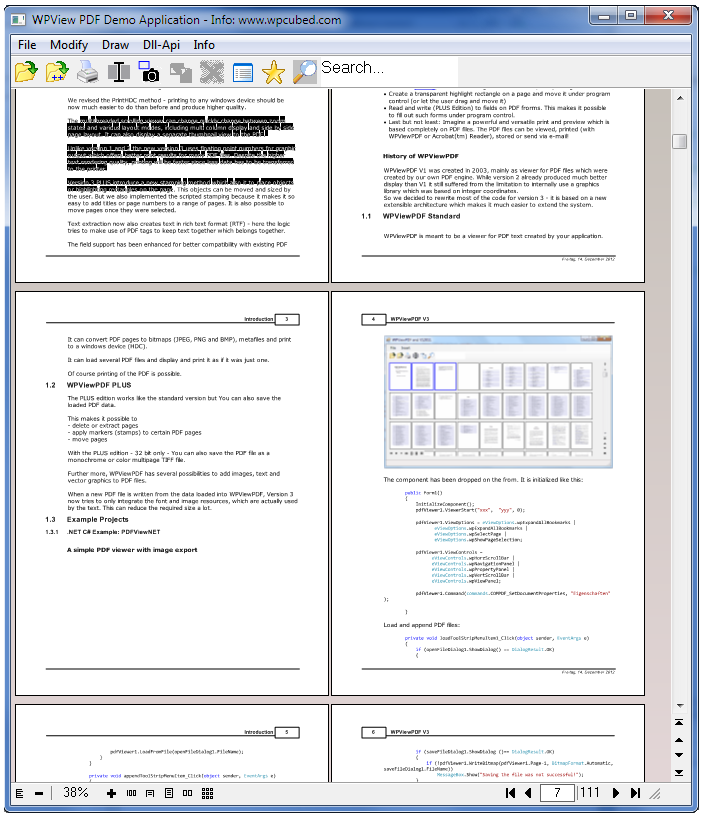
WPViewPDF is a component that allows you to load one or multiple PDF files and to display or print it/them as one.

It is possible to export pages as bitmaps (PNG, JPEG) or as text. It is possible to add drawings which will be displayed and printed on top of the original data. The drawing objects can be moved and sized by the programmer in code or by the user in the end product.

With WPViewPDF PLUS you can also add graphics and images to the PDF data (stamp PDF). It is possible to combine several PDF files into one new file (merge PDF). It is also possible to save selected pages (extract pages) or delete certain pages. It is possible to change field data, for example to merge data to fill out forms.

Version 3 is the result of extensive work. The logic required to load, render and manipulate PDF data was completely reinvented to create this new version. It makes use of clever and effective caching for quick response times. It also makes use of multithreading for better user interaction.

The PrintHDC method was revised and, as a result, printing to any Windows device is now much easier and produces a higher quality printout.

The multithreaded scrolling viewer can quickly change between zoom states and various layout modes, including multi-column display and side-by-side page layout. It can also display a separate thumbnail view to the PDF.

Version 3 PLUS introduces a new stamping method which allows it to place objects or highlighting rectangles on the page. This objects can be moved and sized by the user. The scripted stamping was also implemented because it facilitates the addition of titles or page numbers to a range of pages.

Pages can be selected and dragged to a new location.

Text extraction can now also create text in rich text format (RTF) - here the logic makes use of PDF tags to keep text together which belongs together.

PDF features supported:

  • support for embedded Type3 fonts
  • separation color space (Type 0, 2 and 4)
  • LAB color space
  • DeviceN color space
  • encrypted PDFs
  • PDFs with compressed XREF tables
  • better support for JPEG format (YAAC)
  • better annotation support
  • new: includes 64 bit engine

With WPViewPDF you get a VCL, an ActiveX and a .NET component in one reasonably priced package. It is updated regularly and, since it is based on a DLL, updating works effectively and a new build of your application is not necessary.

The Demo Setup can be downloaded here:
[](http://www.wpcubed.com/pdf/download/wpviewpdf-and-wpviewpdf-plus-demo-component/)
This setup contains the DLL and the VCL for Delphi and sample projects.

Regards,
Julian Ziersch
WPCubed GmbH
[](http://www.wpcubed.com)
#1 ✎ ♥ 0