WPCubed Product Support

Announcements

WPCubed GmbH posts news here

Show as list
📌Welcome to our new forum - 12.10.2026

Welcome to our new forum

On October 12, 2026 we moved our forum to new software.

It has fewer features than the previous system, but we think it fits our brand better: a clean, fast layout that works well on phones and tablets, and that we can adapt more easily to your needs.

All existing topics, posts and accounts have been carried over. You can log in with your previous username and password.

We hope you like it. If something does not work as expected or you are missing something, please let us know in this category.

📌WPViewPDF V6.01 - now embedded font engine, JPEG 2000 and JBIG 2 decoder

WPViewPDF 6.01.0.0 release 24.7.2026

NEW embedded font engine for TTF
NEW embedded font engine for PostScript fonts
NEW embedded, original JPEG 2000 decoder
NEW embedded, original JBIG2 decoder

With these additions, WPViewPDF no longer relies on external DLLs,
only the WPViewPDF 6 DLL is required. This makes the whole product safer
and programs using it significantly easier to deploy.

We have thoroughly tested our new font engine with a wide range of PDF files.
To verify accuracy, we compared synchronized output in different colors against the
previous FreeType/AGG‑based renderer. Any discrepancies identified were corrected
at the source. However, because this is a completely new engine, we kindly ask for
your assistance in verifying that font rendering is flawless. The new text rendering
engine is intended to be 100% accurate.
If you encounter any issues with text output, please send us sample files so we can investigate.

Please note that JBIG2 and JPEG 2000 are highly complex formats and not ideal for
long‑term data preservation—they effectively embed another compressed document format
inside your PDF. Because of the complexity, the decoders are not included in the WPViewPDF source code license.

--> NO MORE ADDITIONAL DLLS NEEDED

Also new:

  • much improved text extraction which also creates tab stop characters
  • improved ColorSpace handling
  • character handling carefully checked

Stay tuned for upcoming changes in WPViewPDF in fall - a more robust page scroller,
improved annotation and form handling.

WPViewPDF 6.0.5.2 release 27.5.2026

  • the last change introduced a problem with empty acroform text fields when opened in edit mode. This has been fixed.

WPViewPDF 6.0.5.0 release 11.5.2026

  • improvement to acrofields. Many radio checkboxes are now supported. (Make sure the PDF property /Opt is used)
  • one stability issues was fixed

(Next built will include a new internal font rendering to eliminate the requirement for the TTF DLL. This is in beta test right now.)

WPViewPDF 6.0.3.0 release 29.4.2026

  • fix problem when printing to a file. When the user didn't select an output file the dialog showed again. Now printing will be aborted and a message will be displayed. The message can be changed with SetGlobalProp( "TextAbortPrint=..." )

WPViewPDF 6.0.2.0 release 20.4.2026

  • detect circular reference in StructTree

WPViewPDF 6.0.1.0 release 3.3.2026

  • improved detection of CID fonts with improper PDF parameters
  • the document information dialog now contains info about the used encryption method, if one of the loaded PDF files is encrypted.

WPViewPDF 6.0.0.0 release 25.2.2026

  • AES Decryption
  • AES Encryption
  • Delphi class TWPViewPDFWorkbench
  • command COMPDF_EX_ReplaceXObject can be used to replace a placeholder image with a PDF from a different PDF file.
📌*** Privacy Statement ***

We, the Operators of this Website, provide it as a public service to our users.

Your privacy is important to the us. Our goal is to provide you with a personalized online experience that provides you with the information, resources, and services that are most relevant and helpful to you. This Privacy Policy has been written to describe the conditions under which this web site is being made available to you. The Privacy Policy discusses, among other things, how data obtained during your visit to this web site may be collected and used. We strongly recommend that you read the Privacy Policy carefully. By using this web site, you agree to be bound by the terms of this Privacy Policy. If you do not accept the terms of the Privacy Policy, you are directed to discontinue accessing or otherwise using the web site or any materials obtained from it. If you are dissatisfied with the web site, by all means contact us; otherwise, your only recourse is to disconnect from this site and refrain from visiting the site in the future.

The process of maintaining a web site is an evolving one, and the Operators may decide at some point in the future, without advance notice, to modify the terms of this Privacy Policy. Your use of the web site, or materials obtained from the web site, indicates your assent to the Privacy Policy at the time of such use. The effective Privacy Policy will be posted on the web site, and you should check upon every visit for any changes.

Sites Covered by this Privacy Policy

This Privacy Policy applies to all the Operators-maintained web sites, domains, information portals, and registries.

Children’s Privacy

The Operators are committed to protecting the privacy needs of children, and we encourage parents and guardians to take an active role in their children’s online activities and interests. The Operators do not intentionally collect information from minors, and the Operators do not target its web site to children.

Links to Non-Operators Web Sites

The Operators’s web sites may provide links to third-party web sites for the convenience of our users. If you access those links, you will leave the Operators’s web site. the Operators do not control these third-party websites and cannot represent that their policies and practices will be consistent with this Privacy Policy. For example, other web sites may collect or use personal information about you in a manner different from that described in this document. Therefore, you should use other web sites with caution, and you do so at your own risk. We encourage you to review the privacy policy of any web site before submitting personal information.

Types of Information We Collect

Non-Personal Information

Non-personal information is data about usage and service operation that is not directly associated with a specific personal identity. The Operators may collect and analyze non-personal information to evaluate how visitors use the Operators’s web sites.

Aggregate Information

The Operators may gather aggregate information, which refers to information your computer automatically provides to us and that cannot be tied back to you as a specific individual. Examples include referral data (the web sites you visited just before and just after our site), the pages viewed, time spent at our Web site, and Internet Protocol (IP) addresses. An IP address is a number that is automatically assigned to your computer whenever you access the Internet. For example, when you request a page from one of our sites, our servers log your IP address to create aggregate reports on user demographics and traffic patterns and for purposes of system administration.

Log Files

Every time you request or download a file from the web site, the Operators may store data about these events and your IP address in a log file. The Operators may use this information to analyze trends, administer the web site, track users’ movements, and gather broad demographic information for aggregate use or for other business purposes.

Cookies

Our site may use a feature of your browser to set a “cookie” on your computer. Cookies are small packets of information that a web site’s computer stores on your computer. The Operators’s web sites can then read the cookies whenever you visit our site. We may use cookies in a number of ways, such as to save your password so you don’t have to re-enter it each time you visit our site, to deliver content specific to your interests and to track the pages you’ve visited. These cookies allow us to use the information we collect to customize your experience so that your visit to our site is as relevant and as valuable to you as possible.

Most browser software can be set up to deal with cookies. You may modify your browser preference to provide you with choices relating to cookies. You have the choice to accept all cookies, to be notified when a cookie is set or to reject all cookies. If you choose to reject cookies, certain of the functions and conveniences of our web site may not work properly, and you may be unable to use those of the Operators’s services that require registration in order to participate, or you will have to re-register each time you visit our site. Most browsers offer instructions on how to reset the browser to reject cookies in the “Help” section of the toolbar. We do not link non-personal information from cookies to personally identifiable information without your permission.

Personal Information

Personal information is information that is associated with your name or personal identity. The Operators use personal information to better understand your needs and interests and to provide you with better service. On some of the Operators web pages, you may be able to request information, subscribe to mailing lists, participate in online discussions, collaborate on documents, provide feedback, submit information into registries, register for events, apply for membership, or join technical committees or working groups. The types of personal information you provide to us on these pages may include name, address, phone number, e-mail address, user IDs, passwords, billing information, or credit card information.

Members-Only Web Sites

Information you provide on Operators’s membership applications is used to create a member profile, and some information may be shared with other of the Operators’s individual member representatives and organizations. Member contact information may be provided to other members on a secure web site to encourage and facilitate collaboration, research, and the free exchange of information among the Operators’s members, but we expressly prohibit members from using member contact information to send unsolicited commercial correspondence. The Operators’s members may be automatically added to the Operators’s mailing lists. From time to time, member information may be shared with event organizers and/or other organizations that provide additional benefits to the Operators’s members. By providing us with your personal information on the membership application, you expressly consent to our storing, processing, and distributing your information for these purposes.

How We Use Your Information

The Operators may use non-personal data that is aggregated for reporting about the Operators’s web site usability, performance, and effectiveness. It may be used to improve the experience, usability, and content of the site.

The Operators may use personal information to provide services that support the activities of the Operators’s members and their collaboration on the Operators’s standards and projects. When accessing the Operators’s members-only web pages, your personal user information may be tracked by the Operators in order to support collaboration, ensure authorized access, and enable communication between members.

Information Sharing

The Operators does not sell, rent, or lease any individual’s personal information or lists of email addresses to anyone for marketing purposes, and we take commercially reasonable steps to maintain the security of this information. However, the Operators reserve the right to supply any such information to any organization into which the Operators may merge in the future or to which it may make any transfer in order to enable a third party to continue part or all of its mission. We also reserve the right to release personal information to protect our systems or business, when we reasonably believe you to be in violation of our Terms of Use or if we reasonably believe you to have initiated or participated in any illegal activity. In addition, please be aware that in certain circumstances, the Operators may be obligated to release your personal information pursuant to judicial or other government subpoenas, warrants, or other orders.

In keeping with our open process, the Operators may maintain publicly accessible archives for the majority of our activities. For example, posting an email to any of the Operators’s-hosted public mail lists or discussion forums, subscribing to one of our newsletters or registering for one of our public meetings may result in your email address becoming part of the publicly accessible archives.

If you are a registered member of an Operators's website or email list, you should be aware that some items of your personal information may be visible to other members and to the public. The Operators’s member databases may retain information about your name, e-mail address, company affiliation (if an organizational member), and such other personal address and identifying data as you choose to supply. That data may be visible to other of the Operators’s members and to the public. Your name, e-mail address, and other information you may supply also may be associated in the Operators’s publicly accessible records with the Operators’s various committees, working groups, and similar activities that you join, in various places, including: (i) the permanently-posted attendance and membership records of those activities; (ii) documents generated by the activity, which may be permanently archived; and, (iii) along with message content, in the permanent archives of the Operators’s e-mail lists, which also may be public.

Please remember that any information (including personal information) that you disclose in public areas of our web site, such as forums, message boards, and news groups, becomes public information that others may collect, circulate, and use. Because we cannot and do not control the acts of others, you should exercise caution when deciding to disclose information about yourself or others in public forums such as these.

Given the international scope of the Operators websites, personal information may be visible to persons outside your country of residence, including to persons in countries that your own country’s privacy laws and regulations deem deficient in ensuring an adequate level of protection for such information. If you are unsure whether this Privacy Policy is in conflict with applicable local rules, you should not submit your information. If you are located within the European Union, you should note that your information will be transferred to the United States, which is deemed by the European Union to have inadequate data protection. Nevertheless, in accordance with local laws implementing European Union Directive 95/46/EC of 24 October 1995 (“EU Privacy Directive”) on the protection of individuals with regard to the processing of personal data and on the free movement of such data, individuals located in countries outside of the United States of America who submit personal information do thereby consent to the general use of such information as provided in this Privacy Policy and to its transfer to and/or storage in the United States of America.

If you do not want your personal information collected and used by the Operators, please do not visit the Operators’s web site or apply for membership of any of the Operators' websites or email lists.

Access to and Accuracy of Member Information

The Operators are committed to keeping the personal information of our members accurate. All the information you have submitted to us can be verified and changed. In order to do this, please email us a request. We may provide members with online access to their own personal profiles, enabling them to update or delete information at any time. To protect our members’ privacy and security, we also may take reasonable steps to verify identity, such as a user ID and password, before granting access to modify personal profile data. Certain areas of the Operators’s web sites may limit access to specific individuals through the use of passwords or other personal identifiers; a password prompt is your indication that a members-only resource is being accessed.

Security

The Operators make every effort to protect personal information by users of the web site, including using firewalls and other security measures on its servers. No server, however, is 100% secure, and you should take this into account when submitting personal or confidential information about yourself on any web site, including this one. Much of the personal information is used in conjunction with member services such as collaboration and discussion, so some types of personal information such as your name, company affiliation, and email address will be visible to other the Operators’s members and to the public. The Operators assume no liability for the interception, alteration, or misuse of the information you provide. You alone are responsible for maintaining the secrecy of your personal information. Please use care when use access this web site and provide personal information.

Opting In

If you are interested to become notified by newsletter you can join a certain user group within this forum, i.e. Firemonkey.
📌*** Datenschutz ***

Die Daten werden auf zwei verschiedene Arten gesammelt: phpBB erstellt bei Ihrem Besuch des Boards mehrere Cookies. Cookies sind kleine Textdateien, die dein Browser als temporäre Dateien ablegt. Zwei dieser Cookies enthalten eine eindeutige Benutzer-Nummer (Benutzer-ID) sowie eine anonyme Sitzungs-Nummer (Session-ID), die Ihne von phpBB automatisch zugewiesen werden. Ein drittes Cookie wird erstellt, sobald Sie Themen besucht haben und wird dazu verwendet, Informationen über die von Ihnen gelesene Beiträge zu speichern, um die ungelesenen Beiträge markieren zu können. Weitere Daten werden gesammelt, wenn Informationen an den Betreiber übermittelt werden. Dies betrifft — ohne Anspruch auf Vollständigkeit — zum Beispiel Beiträge, die als Gast erstellt werden, Daten, die im Rahmen der Registrierung erfasst werden und die von dir nach deiner Registrierung erstellten Nachrichten. Dein Benutzerkonto besteht mindestens aus einem eindeutigen Benutzernamen, einem Passwort zur Anmeldung mit diesem Konto und einer persönlichen und gültigen E-Mail-Adresse.
Das Passwort wird mit einer Einwege-Verschlüsselung (Hash) gespeichert, so dass es sicher ist. Jedoch wird dir empfohlen, dieses Passwort nicht auf einer Vielzahl von Webseiten zu verwenden. Das Passwort ist Ihr Schlüssel zu Ihrem Benutzerkonto für das Board. Es wird kein Vertreter des Betreibers, der phpBB Group oder ein Dritter berechtigterweise nach deinem Passwort fragen. Sollten Sie das Passwort vergessen haben, so kann die Funktion „Ich habe mein Passwort vergessen“ benutzt werden oder alternativ unser support kontaktiert.

Gestattung der Datenspeicherung

Mit der Anmeldung im Forum gestatten dem Betreiber, die von Ihnen im Rahmen der Registrierung eingegebenen Daten sowie laufende Zugriffsdaten (Datum und Uhrzeit der Nutzung, IP-Adresse und weitere von Ihrem Browser übermittelte Daten) zu speichern und für den Betrieb des Boards zu verwenden.

Regelungen bezüglich der Weitergabe Ihrer Daten

Der Betreiber wird diese Daten nur mit Ihrer Zustimmung an Dritte weitergeben, sofern er nicht auf Grund gesetzlicher Regelungen zur Weitergabe der Daten verpflichtet ist oder die Daten zur Durchsetzung rechtlicher Interessen erforderlich sind.

Sie nehmen zur Kenntnis, dass die von Ihnen in Ihrem Profil angegebenen Daten und Ihre Beiträge je nach Konfiguration im Internet verfügbar und von jedermann abrufbar sein können.

Gestattung der Kontaktaufnahme

Sie gestatten dem Betreiber darüber hinaus, Sie unter den von Ihnen angegebenen Kontaktdaten zu kontaktieren, sofern dies zur Übermittlung zentraler Informationen über das Board erforderlich ist. Darüber hinaus dürfen er und andere Benutzer Sie kontaktieren, sofern Sie dies an entsprechender Stelle erlaubt haben.

Auskunftsrecht

Der Betreiber erteilt Ihnen auf Anfrage Auskunft, welche Daten über Sie gespeichert sind.
Sie können jederzeit die Löschung bzw. Sperrung deiner Daten verlangen. Kontaktieren Sie hierzu bitte den Betreiber unter .

📌Change in Board policy

Due to massive problems with spammers (96 posts at one day!) new user accounts have to be activated by administrator before posting is possible. If you are a customer of our products, please send us an e-mail with your user account name to make sure we activate it.

We will not accept users or posts who use this board only to promote products or services.

We will delete posts which have the sole purpose to promote a Website or which have random contents. We will lock accounts which are used to post spam messages, i.e. advertising for hand bags ...

Please select a user name which we can recognize to belong to a human.

Kind Regards,

WPCubed GmbH

  • updated 11.12.2013 -
fotoARRAY - photo catalog & editor

fotoARRAY V3.1 available now
More information here

WPXOrder - X-Factur (ZUGFeRD) XML Daten lesen und erzeugen

WPXOrder ist eine Sammlung von Delphi-Units zur Erstellung und Auswertung von X-Factur (ZUGFeRD) XML-Daten.

Sie wurde erstellt, um Rechnungs Daten zu laden, zu verarbeiten und zu speichern. Es beinhaltet noch nicht den E-Invoice-Standard und ist darauf ausgerichtet, XML-Daten zu erstellen, die in PDF-Rechnungen eingebettet werden. Um solche Rechnungen zu erstellen, können Sie die praktische PDF-Erstellungs-VCL wPDF verwenden. Um solche Rechnungen zu lesen, können Sie WPViewPDF PLUS verwenden, das nicht nur X-Factur Daten extrahieren, sondern auch anhängen kann.

Bitte schauen Sie sich den Quellcode auf unserer WPXOrder GitHub Seite an.

Zweck und Lizenzierung
WPXOrder wurde entwickelt, um XML-Anhänge für Rechnungen zu erstellen, die als PDFs verteilt werden. Es wurde in Delphi 10.1 entwickelt und funktioniert am besten mit unseren Produkten wPDF oder WPViewPDF PLUS. Es kann auch verwendet werden, um Rechnungs XML-Daten zu lesen und auf alle Eigenschaften einfach zuzugreifen. Es kann auch zur Überprüfung der Berechnung (Gesamtsummen) verwendet werden - bitte beachten Sie jedoch, dass wir nicht garantieren können, dass solche Berechnungen in jedem Fall korrekt funktionieren.

Durch die Art der Implementierung werden folgende Fehler bei der Erstellung von XML Daten vermieden:

  1. Schreibfehler der XML Tags
  2. Eigenschaften in falschem Eltern XML Element
  3. Falsche Reihenfolge der Elemente (Wichtig für die Validierung)

Desweitern kann man Werte in speziellen Typen, wie TDateTime oder float values zuweisen.

Mit der mitgelieferten EXE können Sie die Beispiel-PDFs öffnen und die internen Berechnungen mit den in den PDFs hinterlegten Zahlen vergleichen.

Mit nur einem Klick können Sie Delphi-Code erstellen, der die Daten so erzeugt, wie sie in die Rechnung geladen werden. Dies erleichtert das Verständnis Format besser zu verstehen und Rechnungen zu erzeugen, die erfolgreich validiert werden können.

https://www.wpcubed.com/pdf/products/xorder/

WPCubed – just won Top 100 Publisher Award

We are happy - we have won the following award:

ComponentSource Awards for 2024

WPCubed – Top 100 Publisher Award

WPTools7 Extra property for hyperlinks

Is WPTools 7 no longer supported. I can't see a forum for it.

And this seems to be the only forum I can create a new thread in. So...

WPTools 7.

I want to store a hint with hyperlink objects.

I thought I could use the Extra property, but when ever I try to add text it triggers an access violation. Looking at the code, it seems "Extra" is never actually created.

Next thought was to store the hint as part of the display text and then use OnTextObjGetTextEx to manipulate the displayed text.

Assumed this would be as simple as setting PrintString to the text I wanted, but that doesn't seem to be the case. If I wanted, for example, to change the displayed text to "Hello", how would I go about that?

Next problem I faced was how to get the text object under the mouse in the mouse move event. Thought CodeObjectAtXY would get it, but it only fires when you are on the far right of the object and the far left of it (including from the edge of the object to the far left margin). GetObjectFromXY does the same.

Many thanks.

Can you read CSS variables in WPTrichtext?

Hello, I tried to read an .HTML file, then I wanted that when reading that file it would bring its CSS attributes but it didn't work, after a lot of trying I observed that when I did a p{color:red;} in my CSS styles it did change color, but when used p{color:var(--redColor);} didn't work. (--redColor:red😉, this is in html when viewed in any browser, obviously it is reflected but when it is read in wptools it is not, and I would like to know from now on I have to work my styles in the first way, Or is there a way to read the variables?

Code I use to read the html and CSS:

 WPRichText.LoadFromFile( 'D:\temporal\GC 2023\pruebacss\test.html', true, 'AUTO-csspath:"style.css"');
WPEvalEngine1 - How to use exponential?

In Excel we use 2 ^ 3.

In WpevalEngine it gives error.

How to proceed to use exposure in WpevalEngine?

The Delphi Day, XVIII edition - Piacenza, June 5-6th 2019

The Delphi Day, XVIII edition, is the Italian Delphi Developers gathering: two days of conferences and meetings organized by Wintech Italia.

A great opportunity to examine technical topics, to meet other developers (about 120 in 2018 edition) and foreign delphi experts!

The event will be at Best Western Park Hotel - Piacenza, June 5-6th

There will be 3 meeting rooms, more than 10 speeches and speakers from all over the world!

Come and meet more than 100 Italian Delphi Developers, major European and Italian Delphi Experts and the last news about our great and beloved tool!

The Delphi Day speakers will hold some technical seminars the day before the conference.

Get your ticket, enjoy and share the #DelphiDay!

WPTools 8 Update History

This is an important update to WPTools 8. It improves rendering, formatting and also the API was extended.

This is the list of changes:

WPTools 8.05.2 - 6.7.2018

  • SelText ignored #10 characters.
  • UNICODE reader ignored #10 characters
  • improvement within speech recognition interaction code.

Please note: To enable the interface the property HandleRichEditMsg must be set to TRUE

  • text selection is not highlighting additional area when vertical text alignment is being used.

WPTools 8.05.1 - 14.6.2018

  • event AfterPaintDesktopBackground - makes it easy to paint custom borders around the TWPRichText
  • fix incorrect page length calculation when table borders were used.
  • ReplaceTokens sets Finder.DontIgnoreObjects temporarily to true, to avoid miscalculations with token position.

This fixes the problem that if a token was preceeded by a hyperlink the hyperlink got corrupted.

  • fix in function TWPTextFinder.FindAgain to avoid wrong found start position
  • OnTextObjectClick will not be executed after a textbox object has been first selected
  • flag wpDontCopyCellSubParagaraphs for TParagraph.Duplicate
  • updated reference: WPTools_8_Reference.chm

WPTools 8.05.0.2 BETA - 11.6.2018

  • the RTF reader will assign the style name style-XX in case it detects an empty style name.
  • use compiler symbol CLEAN_STYLE_NAMES to activate code in RTF reader to clean non-ASCII characters from styles names if style names longer than 256 characters.

WPTools 8.05.0.1 BETA - 6.6.2018

  • new demo project: H) Techniques\CustomParDraw
  • new demo project: P) Premium\TextBox
  • ViewOptionsEx: wpShowImagesLinkedByHeader - display linked images and text boxes even when invisible due to Layoutmode

WPTools 8.05.0 BETA - 5.6.2018

This version is also the code basis for our upcoming product: WPTools for Firemonkey.

Many refactorings were required to make crosscompiling possible, therefor

we decided to mark 8.05.0 as "beta". There are many IFDEF WPFMX in the code, however

you cannot activate this compiler symbol since it is neither technically nor legally

possible to compile this WPTools editon for other platforms than VCL. If you are

interested in FireMonkey development please let us know: supportwptools.de.

  • WPWordDelimiterArray['X'] := TRUE;

has to be changed to WPWordDelimiterArraySet('X', TRUE);

  • text boxes in header were empty if header was visible on multiple pages
  • load watermarks created by MS Word better (vertical positionioning of images in RTF)
  • function TWPTextObj.SaveEmbeddedTextToStream
  • WPToolsRTFToANSI now reads from a RAWByteString and writes to a String (Delphi XE3 and later)
  • FWPT_IsHexChar and other arrays for conversion now BYTE based
  • disabled the code which caused lonbg tabvles to be always moved to a new page.
  • fix TParagraph._IsWidthTw which was not correct with merged cells.
  • wpHideDynamicCellSelection in ViewOptionsEx can be used to hide the selection in a table.
  • wpDisableCaret in EditOptionsEx can be used to dynamically change visibility of caret since SetFocusValues is automatically called
  • fix a range check error
  • performance optimation in CPAttr interface.
  • WPRichText label now also has TextWidth/and TextHeight function
  • fix problem with TReformatWorkObjects
  • hardened RTF reader agaianst illegal color values
  • fix for rare problem when footnotes were used in table cells and had a space before the number
  • function TParagraph.CalculateTableGrid(needxpos : Boolean; var grid : System.Generics.Collections.TList<Integer>) : Boolean;
  • property TParagraph.Text to read and write the paragraph as string. Any controll codes<#9 will be removed.
  • property TParagraph.ANSIText is depreciated
New Forum Software

End of 2017 we converted our forum to use a new software. The old software was flooded by spam accounts (>100 / day) which caused problems with eligible registrations.

As side effect the new layout is responsive and includes several convenience features, including the list of last posts on the first page.

For support questions which are interesting for other users please use this forum.

WPTools 8 is available now

What new: [](http://www.wpcubed.com/pdf/_news/whats-new-wptools-8/)

  • TWPRichText.TableFilterSort - powerful method to sort and filter the rows in a table.
  • TWPTableProducer and TWPTableProducerDB - unique and innovative to view data in table structure

with, in contrast to database grids, instant preview, print and export to RTF/DocX
It is also possible to modify the report in the viewer (=TWPRichTExt)
The tool has little overhead since it uses the standard WPTools technology
Instant preview of the table in the IDE designer
Supports rowspan cells.
Possibility to create the structures in code - something which can be problematic with live binding.

  • TOUCH SUPPORT: Zoom and Panning (to disable set Touch.InteractiveGestures)
  • Dynamic objects are used by the paint routine to draw special objects
  • WPStyleScroller has been improved to work with styles which are using large fonts
  • several tweeks in WPStyleScroller
  • Dynymic Grids. Created with TableAdd and Option wptblCreateDynamicGrid
  • Support for KeepN defined in table rows. Can be disabled by wpfDontIgnoreKeepNInTable in FormatOptionsEx
  • TWPParagraphList.SortEx now maintains the current order for items with equal content
  • TWPListOfParagraphList makes it possible to sort rows in tables and maintain header/footer and groups.
  • property "TWPStyleCollection.Usage" makes it easy to use the style collection to

define a basis set of styles to be used by new documents.

  • TParagraph.QuickFind('{~*~}' ... can be used to locate tokens in the text.
  • wpfIgnoreSoftParagraphbreaks in FormatOptionsEx2
  • TableAdd can create up to 3 table header and up to 3 footer rows.
  • WPDataSetTools.pas
  • New Style in drop down did not work properly in a split screen editor
  • TableAdd now optionally accepts styles for header/footer
  • improved table column resizing code
  • WPCELL_FILLERCELL
  • SplitRow
  • Rows now support ColsByName[]
  • TParagraph.CharAttrModify Modify the CharAttr of the complete text or parts of it. You can pass

a attribute which will be modified. This makes it easy to set a color
to the text without using the CharAttr interface

  • TWPValueEdit was not loading "value" from DFM
  • TWPMMDataProvider can now load images specified by filename in field. (property LinkedImageFields and others)
  • much improved speed of ClearSelection after a SelectAll (Ctrl+A)
  • new function LoadSelectionFromFile
  • RTF tag \column supported (WPTools Premium)
  • SelectAll/Delete keeps current writing attribute and style
  • improvement for DOCX import of embedded graphics
  • DOCX import now fixes width defined in wrong percent values
  • improved FileSave dialog to add file extension automatically
  • HTML writer now also defaults to write SPAN tags if no format string was used.
  • DocX writer now limits the page width / page height to a 32K value (22 inch) to avoid Word crashing.
  • Contents.InputTextFiledName was not using the attribute of the field
  • Image positions used for mouse click detection sometimes were wrong directly after reformatall
  • SaveSelection saved \page to a file when the page break was on the first saved paragraph
  • paprStartingComment moved to TParagraph.State: wpstStartingComment
  • TParagraph.Compare now ignores trailing whitespace. It optionally compares case insensitve or on base of the first number in the text.
  • apply width and height for loaded images.
  • function TWPTextObj.LoadObjFromStream preserves current width and height defined in TWPTextObj.
  • wpPrintAsBitmap for text objects (useful to hide text elements in PDF output)
  • HandleRichEditMsg to eanble/disable dictation software access
  • don't print character background color in the page margin or between columns
  • better saving of trrh in RTF. (Absolute height takes precedence)
  • GetCharAttr now reads the attributes at the start of a selection if text was selected.
  • The "finder" ignores hyperlink and bookmark objects unless the property DontIgnoreObjects = true. Inserted text will be placed within the objects.
New Users: Please contact after registration

Bots seem to love this forum and register accounts faster than it is possible to delete them.

So please, after you registered, please

a) use a user name which you like to be called by
b) send me a note with your customer name and the new user name so I can, after verification, activate the user account.

Regards,
WPCubed Support

New WPTools, wPDF, WPViewPDF MultiDemo

Standard mini-demos are not capable of demonstrating how well each WPCubed component works when combined with its siblings. Here you can download demo application which demonstrates in details the various facets of our VCL components WPTools with WPReporter, WPViewPDF and wPDF. This multi-demo – WPCubed “Calculus” is the core of a customer management application with the ability to write invoices which are created as PDFs and consequently saved to database in this form. It only uses a minimum set of database tables and database fields to demonstrate how the components can work together.

Please read more here:
[](http://www.wpcubed.com/pdf/download/wpcubed-multidemo/)

WPViewPDF V3

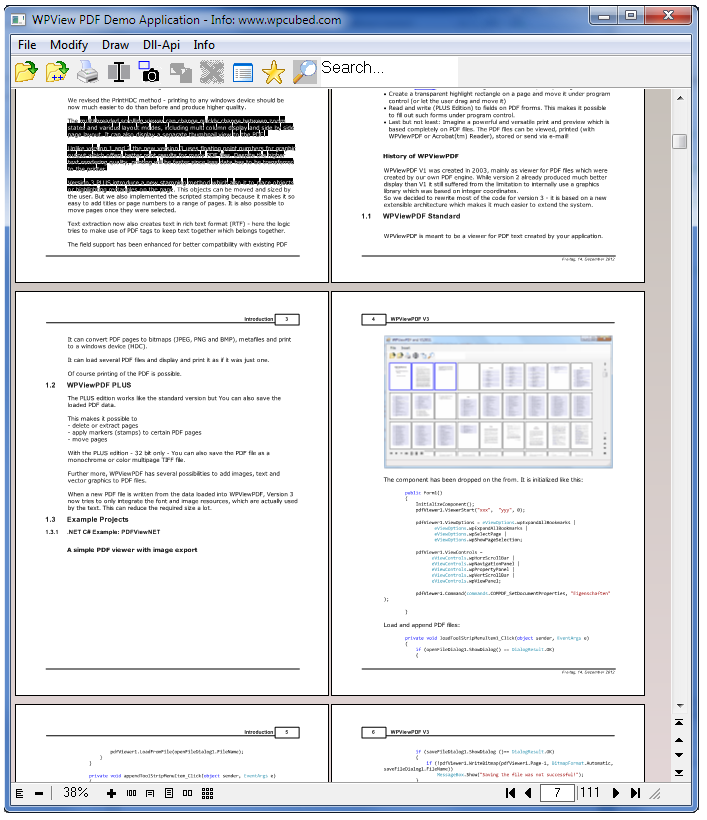
WPViewPDF is a component that allows you to load one or multiple PDF files and to display or print it/them as one.

It is possible to export pages as bitmaps (PNG, JPEG) or as text. It is possible to add drawings which will be displayed and printed on top of the original data. The drawing objects can be moved and sized by the programmer in code or by the user in the end product.

With WPViewPDF PLUS you can also add graphics and images to the PDF data (stamp PDF). It is possible to combine several PDF files into one new file (merge PDF). It is also possible to save selected pages (extract pages) or delete certain pages. It is possible to change field data, for example to merge data to fill out forms.

Version 3 is the result of extensive work. The logic required to load, render and manipulate PDF data was completely reinvented to create this new version. It makes use of clever and effective caching for quick response times. It also makes use of multithreading for better user interaction.

The PrintHDC method was revised and, as a result, printing to any Windows device is now much easier and produces a higher quality printout.

The multithreaded scrolling viewer can quickly change between zoom states and various layout modes, including multi-column display and side-by-side page layout. It can also display a separate thumbnail view to the PDF.

Version 3 PLUS introduces a new stamping method which allows it to place objects or highlighting rectangles on the page. This objects can be moved and sized by the user. The scripted stamping was also implemented because it facilitates the addition of titles or page numbers to a range of pages.

Pages can be selected and dragged to a new location.

Text extraction can now also create text in rich text format (RTF) - here the logic makes use of PDF tags to keep text together which belongs together.

PDF features supported:

  • support for embedded Type3 fonts
  • separation color space (Type 0, 2 and 4)
  • LAB color space
  • DeviceN color space
  • encrypted PDFs
  • PDFs with compressed XREF tables
  • better support for JPEG format (YAAC)
  • better annotation support
  • new: includes 64 bit engine
  • new: includes JBIG2 decoder
  • Improved support for PDF forms
  • Add and modify PDF outlines

With WPViewPDF you get a VCL, an ActiveX and a .NET component in one reasonably priced package. It is updated regularly and, since it is based on a DLL, updating works effectively and a new build of your application is not necessary.

The Demo Setup can be downloaded here:
[](http://www.wpcubed.com/pdf/download/wpviewpdf-and-wpviewpdf-plus-demo-component/)
This setup contains the DLL and the VCL for Delphi and sample projects.

Regards,
Julian Ziersch
WPCubed GmbH
[](http://www.wpcubed.com)

wPDF V4 is available now

Used alone, with your own component or linked with WPTools, wPDF instantly creates PDF files at high speed.

The new wPDF4 engine includes improved GDI support. It also offers a new font embedding mode: EmbedType3. Type 3 fonts are little font programs, only the required glyphs are created and embedded. Used for Asian languages, this can reduce the size of the created PDF files dramatically.

wPDF V4 can also attach files, i.e. the document original data to a PDF file.

It can also integrate custom XMP data into the PDF metadata. It also supports the copyright information strings.

To upgrade please visit: [](http://www.shareit.com/programs.html?productid=209211)

The new demo (includes VCL) is available here:
[](http://www.wpcubed.com/pdf/download/wpdf-trial-edition/)

ANN: WPTools 6.29 is now online for registered customers

Customers can download WPTools 6.27 from the registered download site. The PRO and PREMIUM edition also support Delphi XE3.

If you work with Delphi or C++Builder our WPTools Version 6 is the perfect text wordprocessing component for You.
It is a native VCL Component with all the editing features which are common to powerful wordprocessing applications and wordprocessing controls.

With the PRO and Premium License you get 100% object pascal source. WPTools can be used as a powerful word processor and to create programmatically controlled text. It has a very versatile mail-merge feature which can be enhanced with the "WPReporter addon" to also work with bands. So it is the tool to create contracts and similar documents under program control.

The Premium Licenses adds support for text boxes, footnotes and columns (incl. balancing) to the editor.

Version 6 comes with innovative label printing and a special HTML mode. It supports Delphi XE2 - with the PRO edition You can also compile 64bit applications. We enhanced the API a lot, there is a new border dialog and new unicode features. It is based on the engine developed for Version 5 and an upgrade should be smooth. (Compared to Version 4 the engine is much andvanced - it was basically rewritten.)

Internally the WPTools VCL is based on XML like data structures and is completely object oriented. In contrast to other solutions its data structures support "undefined" attributes which makes it possible to implement inherited attributes. So it has a very strong paragraph style support. Its clean design splits the implementation of data and display, so you can have different views on the same text easily.

Due to its architecture it can also help with unconventional solutions, such as sub paragraphs, shared documents and shared styles between documents.

There is a VCL demo downloadable here:
[](http://www.wpcubed.com/download.htm)

Our product wPDF can be used to create PDF files directly from WPTools with a few lines of code. Due to the special interaction between the products it can optimize the images and export links and bookmarks as well. Even PDF tags will be created for better PDF/A compliancy. wPDF however can also be used with the common Delphi reporting solutions and also offers metafile to PDF conversion.

Regards,
Julian Ziersch
WPCubed
[](http://www.wpcubed.com)

ANN: WPTools 6.20

WPTools V6.20 is available now.

If you work with Delphi or C++Builder our WPTools Version 6 is the perfect text wordprocessing component for You.
It is a native VCL Component with all the editing features which are common to powerful wordprocessing applications and wordprocessing controls.

With the PRO and Premium License you get 100% object pascal source. WPTools can be used as a powerful word processor and to create programmatically controlled text. It has a very versatile mail-merge feature which can be enhanced with the "WPReporter addon" to also work with bands. So it is the tool to create contracts and similar documents under program control.

The Premium Licenses adds support for text boxes, footnotes and columns (incl. balancing) to the editor.

Version 6 comes with innovative label printing and a special HTML mode. It supports Delphi XE2 - with the PRO edition You can also compile 64bit applications. We enhanced the API a lot, there is a new border dialog and new unicode features. It is based on the engine developed for Version 5 and an upgrade should be smooth. (Compared to Version 4 the engine is much andvanced - it was basically rewritten.)

Internally the WPTools VCL is based on XML like data structures and is completely object oriented. In contrast to other solutions its data structures support "undefined" attributes which makes it possible to implement inherited attributes. So it has a very strong paragraph style support. Its clean design splits the implementation of data and display, so you can have different views on the same text easily.

Due to its architecture it can also help with unconventional solutions, such as sub paragraphs, shared documents and shared styles between documents.

There is a VCL demo downloadable here:
[](http://www.wpcubed.com/download.htm)

Our product wPDF can be used to create PDF files directly from WPTools with a few lines of code. Due to the special interaction between the products it can optimize the images and export links and bookmarks as well. Even PDF tags will be created for better PDF/A compliancy. wPDF however can also be used with the common Delphi reporting solutions and also offers metafile to PDF conversion.

Regards,
Julian Ziersch
WPCubed
[](http://www.wpcubed.com)

ANN: TextDynamic V1.62

TextDynamic V1.72.1
is the latest release of our popular word processor for .NET, VB, ActiveX.

We added more possibilities to the popup editor mode:
[](http://www.wpcubed.com/manuals/textdynamic/rtf_popup_editor.htm)

The manual has been extended with a "Document and text property API reference"
[](http://www.wpcubed.com/manuals/textdynamic/attributes_of_document.htm)

You can now download the latest demo here:
[](http://www.wpcubed.com//products/textcontrol/index.htm)

Manual: [](http://www.wpcubed.com/manuals/textdynamic/)

Kind Regards,
Julian Ziersch

ANN: WPTools 6.12 - with all new border dialog

WPTools 6.12 is available for registered customers.

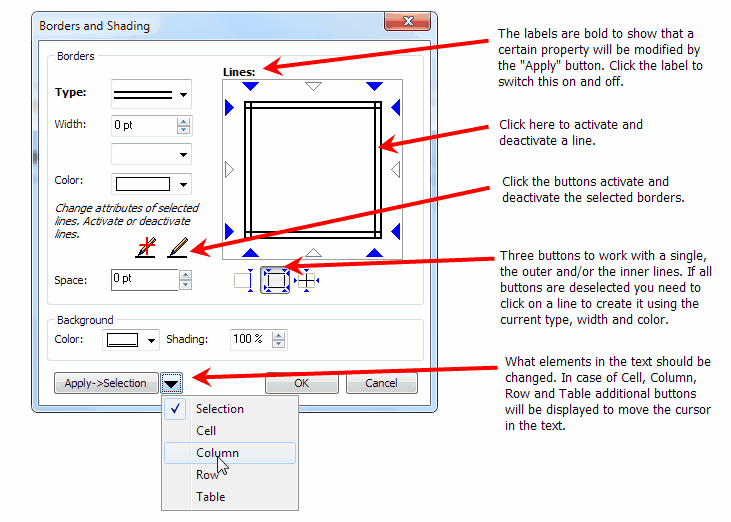
It introduces an all new border dialog. The new dialog was build to work intuitively and it is very powerful. The user can style multiple tables, rows and columns with different border and shading selection, without leaving the dialog. It is possible to apply different color and style properties to each side of a table cell or table. Of course paragraphs can have borders, too. Unlike in many competing products here it is possible to select a range of cells and set the outer borders and remove all inner borders.

Other of the many improvements in V6.12 are:

  • new method: procedure SetBorderProperties(Inner, Outer: TWPTextStyle;

ApplyMode : TWPParagraphBordApply;
Mode : TWPUpdateBorderProperties =
[wpSetBorderFlags, wpSetBorderType, wpSetBorderWidth, wpSetBorderColor, wpSetParColor, wpSetParShading]);
This method is mainly used by the new border dialog.

  • new flags in ViewOptionsEx:

wpShowCurrentCellAsSelected, // Displays current cell to be selected. Disables current selection
wpShowCurrentRowAsSelected, // Displays current table row to be selected. Disables current selection
wpShowCurrentTableAsSelected // Displays current table to be selected. Disables current selection

  • new property YOffsetNormal to defined an upper border for normal and wordwrap view.
  • feature Header.MarginMirror changed to work like MS Word

new flag: wpMarginMirrorBookPrint in FormatOptionsEx2 to enable the previous logic

  • workaround for MouseWheel UP beeing triggered too often (10 mms check)
  • ClipboardOption wpcoDontPasteHTML to disable HTML pasting completely (avoid problems with firefox)
  • it is now possible to load base64 embedded JPEGs from HTML
  • it is now possible to change width of tables which exceed right margin
  • fix bug in HTML writer for lists in table cells
  • fix in RTF writer to write character colors also for text which is using a character style
  • fix: numbering was not always updated
  • fix: better use fonts in certain RTF files written by MS Word
  • Update to WPLanguageControl to make Localization easier to use. Only< this code is not required:

procedure TForm1.WPLanguageControl1Loaded(Sender: TObject);
begin
WPLangInterface := TWPLocalizationInterface.Create(WPLanguageControl1);
WPLocalizeAllStrings;
end;

Regards,
Julian Ziersch
WPCubed GmbH

WPTools 6.11.1

Hi,

We now posted a new WPTools 6.11.1.

It includes the package file for C++Builder 2010 in Directory D2010.

When You create decide to create such a package, C++Builder requires to not only include the unit wptools_reg.pas but also all other units. Othewise the linker will produce an error.

The package must be a designtime only package.

As special option -LUdesignide must be supplied - this links in the designide package.

Regards,
Julian Ziersch
WPCubed GmbH

ANN: TextDynamic V1.62 is available now

TextDynamic V1.62
is the latest release of our popular word processor for .NET, VB, ActiveX.

We added more possibilities to the popup editor mode:
[](http://www.wpcubed.com/manuals/textdynamic/rtf_popup_editor.htm)

The manual has been extended with a "Document and text property API reference"
[](http://www.wpcubed.com/manuals/textdynamic/attributes_of_document.htm)

You can now download the latest demo here:
[](http://www.wpcubed.com/pdf/download/textdynamic-v7-trial-edition/)

Manual: [](http://www.wpcubed.com/manuals/textdynamic/)

Kind Regards,
Julian Ziersch

ANN: WPTools V6.05.8 (full release and demo)

A new edition of WPTools Version 6 can be now be downloaded.

The new V6.05 supports vertical scrolling when pressing the middle mousebutton. This behaviour is pretty much standard in applications now, and will be well appreciated by Your customers.

There is a special XML editing mode which displays the tags as objects. With the premium edition You can also create a popup menu according to the position of the caret in the text.

Other news are:

  • TParagraph.Trim method to remove white spaces at start and end
  • improved auto thumbnail mode
  • enhancement to HTML reader / writer to handle embedded SPAN objects
  • new method: ApplySPANStyles(and_remove : Boolean=false; ignore_charattr : Boolean = false);

can be used to apply SPAN styles to the text which it embeds

  • The function InputSpanObjects( Attributes : TWPAbstractCharAttrInterface ) : TWPTextObj;

can be used to wrap the selected text into SPAN objects

  • method LoadCSSheet can be used to load paragraph styles in CSS format from a string. There is also SaveCSSheet.
  • new even OnTextObjectMovePosition (move event) - OnTextObjectMove is still used for resize (unchanged)
  • several improvements in editor
  • fix problem with Wordrwap and centered text

Order Upgrade:
[](http://www.shareit.com/programs.html?productid=213808&amp;cart=1&amp;cookies=1&amp;quickbuy=0)

Kind Regards,

Julian Ziersch

ANN: WPTools 5.50 is available

WPTools 5.50 is available for registered customers.

It extends the AppendAsSection method with a new option parameter.
It implements a few bug fixes, too.

Regards,
Julian Ziersch
WPCubed GmbH

ANN: WPTools V6.05 (full release and demo)

A new edition of WPTools Version 6 can be now be downloaded.

The new V6.05 supports vertical scrolling when pressing the middle mousebutton. This behaviour is pretty much standard in applications now, and will be well appreciated by Your customers.

There is a special XML editing mode which displays the tags as objects. With the premium edition You can also create a popup menu according to the position of the caret in the text.

Other news are:

  • TParagraph.Trim method to remove white spaces at start and end
  • improved auto thumbnail mode
  • enhancement to HTML reader / writer to handle embedded SPAN objects
  • new method: ApplySPANStyles(and_remove : Boolean=false; ignore_charattr : Boolean = false);

can be used to apply SPAN styles to the text which it embeds

  • The function InputSpanObjects( Attributes : TWPAbstractCharAttrInterface ) : TWPTextObj;

can be used to wrap the selected text into SPAN objects

  • method LoadCSSheet can be used to load paragraph styles in CSS format from a string. There is also SaveCSSheet.
  • new even OnTextObjectMovePosition (move event) - OnTextObjectMove is still used for resize (unchanged)
  • several improvements in editor
  • fix problem with Wordrwap and centered text

Here You can purchase the upgrade (from V5 or 4) with 33% rebate to the upgrade price. The rebatte is valid until 31.7.2009.

Prices start at €99,-

Kind Regards,

Julian Ziersch

ANN: TextDynamic V1.49.1 is now available

We added a powerful method to convert certain pages to bitmap files (BMP and PNG) and also, with the premium or server license, export pages into a multi page TIFF file.

This new release also improves the HTML support and fixes problems which were reported the last weeks.

This new relase also implements a powerful, yet easy to use reporting tool (requires optional license). You can use standard documents enhanced with '<<...>>' tokens to mark fieds and bands and you are ready to create a report. There is even a syntax higlighting mode which marks the tokens in the text without touching the text attributes, such as text color or text font.

About reporting:
[](http://www.wpcubed.com/products/5402639a700a69105/index.htm)

ANN: WPTools V5.35.3 is available for download

WPTools V5.35.3 is available for download.

It includes fixes for problems which were reported recently in this forum and some improvements:

  • fix problem when pasting text in form completion mode
  • fix problem is two DFM files
  • fix problem with double grid lines (around tables)
  • improved update of GUI methods - now using inherited style properties (Use CUrrAttr)
  • When printing all colors can be set to black - see PrintParameter.PrintOptionbs: wpAllColorsAreBlack
  • improved padding saving for table cells
  • the code dealing with reading attributes of the selected text now also reads attributes of attched styles.

This can be switched off using the EditOptionEx: wpDontInitSelTextAttrWithDefaultFont
If a character attribute was not defined in a style the document default is retrieved
This only works for character attributes, not for paragraph attributes. Those can be read using
ActiveParagraph.AGetInherited in case SelectecTexAttr reports an undefined attributesx

  • Font "System" is now mapped to "Arial" since the cursor advance does not work otherwise
  • When printing all colors can be set to black - see PrintParameter.PrintOptionbs: wpAllColorsAreBlack
  • improved padding saving for table cells
  • the code dealing with reading attributes of the selected text now also reads attributes of attched styles.

This can be switched off using the EditOptionEx: wpDontInitSelTextAttrWithDefaultFont
If a character attribute was not defined in a style the document default is retrieved
This only works for character attributes, not for paragraph attributes. Those can be read using
ActiveParagraph.AGetInherited in case SelectecTexAttr reports an undefined attributesx

  • Font "System" is now mapped to "Arial" since the cursor advance does not work otherwise
  • WPRichText1.TextCursor.CurrAttribute.AInc(WPAT_CharFontSize, pt*100, 300) can now also be used to increment/decrement font size of text which is controlled by a style sheet.
  • in normal layout modes borders are not drawn between virtual pages
  • Update to WPReporter table calculation. When the functions left() and previous() refer to non-existing cell

The result of the function will be undefined and "[ERR]" will be displayed.

  • Some updates to RTF reader and HTML writer
  • ANSI text writer understand option "-nolinefeed" to use CR instead of CR+LF

Regards,
Julian Ziersch
WPCubed GmbH

ANN: TextDynamic .NET and TextDynamic ActiveX V1.25

TextDynamic V1.25 is now available. It is a powerful WYSIWYG word processing and mail merge component with support for CSS style sheets, tables, header+footer texts, images and optianally integrated spellchecking and PDF creation.

The text control comes with assemblies for .NET 1.1 and 2 which can be used in C# and VB.NET. The also included ActiveX control, it can be used in systems such as Visual Basic 6 or MS Access, has been checked through to make it more robust and deployment easy. The bindable property "Text" now works with a variant array of bytes to make it possible to connect it to a binary field, such as an OleObject field in MS Access, which allows much faster loading and saving.
When working with the editor in MS Access the delete key was not working - this problem has been resolved.

New features in this release:
It is now possible to create pop menus in the GUI description file.
The included PDF engine is the far advanced wPDF V3 with unicode and PDF/A support.

Please check out the online version of the manual
[](http://www.wpcubed.com/manuals/textdynamic/)

The TextDynamic Demo includes a demo executable + ActiveX + .NET and works 45 days.
[](http://www.wpcubed.com/pdf/download/textdynamic-v7-trial-edition/)

Regards,
Julian Ziersch
WPCubed GmbH

ANN: wPDF V3 - with PDF/A and unicode (cidfont) support

wPDF Version 3 is available now.

The main new features are:

  • support for CID fonts (better support for unicode text such as russian, also creates smaller PDF files. On WinNT or later.

[](http://www.wpcubed.com/products/wpdf/cidfont.htm)

  • creates PDF files which meet PDF/A norm (should be used with WPTools 5 Premium since only this product can embed the required layout tags)

[](http://www.wpcubed.com/products/wpdf/pdfa.htm)

  • intelligent image embedding
  • support for standard brush styles
  • support for API: TransparentBitBlt

You can download the new demo at
[](http://www.wpcubed.com/ftp/wPDF3DemoSetup.EXE)

This is the wPDF upgrade page
[](http://www.shareit.com/programs.html?productid=209211)

Kind Regards,

Julian Ziersch
WPCubed GmbH

ANN: WPTools 5.20.8 - for registered customers

In the customer area you can now download WPTools V5.20.8 which includes the following improvements.

  • property WPRichText.Memo.TextColor - this color is used for the text which uses the default color.

It is initialized from the global variable wpClWindowText which has the default value clBlack.
Note: To set the color of the editor window use property DeskColor and PaperColor

  • new flags in ProtectedProp: ppBookmarkKeepStructure and ppInsertpointKeepStructure

--> if text is deleted the contained bookmark or field objects can be recreated.

  • new method: SetOuterCellBorders(Activate : Boolean; BorderWidth : Integer = -1);

It is now used by the "outer border" standard action

  • StartSpellcheck automatically positions cursor before current word.
  • Some improvements to further improve stability
  • if compiler symbol TOTALREADONLY is active (see WPINC.INC) no table or object resizing

is possible when the Readonly property is true

  • new ClipboardOption wpcoAlsoCopyHTML to also create a HTML block when copying text. This solves a

problem when the text is pasted into Outlook express which seem to not handle RTF correctly.

  • numbering action will now continue numbering after bulleted paragraphs

The numbering will restart, unless the CTRL key is pressed
<-->

  • new event: OnLeaveRTFDataBlock
  • new flag in EditOptionsEX: wpScrollLineWise
  • improved HTML reader - assign border attributes from styles
  • InputCode automatically moves to first cell if currently in table ot table row object
  • some secuity checks (GetPosition, SetPosition)
  • improved RTF reader (reading nested tables)
    • fix for wrong headerr tag in WPWord written files
    • ignore wrong textb code in TX written RTF files
    • under some circumstances paragraphs were appended
  • WPPREMIUM: KeepN was broken
  • fixed some stability issues and improvements to UNDO/REDO handling
ANN: WPTools 5.20.6 (full and new demo version)

WPTools is the most powerful word processing control on the market developed with and for Delphi. (also usable in C++Builder 5,6 and 2006)

For .NET and VB6 developers we now sell TextDynamic - a powerful control not only to do word processing but also for mail merge and RTF reporting.

WPTools Version 5.20.6 is now available for registered customers and as new Demo VCL. (demos: [](http://www.wpcubed.com/download.htm) )

Fixes:

  • don't color paragraph symbol when merge field at end of line
  • fix in DeleteMarkedChar API
  • change in RTF reader to handle table rows with no cells
  • added load formatstring option: -overwriteparattr to always use attributes of first paragraph
  • added REDO hot key Shift+Ctrl+Z (in addition to Ctrl+Y)
  • modified numbering action - [](http://wpcubed.com/forum/viewtopic.php?t=2148)

with changes to make it also work with selected text
added similar code for bullet button

  • Table dialog now allows wpDefaultTableInTable if option wpAllowTableInTable was not set

new: default Option wpNestingAsInEditOptions to use wpAllowCreateTableInTable of TWPRichText.EditOptions

  • improvement of cursor position restore when applying UNDO
  • fix in RTF reader which sometimes chose wrong charset for default font

Regards,

Julian Ziersch

ANN: TextDynamic .NET and TextDynamic ActiveX Version 1.10

A new release of the universal text editing and word processing component TextDynamic is now available.
TextDynamic works with .NET framework 1.1 and 2 (Delphi 2006, VB.NET or C#)

Since an ActiveX is also included it can be use with Visual Basic 6.
[](http://www.wpcubed.com/products/textcontrol/)

TextDynamic has been created to provide companies with an easy to use yet powerful word processing control which can be embedded into their application. It has a mature programming API which makes it easy to create text and tables under program control.

The graphical user interface can be completely configured - it contains toolbar, ruler, scrollbars and special side tool panels which can be used intuitively.

The basis edition already contains

  • mail merge
  • headers and footers (100% WYSIWYG)
  • paragraph style support
  • import/export of HTML
  • tables
  • tab stops
  • images, movable with text wrap around
  • numbering and outlines
  • paragraph attributes such as indents and spacing
  • character attributes such as underline, bold etc

Optionally available is

  • PDF export, including 128 bit encryption
  • integrated spell check
  • support for text boxes and footnotes

Version 1.1 comes with several enhancements to the programming interface, for example a very easy to use interface to create and modify number styles.

The developer reference is now complete, see [](http://www.wpcubed.com/manuals/word_processing/)

You can download the demo edition - it will work for 45 days.
[](http://www.wpcubed.com/ftp/TextDynamic_Demo.exe)

Regards,
Julian Ziersch
WPCubed GmbH

ANN: TextDynamic V1.01.4

TextDynamic .NET and TextDynamic ActiveX is now available in Version 1.01.4.

Product Page: [](http://www.wpcubed.com/products/textcontrol/index.htm)
Manual: [](http://www.wpcubed.com/manuals/textdynamic/)

TextDynamic is not only a powerful replacement for the .NET richtextbox (richedit DLL) but a complete word processing component. It can be used with and without its integrated toolbar. The basis licenses (Euro 330.60 incl VAT) already includes support for mail merge, HTML, numbering, header/footer, paragraph styles and tables. Optionally integrated spellcheck and PDF export is available.

Please download the evaluation version. This version adds some useful API functions to check for fields and links at the current position or position under mouse cursor. In introduces a new evaluation system - the demo will work for 45 days, if more time is required temporary licenses can be installed.

New:

  • IWPMemo.GetMouseXY to locate current mouse position on page
  • IWPMemo.GetObjAtXY to locate an object at or near a certain position.
  • IWPMemo.GetPosXY locate the CPPosition at a certain x,y position
  • IWPTextObj.ShowHint - display hint at object
  • IWPTextObj.ObjType - read type of object
  • IWPTextCursor.CPOpenObj

CPOpenObj will be useful to check if the cursor is inside a hyperlinbk or field. GetObjAtXY works similar but checks if the mouse cursor is over an object, hyperlink or field. GetObjAtXY is explained in the CMH file.

The new demo is here:
[](http://www.wpcubed.com/ftp/TextDynamic_Demo.exe)

Regards,

Julian Ziersch
WPCubed GmbH
[](http://www.wpcubed.com)

ANN: WPTools 5.20.5

WPTools is the most powerful word processing control on the market developed with and for Delphi. (also usable in C++Builder 5,6 and 2006)

For .NET and VB6 developers we now sell TextDynamic - a powerful control not only to do word processing but also for mail merge and RTF reporting.

Version 5.20.5 is now available for registered customers. It further improves the compatibility with Word, not only for loaded RTF attributes but also the handling. So when selecting word using Ctrl+Left or Right the punctation singns are handled as one word.

When using the tab key to move in a table the next cell is automatically selected.

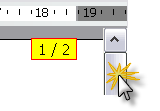
The new Page hint makes it easy to keep track of the page number when scrolling.

For customers of the PREMIUM TEAM license (or higher) we offer a special screen paint mode which has been optimized and tested on application server systems.

The new Page hint makes it easy to keep track of the page number when scrolling.

For customers of the PREMIUM TEAM license (or higher) we offer a sepcial screen paint mode which has been optimized and tested on citrix server systems.

ANN: WPTools 5.20.1
  1. February 2006

WPTools Release 5.20.1 is now available for download.

It has an esspecially nice new feature: display a hint with page number in the scrollbar track event.

Also new: autoselection of merge fields

The paint routine was also optimized (OnPaint event!) and zooming works even better now.

23.2.2006 V5.0 RELEASE 20.1

  • (!) fix in RTF reader to work when correctly when Czech list sorting is active
  • new event: OnTestForLinkEvent to detect hyperlinks in plain text.
  • new: [Ctrl+DELETE] deletes word or white space to the right
  • CSS format now supports the MS Office elements: mso-style-parent and mso-style-parent
  • better detetection of symbol fonts
  • function IsSelected returns FALSE if text is selected but the length of the selection is 0 character
  • new demo: PrintOnBMP - for those who want to FAX pages
  • new demo: PlainTextLinks - use hyperlinks in plain text (without having <a> tags in text)
  • new procedure ScrollLinePos(par, posinpar) makes this text line first of screen (when text long enough)
  • paste of tables in RTF code works better
  • improved automatic field selection
  • better display of selection of paragraph breaks
  • also show manual pagebreak (dashed line) when property WordWrap=true

11.2.2006 V5.0 RELEASE 20.0

  • Display hint with "Page/ PageCount" when the text is scrolled. Can be switched off using

compiler symbol NOPAGENHINT or ViewOption 'wpDontDisplayScrollPageHint'

  • OnPaint event now allows flicker free painting
  • New EditOption: wpSelectCompleteFieldAlsoWhenInside - even wehn selection is done within a field

the complete field will be selected.

  • EditOption: wpDontSelectCompleteField - unless activated, always select a complete fields when

the selection contains part of a field

  • several fixes to RTF reader (i.e. \line\par in header)
  • fix for default tabstops in WordWrap mode
  • new ClipboardOption: wpcoDontCopyProtectedAttribute, dont copy the protected attr (RTF, WPTOOLS)
  • better support for the WordWrap mode (when page LayoutMode is selected)
  • support for context menu key. The event OnMouseDownWord will be triggered when the context menu key was

pressed. If you use the new EditOptionEx: wpDontTriggerPopupInContextEvent the old behavior is
established, the event will be then only triggered in OnMouseDown.

  • some fixes to improve stability
  • better display of embedded textobjects
ANN: WPTools V5.17.3

We have released WPTools 5.17.3. This release incorporated many items from the wishlist collected during the last weeks. It also improves WPReporter greatly. Now it is easier than ever to convert an existsing document into a reporting template. So it is possible to auto create header/footer bands which match the header and footers included in the document (API: ConvertLetterIntoTemplate). A different API converts an existing table into a group with header and footer bands, ConvertTableIntoGroup. We have also added the possibility to wrap the text created by bands or groups into bookmarks.

10.7.2005 V5.0 RELEASE 17.3
++++++++++++++++++++++++++++++++++++++++++++++++++++

  • new localizable strings. See file "WPTools_EN_ADDED.XML" in Demos\Tasks\Localisation
  • new procedure TWPOImage.Compress - automatically used after paste from clipboard.

Requires $DEFINE COMPRESSBITMAPASJPEG

  • RTF reader now supports vietnamese charset
  • WPREPORTER: the option wppNewPageAfter can now be used for report groups
  • WPREPORTER: new utility functions in WPSuperMerge:

FindGroup, FindBand: Locate bands and groups
ConvertLetterIntoTemplate: Create a banded report template from a text with header/footer
(also see: ConvertTableIntoGroup: Convert a table into a report group with header, data and footer bands)

  • WPREPORTER: band.Bookmark to automatically wrap the text which was created by a

band or group into bookmarks. The bookmarks are applied after all text was copied!

  • WPREPORTER: new event: AfterCopyParagraph - triggered after new par was appended but before the data is merged
  • new component: TWPManageHeaderFooterDlg opens the dialog to create and delete header+footer, now localizable!
  • improved XMLEditor for WPLanguageControl
  • new flag for Contents.Options in OnMailMergeGetText: mmDeleteThisField deletes the field markers!
  • WPREPORTER: Option 'wpDeleteFieldsInDestination' deletes the fields in destination. (uses mmDeleteThisField)
  • ReplaceAll through the replace dialog now

a) uses UNDO b) will work within current selection only

  • Replacement in TParagraph.Replace now supports UNDO

Bugfixes:

  • Select Word Procedure
  • DB control automatically uses '-nobinary',
  • HTML reader and writer improvements
  • RTF reader now creates OnRequestHTTPImage event of embedded TWPObject (import from V4 files) and ignores next INCLUDEIMAGE
  • RTF reader: Ignore \r\n after unicode \u tag
  • RTF reader: apply subtrative properties
  • Fixes in WPTOOLS reader
  • some improvements to format and paint routine
  • new event: AfterCopyToClipboard makes it possible to add custom objects to clipboard
  • CombineCells now removes empty paragraphs
  • inputbuffer for fast writeres (unit WPCtrMemo) optimized
ANN: WPViewPDF V1.11

New:

  • better handling of unknown font for much enhanced display
  • enhanced support for CCITT images
  • 128 bit decryption

Julian Ziersch
WPCubed GmbH

ANN: WPTools V5.14.1 for registered customers

WPTools 5.14 is now available for registered customers. It includes a lot of large and small fixes to improve the handling.

The copy&paste in tables now work more spreadsheet like.

Word wrap around images work a lot better now, also in combination with justified text!

8.4.2005 V5.0 RELEASE 14.1
++++++++++++++++++++++++++++++++++++++++++++++++++++

  • new procedure: SelectWord to select word at cursor position
  • changed SelText property - now uses optimized function insetad of general writer class
  • changes in ruler did not update (reformat) the text. This needed to be fixed quickly.

++++++++++++++++++++++++++++++++++++++++++++++++++++

  • improve import of V4 mail merge templates. In RTF reader (wpioreadrtf.pas) the $DEFINE FIXUP_V4_FIELDS

enables that trailing >> and ] are automatically removed.

  • WPPremium: fixed bug in copy&paste of footnotes
  • WPPremium: cursor movement within ootnote blocks using cursor up/down
  • WPPremium: fixes to footnote format routine
  • WPREPORTER: fix to merge fields in second table row of a band
  • "image under text" option in graphics menu of default actions
  • cursor movement within visible header/footer blocks using cursor up/down and mouse click
  • improvements to the handling of forms (see demo: EditFields)
  • added WriteObjectModes: wobRTFNoBinary and wobStandardNoBinary if you need to save to database MEMO fields
  • improved format routine to support better text wrap around images + text justification
  • Revised border dialog. (All properties are undefined by default, can be changed individually)
  • LoadFromFile, LoadFromStream now loads header/footer even if there is a body text defined

(the function IsE,mpty) has been updated

  • several fixes to stream sections in RTF and WPTOOLS format
  • the property WPAT_ProtectedPar is now also checking attached styles and parent table/rows
  • copy&paste, Drag&drop now automatically tries to not create orphan field opening/close tags
  • added support for IME editor
  • the ruler now alows it to change the left indent only
  • bug fix: space before + page break
  • improved RTF reader: load bookmarks in table cell bug fixed.
  • possibility to ignore font, font sizes when reading/pasting text
  • better update of WPComboBox
  • fix for WPTOOLS reader when fields params were enclosed in [ ] signs
  • possibility to have a tabstop before the left indent
  • new handling of font names in RTFPros object (list instead of array)
  • changed logic of Ctrl+Left/Right to jump to start of word instead of end of word
  • font charset load&save in RTF format
  • several improvements to cursor positioning in forms (ProtectedProp=[ppAllExceptForEditFields])
  • new RTF writer option: "-nonumberprops" - in RTF the numbers are saved as regular text
  • new writer option: "-nomergefields," - merge fields are not saved, just the embedded text
  • new writer option: "-nohyperlinks" - hyperlinks are not saved
  • new writer option: "-nobookmarks" - Bookmarks are not saved
  • new RTF reader option: "-ignorerowmerge" - ignore the combine rows RTF tag
  • procedure 'FastAppendText' is now a function. If the optional parameter 'AsNewSection' is true

this function will return the reference to a new section property object.

  • linked images are now saved with width/height (Word still ignores the \w \h parameters)
  • the following functions have been added, they now include table cell handling:

function DeleteParWithCondition(Condition: TWPCheckParagraph) : Boolean;
function DeleteParWithEmptyFields : Boolean;
function DeleteParWithText(const FindText: string) : Boolean;
function DeleteTrailingSpace(EmptyFieldsToo: Boolean): Boolean;
function DeleteLeadingSpace(EmptyFieldsToo: Boolean;InFirstPar : Boolean = TRUE): Boolean;

  • ... lots of small fixes to improve overall perfomance and reliability
ANN: WPTools 5.12

February 5, 2005

WPTools Version 5.12 is now available for registered customers and also demo VCL for Delphi 5,6 and 7. A Delphi 2005 Win32 Demo will be posted as soon as possible.

WPTools 5 is based on new code - only the names of the types and the dialog boxes have been imported from WPTools 4. This work has been done to make it possible to support the latest technology, a powerful paragraph style concept, full WYSIWYG with scaling, multi window editing etc etc.

The major new feature in V5.12 is the printer control (paper bins, duplex and more) which has been also tested in combination with the BeginPrint/EndPrint feature. These commands make it possible to send different texts (from different editors) into one printing job.

But also the editbox modes are impressive. An editor can automatically adjust its size to the contents - using an event you can limit the size. WordWrap can be applied when the limit is reached.

You can read about WPTools 5 in the current (2/2005) Delphi Magazinewritten by Craig Murphy: "WPTools offers us the power and control of a word processor in the form of a regular Delphi component. ... It is clear that the author has spend a lot of time making sure the class hierachy is the best it can be both from a usability and performance perspective. ... If you need both GUI and code-level control over your documents, WPTools is the answer".

WPTools can als highlight the syntax of many programing languages since the the SynEdit higlighting modules can be used.

Other things WPTools will also do for you:
-> WYSIWYG header and footer edition
-> images: as character, relative to paragraph, relative to page (can be positioned freely and placed in headers)
-> text can wrap around movable graphics on one or both sides
-> sections: different page sizes/header+footer for each page
-> creation of table of contents
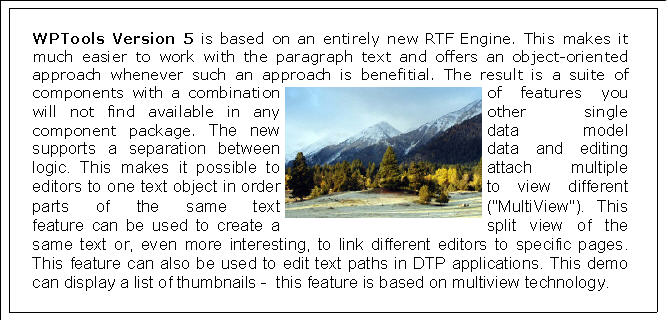
-> multi view: different editors edit the same text
-> text path editing: different editors edit different pages of the same text
-> external pages: logically insert custom drawn pages into RTF stream to combine text and report output
-> many page layout modes - even display and edit pages side-by-side or as thumbnails
-> zooming and scaling
-> API to draw on any canvas
-> powerful cascading style sheets
-> each paragraph can have its own attributes or inherited attributes
-> each character has its own attributes or inherited attributes
-> supports tables, even nested tables
-> works internally with HTML-like paragraph tree
-> supports numbering and outlines
-> paragraph borders
-> loads and saves HTML/CSS
-> loads phpBB codes
-> loads and saves RTF
-> native WPTOOLS format is similar to HTML and as such indexable
-> unlimited undo and redo
-> optional 'live' spell-checking
-> extremely fast one pass format routine
-> shared paragraph styles
-> memo control without parent window to create or print text
-> multi-threaded use possible -> label control included
-> optimized component to use SynEdit syntax highlighting modules included
-> find text using wildcards
-> find text with special attributes
-> component and demo to print labels
-> print booklets
-> localize the included dialogs using XML files
-> create data entry forms using edit fields (formfields)
-> mail merge uses standard RTF syntax
-> many events to print watermarks, objects and paragraph backgrounds
-> endless text scrolling mode
-> powerful ruler objects
-> ships with 45+ carefully designed Delphi demo projects

Exe demo:
[](http://www.wpcubed.com/ftp/wp5demo.zip)

VCL demos + manuals are available in the download section.

Julian Ziersch
WPCubed GmbH
[](http://www.wpcubed.com)

ANN: WPTools 5.11

January 16th, 2005

WPTools V5.11 is available for registered customers.

You will hopefully notice how fast the editing now works, also in large files of 200 pages with many tables.

The new version supports KeepN - You might want to disable this feature in FormatOptions since it slows down the format routine if active and keepN flags are used.

WPTools 5.11 can use the syntax highlighter which are part of SynEdit 2. You can choose from more than 30 different highlighting module to make editing your scrips or configuration files easier.

WPTools V5.11 can load BB codes. There is a small demo which shows it. The HTML reader is used for this.

There is a new component: TWPPaintEngine. It can be used to paint the text which is stored in one element of the TWPRTFDataCollection to any canvas. The DynAssignRTFData shows how you can have many texts blocks in one file (TWPRTFDataCollection) and use one editor to edit such an element.

From the history TXT file:

16.01.2005 - V5.0 RELEASE 11
++++++++++++++++++++++++++++++++++++++++++++++++++++

  • TWPVirtPagePaintParam which is parameter of event: CustomLinePaintBefore

now has new boolean property: PaintingInEditor

  • unit WPSyntaxInterface to use the SYNTAX HIGHLIGHTING modules which are

part of SynEdit with WPTools 5. (See demo SynHighlight)

  • SPEEDREFORMAT (can be disabled in FormatOptions): During regular text editing only

the current and the next page is formatted, the rest of the text is untouched until
the next time CR or Ctrl+CR is pressed or the user scroll the text.
The delay between keystrokes which was noticeable with very long texts is so minimized.

  • new component: TWPPaintEngine. Used to paint the text from a TWPRTFDataCollection.

See demo: Tasks\DynAssignRTFData

  • KeepN support activated
  • Widow/Orphan control revised (--> property FormatOptions)
  • improved handling of double buffer. Now the creation of 1000+ editors at a time is possible
  • two small editing bugs solved (delete selection of one char, up/down in table)
  • Hyphenation (manual, use Ctrl + '-' to mark a character to go into next line)
  • Support for BB codes in the HTML reader. Must be enabled with -useBBCodes in format string.

Use -ignorehtml to ignore regular HTML tags

  • use #13 code to create new paragraphs in HTML. Must be enabled with -useCRin format string
  • the DefaultAttr and the WritingAttr didn't survive a Clear of the text. This has been fixed.
  • better line number display in WPGutter - now start with 1 instead of 0
  • change to make sure the selection/cursor is displayed at once when cursor keys are pressed! (define UPDATE_CURSOR_ATONCE)
  • LoadFromFile now uses the FormatString parameter
  • Load&Save Section in WPTOOLS Format, too
  • fixes to WPReporter

11.12.2004 - V5.0 RELEASE 10.5
++++++++++++++++++++++++++++++++++++++++++++++++++++

  • new Event: OnNewRTFBlock: Makes it easy to apply a default font/style/text
  • new GetAllText function of TParagraph to get the complete text of a cell
  • the TWPObject.Paint() function now receives "ParentTxtObj : TWPTextObj" parameter.
  • the TWPObject.Paint() function now receives "PaintMode : TWPTextObjectPaintModes" parameter.
  • additions to WPObj_Image.PAS to create temporary true color images for certain images to work

around problems with some printers. (i.e. in a metafile only one image is placed)

  • The size of the temporary image is limited by the WPMaxPrintDPI variable.
  • additions to WPObj_Image.PAS to use DIB code for printing.
  • export JPEG data to PDF untranslated (requires wPDF 1.51 or later)
  • faster paint routine
  • fixed procedure Paragraph.MergeCell
  • replacement for embedded text within text objects now also works with multiline texts
  • fixes to RTF reader/writer
  • fixes to handling of scrollbars
  • fixed image resize bug in normal layout mode
  • wpcoDontPasteGraphics ClipboardOption now works
  • several improvements to the text finder
  • ANSI text writer (Text property!) did not save CR
  • RTF reader case cleaned up. This avoids a compiler problem.
  • applies wpxSaveToRTF when info item (RTFVariable) is loaded from RTF
  • cleaned up and ordered prop and dest constants in RTF-Reader to avoid compiler error
  • fixes to property CPParNr
  • revised saving and loading of the HorzLine objects in RTF (now using \wphzlinetw with twips parameter)
  • better handling of the default paragraph char attribute (property LOadedCharAttr)
ANN: WPTools V5.10

Munich, December 7th, 2004

WPTools V5.10 is now online for registered customers.
The EXE demo: [](http://www.wpcubed.com/ftp/wp5demo.zip) has been updated.

What is WPTools?
In general it is a word processing component. This does not only mean it can work with different character and paragraph attributes, tab stops and tables. WPTools 5 also has the ability to display the text pages as they will be printed, 100% WYSIWYG and scalable.
This includes header and footer texts, and with WPTools "Premium", footnotes and text boxes. All these text can be edited, too.

WPTools 5 allows each page to have different margins and page size. This is controlled through an event. It is also possible to select any header or footer for each page individually.

But WPTools is also powerful to create text using program code.
It includes a new API to create text and table and set attributes in an object oriented manner. (See CreateTable demo)
Important for server apps: WPTools 5 can be used in a thread save manner and does not add too much to your apps EXE size - our "mini" text editor is only about 1MB (uncompressed EXE size)

Only WPTools 5 can display and edit (!) the same formatted text within multiple editors. This makes it finally possible to create split screen editors. The different editors can use different page layout and zoom modes.

WPTools optionally includes the "WPReporter". This tool adds 'band-technology' to the mail merge feature. The enhanced editor can be integrated with a few lines of code, it is mainly an easy to understand dialog box which floats over the regular editor. Reporting groups can be nested and collapsed in the editor. WPReporter does not compete with full blown report generators, it has been optimized to offer your end user an easy to understand possibility to create documents, lists and invoices.

Included with WPReporter is a formula parser. It has been optimized to work with currency values. So you can add calculation to your text and tables. The calculation feature has been optimized for business needs, i.e. sum values and apply VAT. It uses numbers which are displayed (rounded to 2 decimals) not using internal exact values which would lead to incorrect results. (See Table_Calc demo)

The preview capabilities of WPTools 5 are exceptional. But what if you need to preview output from other components, such as report generators? Here the feature "EXTERNALPAGES" helps you out - it makes it possible to integrate other pages into the preview/editor pages (of any size) painted in an event. The text pages can be before and/or after the inserted pages. Please check out the 'ExternalPages' demo.

WPTools has strong support for embedded images. They can not only be inserted as characters but also be handled relatively to their parent paragraph or page with the text optionally wrap on left, right or both sides. If you place a page relative image into a header text it will be displayed on each page this header is used for - this is how users expect a watermark feature to work!

With some competing text controls you may have the problem that text can use the attributes which are defined in only one style (or its ancestors). So if you have two text parts which should look different you end up with two style objects - although the both text parts are in the same context.
With WPTools you do not have this problem. The text attributes are stored in many different locations in this order:
character attribute for one character (they are cached!), preceding SPAN objects in this paragraph, the paragraph, par-style attached to this paragraph / ancestor style, parent row or table if in text is in a cell and at last - the default character attributes. (Not all attributes are inherited between this levels to avoid performance problems)
Paragraph and numbering styles can also be shared between editors. This makes it possible to use the same style sheet in the WPReporter template as in the report output. So if the template is updated the output is updated at once, too!

WPTools 5 native save/load format is optimized to handle this style inheritance. (Please check out the 'GlobalStyle' demo).

About the update 5.10:

Includes support for Delphi 2005 Win32

Most of the changes are in the RTF area. WPTools 5 now handles subtractive character styles correctly: A style which defines 'bold' is assigned to a paragraph but some text in this paragraph switches 'bold' off. This is now displayed correctly and is loaded and saved property in RTF and "WPTOOLS" format.

The "finder" has been improved. It is now able to compare character attributes as well. Check out the 'Finder' demo.

The "hover styles" are now fully operational: Hyperlinks can show a popup effect when hit by the mouse cursor or a hint window can be displayed. Please note that you maybe have to explicitly set the 'Use..Color' property in the properties for special text - i.e. 'AutomaticTextAttr'. With WPTools 5 not only hyperlinks can be active text - it is also possible to change the special style depending on the text (through event) - for example to set a different color for visited hyperlinks.

There is now a label printing demo - the carefully designed dialog form can be easily integrated into your application.

The OnTextObjectPaint event makes it possible to paint objects as they are required. You can embed a placeholder and so keep the files small.

Kind Regards,
Julian Ziersch
WPCubed GmbH
[](http://www.wpcubed.com)

ANN: WPTools V4.25

WPTools V4.25 is now online for registered customers. It includes Delphi 2005 support.

WPTools 4.25 includes improved support for asian languages (cursor
movement, painting) and a few fixes collected the last months.

Regards, WPCubed GmbH

ANN: WPTools 5.09

This is a great update - it includes many fixes, new functionility and API, new demos.

It is available for download for registered customers.

  • better handling for PageWidth/PageHeight actions
  • better handling of the tables with WordWrap set to TRUE
  • added demo "ThreadSave" to show how to do threadsave mailmerge
  • added procedure: DeleteFields
  • now possible: colors and sizes for bullets
  • added FormatOption: wpfAlwaysFormatWithScreenRes - for better display when you only display on screen but do not print
  • added event: OnCustomLinePaintAfter - print borders around paragraphs or group of paragraphs
  • added event: OnCustomLinePaintBefore- print background of paragraphs or group of paragraphs
  • added event: BeforeInitializePar - syntax highlighting, dynamic hiding of pars etc
  • new: powerful TWPSuperPrint component to print labels, multiople pages on one page and booklets
  • WPReporter: added TWPFormulaInterface - calculation in tables, paragraphs and "CALC" fields
  • fixed format routine: centered and right aligned text was not handled correctly when indents were used.

NEW and updated Demos:

  • CreateTable - shows how to modify an existing table!
  • SuperPrint - print labels and booklets using a new powerful component: TWPSuperPrint
  • ThreadSave - merge letters in a several threads
  • Mini - create a compact wptools editor window with split screen in code
  • Localisation- localize wptools at runtime
  • WPReporter_Calc - requires WPTools bundle: powerful calculation in text and tables

Julian Ziersch
WPCubed GmbH

ANN: WPTools V5.06

**WPCubed GmbH announces WPTools 5

  • The component suite for killer applications!**

8/24/2004: Version 5.06 is now available for registered customers.

WPTools 5 is based on a complete new text management code ("RTFEngine")
which had been optimized to work best with RTF and with HTML/CSS code.

*Customer Quote: "WPTools5 is an amazing set of components, and the
performance is nothing short of awesome! In our application, we were
able to generate over 230 pages of text in under a second - on the slow computer!"*

Similar to a first class preview window it displays pages in columns, shows
thumbnails or watermarks - but the displayed text is actually editable!

Multiple editor/preview controls can be attached to the same text!

WPTools 5 is a component suite with exceptional word processing
capabilities including multiple paragraph and character attributes, tables,
tab-stops, tab-fill signs, borders, paragraph style sheets and numbering,
complete header+footer support, bookmarks and references,
hyper-links, custom text objects, mail-merge and editable fields,
images with text wrap on left and/or right sides.

WPTools 5 is also the ideal tool for writing electronic documents.
Create text either in code, or use mail merge or the optional
"WPReporter" which adds 'bands' to the mail merge concept.

Only with WPTools can you embed external pages into the text flow.
This helps to create a consistent user interface.
Thus you can use the powerful preview to display the text and the
output from your existing reporting tool.

The WPTools rendering engine can be created and used with no need
for a TForm object - optional threadsave operation is possible!

WPTools 5 is extremely fast when loading and saving RTF, ANSI,
HTML/CSS and its own WPT format (similar to HTML) - see for yourself.

Top 10 features which distinguish WPTools 5 from the competition:

  • Page layout view with WYSIWYG editing of header and footer texts
  • Fast zooming and scaling + multi-view capability (ie. split screen feature)
  • Section support: Different page sizes and header/footer in one doc.
  • WYSIWYG printing in high quality (no reformat upon printer change!)
  • Hyper-links, nestable bookmarks and references
  • Attribute inheritance: character attributes are read from character,

preceding "<SPAN>" tags, paragraph or parstyles - in this order.

  • Elegant object design (TParagraph class, data block collection)
  • Label component, implemented as TGraphic control (without window)
  • Supports movable images - text wrapping possible on both sides.
  • Powerful mailmerge, easy to use and extendable with "WPReporter" to

use not only fields, but also bands with an efficient template designer.

For further information please see [](http://www.wpcubed.com)

Julian Ziersch
WPCubed GmbH
Munich - Germany

PS.: WPTools 5 also works perfectly with our wPDF component to create
high resolution PDF files quickly. wPDF is able to convert
most Windows meta files (*.EMF) to PDF while preserving the vectors.

Special Offer: WPTools 5 PDF Bundle (EUR 430):
[](http://shareit1.element5.com/programs.html?productid=196833&amp;language=English)

ANN: WPTools V5.0 - Release 1 is now available.

WPTools V5.0 - Release 1 is now available.

For Delphi 5, 6 and 7 - Delphi 8 and BCB will be available soon, too.

We have enabled the download for customers who qualify (WPTools order after 15 October 2003) - if you think we missed you please send an e-mail.

A demo will be posted as soon as possible.

The EXE demo can be downloaded here:
[](http://www.wpcubed.com/ftp/wp5demo.zip)

WPTools Version 5 has an entirely new RTF Engine. This makes it much easier to work with the paragraph text and offers an object-oriented approach whenever such an approach is benefitial.

Please note that because of these changes, the replacement of WPTools 4 in a project with WPTools 5 will take some time. Some event handlers had to be changed and some properties, too. This was necessary to a) support the new datastructures b) to support multi view. We are working on a new 'WPReporter' which loads the old files but internally will work differently.

The new data model supports a separation between data and editing logic. This makes it possible to attach multiple editors to one text object in order to view different parts of the same text. This feature can be used to create a split view of the same text or, even more interesting, to link different editors to specific pages. This feature can also be used to edit text paths in DTP applications.

The result is a suite of components with a combination of features you will not find available in any other single component package.

For application designers WPTools Version 5 supports

For word processing WPTools Version 5 includes

New concepts found in WPTools Version 5 include:

We hope that you are as satisfied with WPTools Version 5 as we are and that the improvement in your product is worth the effort which may be required for the upgrade to this new version. WPTools 5 was built to be the most powerful word processor available on the component market. In addition, it also works as a HTML editor, offering convenient word processing features, while still working as closely to the HTML document model as possible.

With kind regards,
Julian Ziersch
WPCubed GmbH
[](http://www.wpcubed.com)

WPTools V4.22a is available for registered customers

WPTools V4.22a was posted March 16th to solve the problems which were reported since the last release, such as improvements to the RTF reader and writer, preview dialog and WPReporter.

WPViewPDF V1.04 is now available

New:

  • support for indexed images
  • support for RLE compression
  • Text search
  • Text highlight (of searched text)
  • ANSI text extraction

The text positioning has been improved and some incompatibilities have been removed.

Julian Ziersch
WPCubed GmbH

WPViewPDF V1.02.1 is now available

Our PDF Viewer component WPViewPDF V1.02 is now available for download.

With the added support for the MAC charset it will display more PDF files correctly.
You can also enable a new thumbnail view which arranges minatures of the pages in rows and columns.
The new possibility to select pages help users to only print certain pages out of many.
The optimized engine will open large PDF files even faster. (we tested it with ten thousand pages)

For more info about WPViewPDF please read:
[](http://www.wpcubed.com/products/pdfviewer/index.htm)

V1.02.1 solves the "Window Class not found" problem which happend under Win9X .

Julian Ziersch
WPCubed GmbH

WPTools V4.21 is now available

WPTools V4.21 can be downloaded by registered customers.

It further improves the HTML/CSS handling which has been redesigned for version 4.20.

A new constructor makes it possible to use the RTF-Engine without a parent form (CreateDynamic) this also helps to improves the RB support units and allows TForm less PDF export - a new procedure GetTableSelRowCol retrieves the count of currently selected rows.

The function WPFindTxtOnPage can be used to quickly check if certain text markers exists on a page. This is useful to support individual header and footer for certain pages. V4.21 includes a few fixes which were required for V4.20.

Julian Ziersch

WPTools - the future

Although V4.x will be supported with at least 1 more releases the work on WPTools V5 has begun.

WPTools 5 is designed to work with the latest compilers. To make this possible some changes to the RTF Engine will be necessary, most of the pointer arithmetic has to be replaced. The modified concept introduces new options which are unthinkable with the current concept so WPTools 5 should be the base for another 7 successful word processing years 🙂

We try to make the changes in a way that your code should run as it used to. Code which access pointers (WPRichText.FirstPar, CPAttr ...) will require changes. Sometimes only the ^sign has to be removed, in case the code lists the lines of a paragraph (lin := par.line; while lin<>nil do ... and of course pc and pa arithmetic) this code must be changed. But also here, the changes shall be marginal and be rewared by an easier to understand and extremely stable code. Undocumented procedures and variables of the 'RTFEngine' (WPRichText.Memo) will be changed or replaced to keep WPTools up to date and improve the performace. The way paragraph border attributes are stored will be changed, too.

Some components will not be included in future. This are the almost never used components TWPWallPaper, WPTAltStatusBar and TWPContainer + TWPResLabel.
The new version will alway use the Action classes so the components TWPComboBox, TWPToolButton and TWPToolControl which were mainly created to create GUI without the availability of action classes will also have to go.

WPTools 5 will support Delphi 5 or higher and C++Builder 5 & 6.
It should be ready in the first half of 2004. (Delphi 4 does not provide the necessary compiler features.)

...comments are welcome...

Julian Ziersch
wpCubed GmbH

NEWSGROUPS - Rules

You are envited to use this newsgroup to ask questions about our products TextDynamic, WPTools, wPDF, WPForm, WPSpell and PDFControl.

You need to be a registred user to be able to post questions.

We will activate the account if we believe the account was not only created to create spam messages.

We reserve the right to
a) edit any post - for better reading or if it contains problematic material or language
b) remove posts which do not contain technical questions or promote other products or services
c) lock or remove a user account when it was used to post unrelated links or text (spam)
d) remove user accounts which were added only to abuse the form to promote links or user names

You may not use images which are displayed inline unless this images are hosted on our server.

Regards

Julian Ziersch
WPCubed GmbH

October, 1st 2003 - WPCubed GmbH announces WPViewPDF V1.0

October, 1st 2003 - WPCubed GmbH announces WPViewPDF V1.0
(for Windows NT, 2000, XP and 2003 - planned: Win9x support)

WPViewPDF was mainly created to view PDF files which were created
using the wPDF engine, but it is also capable of viewing PDF files
created with other windows based engines which utilize TrueType(tm)
fonts.

Since the reference PDF viewer is free and can be shipped with your
application the big question is -
Why do I need a PDF viewer component?

  • If you need to embed a PDF viewer into your application, then you

need WPViewPDF since this will, most likely, no longer be allowed with
the Acrobat(tm) Viewer Version 6 or later.)

  • If you need to load PDF files from memory, then you need WPviewPDF

which will allow you to load PDF files from any stream. The stream
interface makes it possible for you to use your own
encryption/decryption scheme for the loading process.

  • If you need to print the PDF files created by your own application,

then you need WPviewPDF which makes it possible to print several PDF
files using just one printer job without starting any external
application

  • If you need to use information from PDF files as background images

in your application, then you need WPViewPDF since it has the ability
to extract PDF pages as metafiles.

  • Last but not least: Imagine a powerful and versatile print and

preview system which is based completely on PDF files. The PDF files
can be viewed, printed (with WPViewPDF or Acrobat(tm) Reader), stored
or send via e-mail!

Download the demo (1MB - for Windows NT and higher!)
[](http://www.wpcubed.com/ftp/PDFViewDemo.exe)

Order Page:

Julian Ziersch
WPCubed GmbH

October, 5th 2003 - WPCubed GmbH announces WPTools V4.2

October, 5th 2003 - WPCubed GmbH announces WPTools V4.2

Version 4.2 of the powerful word processing suite for Delphi and
C++Builder introduces new impressive possibilities and enhances the
already existing features:

  • Right-To-Left writing - when activated (globally or only for RTL

fonts) right to left writing works - including the ability to mix RTL
and LTR text (e.g. numbers!) in the same line of text.

  • improved OLE support: The standard image class learned to load OLE

data from RTF and extract the metafile or bitmap definitions.

  • advanced HTML/CSS reader and writer - based on versatile generic

XML and CSS reader and writer classes.

  • binary RTFVariables - create a stream and save and load it with your

RTF data. Of course there also RTF compatible string variables.

  • improvement of the format routine: Better handling of the

'non-break-table' feature and "Keep with next"

  • addition to the 'save wordwrap information' functionality -

mail-merge overrides the locking for affected paragraphs. Using this
wptools specialty (activated in Header.StoreOptions) it is possible to
lock the wordwrap of text even if it is loaded into a separate
TWPRichText editor.

  • saving of selection markers - includes saving of table selections!

Julian Ziersch
WPCubed GmbH, Munich, Germany