18.12.2015: V3.26'
- fix rare problem when saving to new PDF
- fix a memory leak problem which occurred on rare PDF files
12.12.2015: V3.26
- watermarks are now clipped by BBox property
- support for grayscale indexed color space
18.12.2015: V3.26'
12.12.2015: V3.26
25.9.2015: V3.25.4.9'
18.9.2015: V3.25.4.9'
9.9.2015: V3.25.4.9
30.8.2015: V3.25.4.8''
when SetGlobalParameter('LazyDecodeEI=1') was used
17.8.2015: V3.25.4.8'
6.8.2015: V3.25.4.8
28.7.2014: V3.20.1
20.7.2014: V3.20
WPViewPDF now includes integrated and very fast JBIG2 decoding. JBIG2 is an Image format used by many scanning applications.
You only have to copy the correct DLL, there is one for 32 and for 64 bit.
16.7.2014: V3.13.1''
The behavior was not changed for backward compatibility, but we recommend to call command( COMPDF_StampMetafile_Scaling, 72 ) to fix this problem.
+text draw objects can now also be right aligned
+SaveSelection did not work correctly with an invisible control
1.7.2014: V3.13.1
* optimized loading routine will open PDF data a lot faster
24.6.2014: V3.12.8'
11.6.2014: V3.12.8
30.4.2014: V3.12.7
28.4.2014: V3.12.6'
23.4.2014: V3.12.6
2.4.2014: V3.12.4
22.3.2014: V3.12.3''
12.3.2014: V3.12.3
COMPDF_SetMaxCachePixelsThumbs,
COMPDF_SetMaxCachePathLockTime
20.2.2014: V3.12.2'
COMPDF_ScreenToClient can be used to convert a screen coordinate into a logical page x, y coordinate
3.2.2014: V3.12.1''
the Option 1024 can be used. In this case it will create a comma separated list for the values.
30.1.2014: V3.12.1'
23.1.2014: V3.12.1
17.1.2014: V3.12.0'
11.1.2014: V3.11.9''
29.12.2013: V3.11.9
3.12.2013: V3.11.8
3.12.2013: V3.11.7
21.11.2013: V3.11.6''
12.11.2013: V3.11.6 - WPViewPDF PLUS:
NEW AND UPDATED FUNCTIONS TO FILL FORMS INTERACTIVELY!
DrawObjects. This makes it possible to fill a form interactively.
Example: WPViewPDF1.CommandStrEx(COMPDF_ACRO_MAKEDRAWOBJ,'',2+8+16);
The ID is provided by WPViewPDF1.CommandEx(COMPDF_ACRO_GET, Cardinal(-3))
after a call to COMPDF_ACRO_GET, index to get the name
0 - default behaviour
1 - do not change printer parameter before printing
3 - do not set any print parameter except for page orientation
23.10.2013: V3.11.5
6.10.2013: V3.11.4
and cleared internally when the viewer was cleared.
Note: MadExcept fixed problem with exception at 0x000014 at startup. You need to get latest version of MadExcept.
Please add the conditional VER240 to the compiler conditionals (options), than it should work right away.
(Only the DCUs of wPDF PLUS is not there for XE5.)
I must admit, I think 2 upgrades a year is a bit much of Embarcadero to ask for. I don't know where this will lead do...
When will the wPDF & WPViewPDF products support Delphi XE5?
Long time customer looking to upgrade...
20.9.2013: V3.11.3
After the backspace key was pressed or Command(COMPDF_GotoPrev, 2) the last position is located.
12.9.2013: V3.11.2'
30.8.2013: V3.11.1
V3.11.0 is online now.
23.8.2013: V3.11.0
28.7.2013: V3.10.2'''
22.7.2013: V3.10.2''
18.7.2013: V3.10.2'
16.7.2013: V3.10.2
7.7.2013: V3.10.1
12.6.2013: V3.10.0
V3.09.6 is online now.
The C# wrapper now supports "AnyCPU" - 32 bit and 64 bit is now possible also in .NET applications.
It is now possible to read the bookmarks using the command COMPDF_GetBookmarkXML.
COMPDF_SetBookmarkXML can be used to to modify the bookmarks to be displayed in the bookmark treeview and also to be to written to a new file using WPViewPDF PLUS.
Example for XML structure:
<?xml version="1.0" encoding="utf-8"?>
<File id="1" name="WPViewPDFV3.pdf">
<Outline Title="Introduction" pid="7" pnr="4" X="57" Y="85" Z="0">
<Outline Title="WPViewPDF Standard" pid="9" pnr="6" X="57" Y="269" Z="0"/>
<Outline Title="WPViewPDF PLUS" pid="9" pnr="6" X="57" Y="425" Z="0"/>
<Outline Title="Example Projects" pid="10" pnr="7" X="57" Y="85" Z="0">
<Outline Title=".NET C# Example: PDFViewNET" pid="10" pnr="7" X="57" Y="111" Z="0"/>
<Outline Title="Delphi: PDFView" pid="12" pnr="9" X="57" Y="462" Z="0"/>
<Outline Title="Delphi: PDF to Bitmap" pid="16" pnr="13" X="57" Y="85" Z="0"/>
<Outline Title="Delphi: Add graphics to PDF" pid="17" pnr="14" X="57" Y="430" Z="0"/>
</Outline>
</Outline>
<Outline Title="Installation" pid="19" pnr="16" X="57" Y="341" Z="0">
<Outline Title="Delphi" pid="19" pnr="16" X="57" Y="376" Z="0"/>
<Outline Title="C++ Builder" pid="19" pnr="16" X="57" Y="657" Z="0"/> ....
V3.09.4 is online now.
WPViewPDF now supports a single page mode: only one page is displayed. The thumbnail view can be used to navigate.
It also includes several improvements to PDF rendering and PDF reading. The page selection in thumbnail view has been improved. When pages are rotatet, the current page stays focussed.
The API has been enhanced to get the screen position which corresponds to a certain PDF position. This makes it possible to show a popup menu at a certain position.
The new V3.09.3 improves display on OS with asian codepage. It is now possible to set the parent of the thumbnail window to move it to a different panel. The rendering and compatibility has been improved.
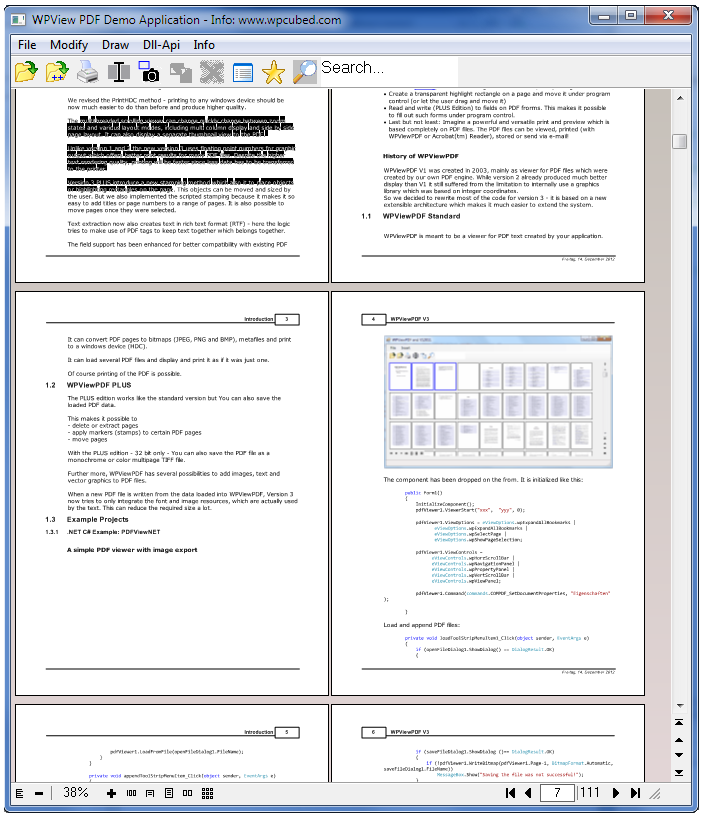
WPViewPDF is a component that allows you to load one or multiple PDF files and to display or print it/them as one.
It is possible to export pages as bitmaps (PNG, JPEG) or as text. It is possible to add drawings which will be displayed and printed on top of the original data. The drawing objects can be moved and sized by the programmer in code or by the user in the end product.
With WPViewPDF PLUS you can also add graphics and images to the PDF data (stamp PDF). It is possible to combine several PDF files into one new file (merge PDF). It is also possible to save selected pages (extract pages) or delete certain pages. It is possible to change field data, for example to merge data to fill out forms.
Version 3 is the result of extensive work. The logic required to load, render and manipulate PDF data was completely reinvented to create this new version. It makes use of clever and effective caching for quick response times. It also makes use of multithreading for better user interaction.
The PrintHDC method was revised and, as a result, printing to any Windows device is now much easier and produces a higher quality printout.
The multithreaded scrolling viewer can quickly change between zoom states and various layout modes, including multi-column display and side-by-side page layout. It can also display a separate thumbnail view to the PDF.
Version 3 PLUS introduces a new stamping method which allows it to place objects or highlighting rectangles on the page. This objects can be moved and sized by the user. The scripted stamping was also implemented because it facilitates the addition of titles or page numbers to a range of pages.
Pages can be selected and dragged to a new location.
Text extraction can now also create text in rich text format (RTF) - here the logic makes use of PDF tags to keep text together which belongs together.
PDF features supported:
With WPViewPDF you get a VCL, an ActiveX and a .NET component in one reasonably priced package. It is updated regularly and, since it is based on a DLL, updating works effectively and a new build of your application is not necessary.
The Demo Setup can be downloaded here:
[](http://www.wpcubed.com/pdf/download/wpviewpdf-and-wpviewpdf-plus-demo-component/)
This setup contains the DLL and the VCL for Delphi and sample projects.
Regards,
Julian Ziersch
WPCubed GmbH
[](http://www.wpcubed.com)