Hi,
You need a temporary directory for this.
There you save the text in HTML format.
You need to use the OnPrepareImageForSaving event to create a image file for each embedded image.
Then you can use your internet library to attach all files.
In the following demo I also added code to create a PDF version of the mail.
uses
  Windows, Messages, SysUtils, Variants, Classes, Graphics, Controls, Forms,
  Dialogs, WPCtrRich, WPCtrMemo, WPRTEPaint, WPRTEDefs, StdCtrls, ExtCtrls, WPPDFWP;

type
  TForm1 = class(TForm)
    Panel1: TPanel;
    Button1: TButton;
    SendMailButton: TButton;
    procedure FormCreate(Sender: TObject);
    procedure Button1Click(Sender: TObject);
    procedure FormDestroy(Sender: TObject);
    procedure SendMailButtonClick(Sender: TObject);
  private
    procedure DoPrepareImageforSaving(RTFData: TWPRTFDataCollection;
              Writer: TWPCustomTextWriter; TextObject: TWPTextObj;
              var DontSave: Boolean);
  public
    WPRichText1 : TWPRichText;
    EmailFiles : TStringList;
    EmailDir   : String;
    procedure SendEmailMessage(body : string; Attachments : TStringList);
  end;

var
  Form1: TForm1;

implementation

{$R *.dfm}

// Load a file
procedure TForm1.Button1Click(Sender: TObject);
begin
  WPRichText1.Load;
end;

procedure TForm1.FormDestroy(Sender: TObject);
begin
  EmailFiles.Free;
end;

// Initialize the TWPRichText
procedure TForm1.FormCreate(Sender: TObject);
begin
   EmailFiles := TStringList.Create;
   // Create
   WPRichText1 := TWPRichText.Create(Self);
   WPRichText1.Parent := Self;
   WPRichText1.Align := alClient;
   // Required Properties and Events
   WPRichText1.LayoutMode := wplayNormal;
   WPRichText1.EditOptions := WPRichText1.EditOptions + [wpAutoDetectHyperlinks];
   WPRichText1.AcceptFiles := true; // Drag&Drop images
   WPRichText1.AcceptFilesOptions := [wpDropCreatesLinkedImage];

   WPRichText1.OnPrepareImageforSaving := DoPrepareImageforSaving;

   // Where we create our temporary files.
   SetLength(EmailDir, 1000);
   SetLength(EmailDir,GetTempPath(1000, PChar(EmailDir)));
   EmailDir := EmailDir + 'WPEmail\';
   ForceDirectories(EmailDir);

end;

// Here we create an image file in the specified directory
procedure TForm1.DoPrepareImageforSaving(RTFData: TWPRTFDataCollection;
              Writer: TWPCustomTextWriter; TextObject: TWPTextObj;
              var DontSave: Boolean);
var s : string;
begin
  if TextObject.IsImage then
  begin
     s := TextObject.ObjRef.SaveToFile( EmailDir, 'Img', '%d', true );
     TextObject.ObjRef.FileName := ExtractFileName(s);  // only the name !!
     EmailFiles.Add(s);
  end;
end;

// Here we save a copy
procedure TForm1.SendMailButtonClick(Sender: TObject);
var i : Integer;
    s : string;
    pdf : TWPPDFExport; // wPDF - PDF Export for WPTools
begin
   // Create temporary file name
   i := 0;
   repeat
      s := Format('%sMessage%d.htm', [EmailDir,i]);
      inc(i);
   until not FileExists(s);

   // Save the ext as HTML file
   EmailFiles.Clear;
   EmailFiles.Add(s);
   WPRichText1.SaveToFile(s);

  { Now we can add a PDF version of the message using wPDF3.   }
    pdf := TWPPDFExport.Create(nil);
    try
     pdf.Filename := ChangeFileExt(s, '.pdf');
     pdf.Source := WPRichText1;
     pdf.Print;
     // set other properties, such as compression
     EmailFiles.Add(pdf.Filename );
    finally
     pdf.Free;
    end;
   { ------------------------------------------------------------------ }

   // Now we let the e-mail library send all files in the list EmailFiles
   SendEmailMessage( WPRichText1.ASANSIString('ANSI'), EmailFiles );

   // and clear the files
   for i:=EmailFiles.Count-1 downto 0 do
      DeleteFile(EmailFiles[i]);
   EmailFiles.Clear;
end;

procedure TForm1.SendEmailMessage(body : string; Attachments : TStringList);
begin
    //TODO
    // When using Indy you need to uise the message object
    // "EML" is just a multi part MIME version of the message with all
    // attachments. Usually the links in embedded HTML are replaced by
    // CID references. But this is done by the e-mail library when
    // converting the HTML
end;
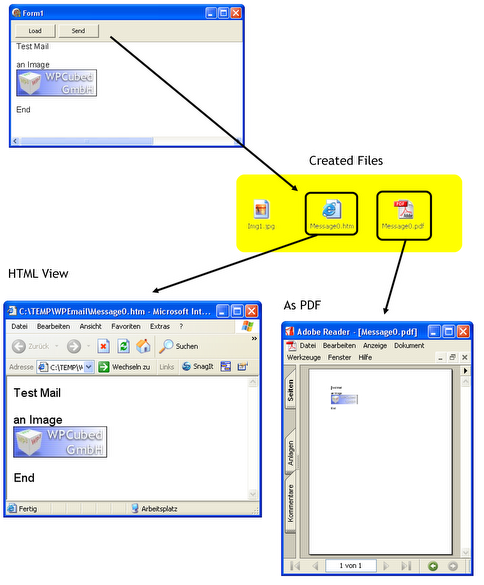
I hope this helps,
Julian

