WPCubed Product Support

Size of the different text no report builder

When I select only one page WpRichText and I transfer to the report builder, the text occupies only half of the print area.

In all the examples below, this actually happened. Have changed the font size, set up the report builder to be with dynamic size, or size estatic. We also have disabled and I enabled the
option adjust. I also tried using different sizes of sheets and pages. Altered margins, header and footer. And yet, the copied page from wpRichText continues using only half page report
builder.

I used ppWpRichText component (getting the text at runtime) and ppDBWpRichText (getting the text in a table)

WPRichText1.SelectPage(0);
ppWPTRichText1.RichText := WPRichText1.SelectionAsString;

or

WPRichText1.SelectPage(0);
ppdbWPTRichText1.RichText := WPRichText1.AsString;

or

ppdbWPTRichText1.RichText := WPRichText1.Text;

or

WPRichText1.SelectPage(0);
Table1TEXT.AsString := WPRichText1.SelectionAsString;

or

Table1TEXT.AsString := WPRichText1.Text;

🖼 imageshack.com

🖼 imageshack.com

#1 ♥ 0
7.8k Views 4 links 2 users read 4 min
support

The correct method is:

ppdbWPTRichText1.RichText := WPRichText1.AsString

But please note that your ppdbWPTRichText1 must be as wide as the page.

ppdbWPTRichText1.RichText := WPRichText1.Text would only read the text as plain text without page information.

#2 ♥ 0

Got ... My goal is: Print the text of a WpRichText in Report Builder. Exactly the same dimensions, same margins, same distance header. So what is seen in the extamente WpRichText is being printed.
I'm working this way because I buy sheets with printed headers, mirror border and fixed dimensions.
How did I not make the report builder working with front and back, I decided to use two reports: one for receiving freight, and another report to get back.
That was the reason I use the "WPRichText1.SelectPage (0)" and "WPRichText1.SelectionAsString"

The problem is that when I copy a page and paste in the WpRichText ppWpTRichText not come margins that were configured in WpRichText.

How do I print in ppdbWpRichText (image 2 of post previous) exactly what I see in WpRichText (image 1 of post previous)? Including print border mirror?

I live in Brazil and do not speak English. Sorry mistakes Google translator ^^

#3 ♥ 0
support

Hi,

SelectPage and SelectionAsString will make other problems - for example when a paragraph is devided by pages. The report object is not designed to print page format - it is used to fill the text into a rectangle of fixed width and variable height.

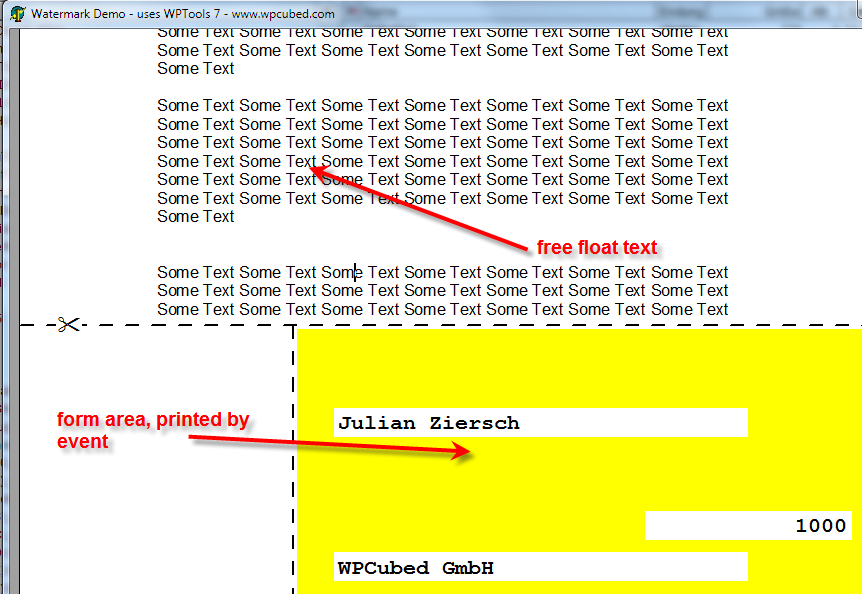
As I understand your demand, I think You will get a stable printing system by either (a) using PrintPageOnCanvas to print the text on top on whatever other contents you have on the printer page or (b) print that contents into the TWPRichText in the PaintWatermark event. (There is a demo which shows how this works).

I would suggest (b) because here you will have a preview, too. Also PDF export is possible with wPDF.

Julian

#4 ♥ 0

The outher problem of lack of fit could solve with your opinion. Now, the last problem is that when I copy a page of print WpRichText the 'Report Builder', the last line is misplaced. Does not reach the final. It seems that the effect of 'justify' does not work on the last line. (see attached image, look at the last line - marked by the red arrow)🖼 imageshack.com

What solution should I do?
1 - Before printing the 'Report Builder', select ONLY the last line of WpRichText and make an effect of 'justify';
2 - Before printing the 'Report Builder', select all the text and make the WpRichText an effect of 'justify';

If you chose option 1, how do I select only the last line of WpRichText? How do I apply the effect 'justify' in it alone?
If chosen, I like option 2 ALL I select the text and apply the effect 'justified'?

#5 ♥ 0
support

Hi,

(b) print that contents into the TWPRichText in the PaintWatermark event. (There is a demo which shows how this works).

The demo "Demos\H) Techniques\Watermark" shows how to print on something like a check form - you can have different print areas on each page when you use OnMeasurePage and change the margins there.

According to your question there is a format option to also justify the last line. However - please do not use that approach for your problem it is very likely that it will cause other problems.

#6 ♥ 0
This category is archived. No new posts are possible.