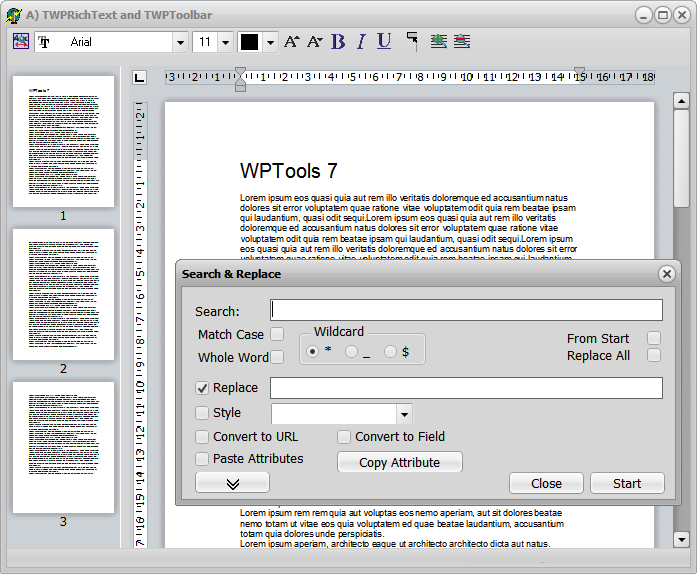
WPTools 7 has been designed to be more accessible than previous version of WPTools. We added several new actions to work with the text. You can easily load and save CSS data. A Style scroller makes it easy to implement a good looking and effective GUI.
The upgrade from WPTools 5 or 6 should be very smooth. In most cases you only need to add a few units to the uses clause (WPRTEPlatform, WPRTEEdit, WPRTEDefsConsts) .
Many new standard action classes - they already have been set up in the new unit WPDefAction7. All actions have been named with preceding category to make it easier to locate them.
Method to copy and paste or brush current attributes (CopyToClipboardAttr - action: TWPAAttributesBrush)
The component TRTFProps makes it easy to share styles between different editors and to create styles at designtime.
New Move method (move to hyperlink, table etc)
New API and handling for sub paragraphs. This makes it easy to hold the data of multiple records in one scrollable editor.
Images can now be embedded in HTML
Improved theme support (Delphi XE3). This affects the toolbar, ruler, gutter and editor.
😎 New hybrid Find and Replace dialog
New style scrolling component - TWPStyleScroller
The units of the RTFEngine have been split up to make it easier to extend it.
Included glyphs for the standard actions
Much enhanced API. Method to create demo text: WPLoremIpsum
I have tryed to install it but there is some problems.
Install part for DXE3 doesn't work, there is juste the .dpk in the folder.
I tried to build it with DXE4 and it seems some $DEFINE constant and Unit Scope Names are not good.
This utility function replaces the font of characters which are not defined in the fontfile
selected for the character:
function FixFontsOfText( RelacementFonts : array of String; Charset : Integer = 0 ) : Integer; + added support for Delphi XE6
4.4.2014 - WPTools 7.11'
Ignore empty formula fields in WPTblCalc unit
fix problem with footnotes and margin mirror
HTML writer will not save span and font tags around <a> tags anymore
ViewOptions: wpShowParNames - this will paint the name on the left side of a paragraph
(flag was there since wptools 4 but not used in V5 and V6)
The ANSI Text reader will now also read UTF8 text files with BOM (requires Delphi 2009 or later)
The ANSI Text reader will now also read UTF8 text text files with option "-utf8' (requires Delphi 2009 or later)
The ANSI Text writer will now also write UTF8 text text files with option "-utf8' (requires Delphi 2009 or later)
with wPDF V4 and Delphi XE PNG files can be exported to PNG including a transparency mask.
With Delphi <XE Please activate the compilewr symbol EMBEDD_PNGJPG in in wpobj_image and, in case you use wPDF 4 PLUS
also add the unit WPPDFR_PLUS to the project
5.6.2014 - WPTools 7.13.1
DecIndent now works better for numbered and outlined text
improved PDF/A Tag creation in combination with wPDF V4
Carriage Return now also triggers the AfterCompleteWordEvent
Memo._MeasureObjectCurrPage available in OnTextObjGetTextEx
(see example in manual, "Use TextObjects (i.e. page numbers, sum fields, dynamic chapter headlines)")
C++Builder 2010 and later only: Memo.GetBlockAttr and TWPBlockAttribute has been modified to workaround a XE compiler problem.
TWPCustomRichText.FontSelect has been optimized. It does not use GetBlockAttr anymore.
The VCL will now use String instead of TFontname to get and set fonts.
C++Builder 2010 and later only: the overloaded method
function TWPAbstractCharAttrInterface.GetFontName(var FontName: TFontName): Boolean;
has been renamed to TWPAbstractCharAttrInterface.GetTFontName(var FontName: TFontName) to avoid a type clash
The ANSI Text reader will now also read UTF8 text files with BOM (requires Delphi 2009 or later)
The ANSI Text reader will now also read UTF8 text text files with option "-utf8' (requires Delphi 2009 or later)
The ANSI Text writer will now also write UTF8 text text files with option "-utf8' (requires Delphi 2009 or later)
with wPDF V4 and Delphi XE PNG files can be exported to PNG including a transparency mask.
With Delphi <XE Please activate the compiler symbol EMBEDD_PNGJPG in in wpobj_image and, in case you use wPDF 4 PLUS
also add the unit WPPDFR_PLUS to the project
5.6.2014 - WPTools 7.13.1
DecIndent now works better for numbered and outlined text
improved PDF/A Tag creation in combination with wPDF V4
Carriage Return now also triggers the AfterCompleteWordEvent
Memo._MeasureObjectCurrPage available in OnTextObjGetTextEx
(see example in manual, "Use TextObjects (i.e. page numbers, sum fields, dynamic chapter headlines)")
C++Builder 2010 and later only: Memo.GetBlockAttr and TWPBlockAttribute has been modified to workaround a XE compiler problem.
TWPCustomRichText.FontSelect has been optimized. It does not use GetBlockAttr anymore.
The VCL will now use String instead of TFontname to get and set fonts.
C++Builder 2010 and later only: the overloaded method
function TWPAbstractCharAttrInterface.GetFontName(var FontName: TFontName): Boolean;
has been renamed to TWPAbstractCharAttrInterface.GetTFontName(var FontName: TFontName) to avoid a type clash
images larger than a page were painted distorted on screen - this has been improved
new option: wpDisableAutomaticImageAntialiasing with ViewOptionsEx
21.9.2014 - WPTools 7.16
function TextWidth(resolution : Integer) : Integer
function TextHeight(resolution : Integer) : Integer;
using the global var WPSpecialCharacterAttrOrder : array[TWPSpecialCharacterAttrKind] of TWPSpecialCharacterAttrKind
it is now possible to customize the order special attributes are applied to the text, i.e. to
also hightlight fields inside of protected text do this:
WPSpecialCharacterAttrOrder[wpInsertpoints] := wpProtectedText;
WPSpecialCharacterAttrOrder[wpProtectedText] := wpInsertpoints;