TextDynamic offers a method to extract each page as a metafile (IWPMemo.GetPageAsMetafile).
In combination with the "PageSizesList" feature it is possible to let the text "flow" into rectangles:
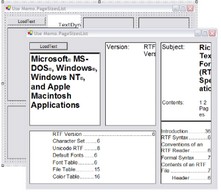
This C# demo uses an invisible TextDynamic editor and 4 picture boxes. It initializes the editor to use the size of each rectangle as page size and then extract the respective page as metafile.
This code initializes the PageSizeList and extracts the metafiles:
private void LoadInImage(System.Windows.Forms.PictureBox PictureBox, int MetaHandle)
{
if (MetaHandle!=0)
{
Metafile aMetafile=new Metafile(new IntPtr(MetaHandle), true);
PictureBox.Image = aMetafile;
PictureBox.SizeMode = PictureBoxSizeMode.StretchImage;
}
else PictureBox.Image = null;
}
private void Update()
{
WPDynamic.IWPMemo memo;
memo = wpdllInt1.Memo;
memo.PageSizeList.Clear();
memo.PageSizeList.Active = false;
memo.PageSizeList.Resolution = 120;
memo.PageSizeList.Add(pictureBox1.Width,pictureBox1.Height);
memo.PageSizeList.Add(pictureBox2.Width,pictureBox2.Height);
memo.PageSizeList.Add(pictureBox3.Width,pictureBox3.Height);
memo.PageSizeList.Add(pictureBox4.Width,pictureBox4.Height);
memo.PageSizeList.Active = true;
// Load the images
LoadInImage(pictureBox1, memo.GetPageAsMetafile(0,4));
LoadInImage(pictureBox2, memo.GetPageAsMetafile(1,4));
LoadInImage(pictureBox3, memo.GetPageAsMetafile(2,4));
LoadInImage(pictureBox4, memo.GetPageAsMetafile(3,4));
}
The "load text" button is connected to this simple method:
private void LoadText_Click(object sender, System.EventArgs e)
{
WPDynamic.IWPMemo memo;
memo = wpdllInt1.Memo;
memo.LayoutMode = WPDynamic.LayoutMode.wplayFullLayout;
memo.AutoZoom = WPDynamic.AutoZoom.wpAutoZoomOff;
if(memo.Load("","")) Update();
}
Of course it is possible to display scaled text:
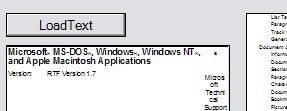
simply change the reference resolution value:
memo.PageSizeList.Resolution = 40;
Note: The TextDynamic demo version will print a red cross.