This is the perfect replacement for the .NET richtextbox. It can be used to edit database memo fields and also to write letters or documents. It can also be used to combine database records to be printed as one form (mail merge, reporting).
TextDynamic .NET is an assembly developed in C#. It can be compiled with the framework version 1.1 and version 2. This assembly contains the code to access the TextDynamic kernel which has been compiled as native windows code. This way it is extremely fast, for example loading and formatting of the 8MB, 200 pages test file (RTF) took only about 6 seconds.
The path to the kernel DLL is specified using WPDLLInt.SetDLLName( pathname ) before the initialization of the form.
A good place to do this is the Main() function of the application. The DLL will be loaded when the first instance of the WPDLLInt class in created.
[STAThread]
static void Main()
{
WPDLLInt.SetDLLName("{hkcu}Software\\WPCubed\\TextDynamic\\path");
Application.Run(new MyDemoApplication());
}
If you are using Visual Basic it is best to place the call into the New() method of the form. (The Form.OnLoad event cannot be used since at that time the handle would be already created)
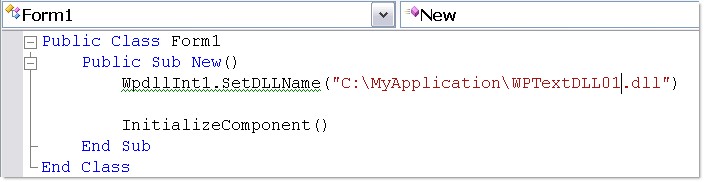
To load the DLL from same direcory as the EXE use this code
Public Sub New()
' Additional Code - look for DLL in same directory as EXE (bin directory)
Me.WpdllInt1.SetDLLName(Application.StartupPath & "\WPTextDLL01.DLL")
' For Windows Form-Designer
InitializeComponent()
End Sub
It is possible to read the name from the registry: Specify the path to the registry key (type string) preceeded by {hkcu} to use HKEY_CURRENT_USER, or {hklm} to use HKEY_LOCAL_MACHINE. In this example the path is specified as reference to a registry entry using {hkcu}. Alternatively you can also sepecify a fully qualified pathname.
Note: The key Software\WPCubed\TextDynamic\path is created by the TextDynamic setup script and must not be used in your application. We use it our example projects only.
Please don't mix up the engine DLL with the .NET assembly (WPTDynInt.dll or WPTDynInt2.dll). Only the engine DLL must be specified in SetDLLName!
Please also see the C# sample project.
IMPORTANT:
With licensed version please make sure you call wpdllInt1.EditorStart with your license name/key before doing anything else.
private void WinForm_Load(object sender, System.EventArgs e)
{
wpdllInt1.EditorStart( your_name, your_key );
....
}