The procedure AddXMPExtra(const SchemaPartXML, InfoPartXML : WideString) makes it possible to add custom XML (or XMP) data to the PDF metadata.
Please note - it is necessary to call AddXMPExtra before BeginDoc!
The string provided in SchemaPartXML will be embedded into the XMP PDFA schema inside a <rdf:Bag>. So it is required to put it into <rdf:li...> ... </rdf:li>
<pdfaExtension:schemas>
<rdf:Bag>
.....added SchemaPartXML....
.....other PDF/A related information ....
</rdf:Bag>
</pdfaExtension:schemas>
The extension of the PDF/A schema is required to be able to see the meta data in AcrobatReader.
The string InfoPartXML will be saved inside the XMP data as a separate branch.
Example:
schema := '<rdf:li rdf:parseType="Resource">' +
'<pdfaSchema:schema>wPDF test data PDFA Extension Schema</pdfaSchema:schema>' +
'<pdfaSchema:namespaceURI>urn:wpdf:pdfa:test_Data:rc#</pdfaSchema:namespaceURI>' +
'<pdfaSchema:prefix>dt</pdfaSchema:prefix>' +
'<pdfaSchema:property>' +
'<rdf:Seq>' +
'<rdf:li rdf:parseType="Resource">' +
'<pdfaProperty:name>info1</pdfaProperty:name>' +
'<pdfaProperty:valueType>Text</pdfaProperty:valueType>' +
'<pdfaProperty:category>external</pdfaProperty:category>' +
'<pdfaProperty:description>Just a line of data</pdfaProperty:description>' +
'</rdf:li>' +
'</rdf:Seq>' +
'</pdfaSchema:property>' +
'</rdf:li>' ;
info := '<rdf:Description rdf:about="" ' +
'xmlns:dt="urn:wpdf:pdfa:test_Data:rc#">' +
'<dt:info1>a single line</dt:info1>' +
'</rdf:Description>';
pdf.AddXMPExtra(schema, info);
pdf.BeginDoc;
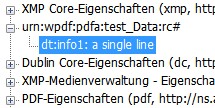
Display in Acrobat Reader under "Metadata":