WPTools Version 9 tables are very powerful: 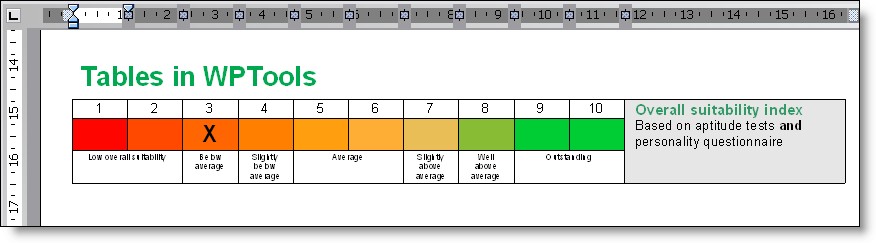
A table is handled like a paragraph object which contains multiple paragraphs as children. These are the rows. In turn, the rows contain multiple paragraphs which are the cells. Each cell paragraph can contain multiple paragraphs which are either text lines or tables:
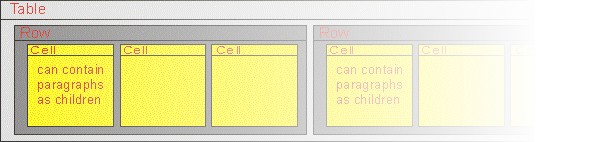
This makes WPTools tables very similar to HTML tables:
<table>
<tr>
<td>Cell 1 in Row 1</td>
<td>Cell 2 in Row 1</td></tr>
<tr>
<td>Cell 1 in Row 2</td>
<td>Cell 2 in Row 2</td></tr></table>
One possibility to create a table is to use the TableAdd API function:
TableAdd() is provided with a callback function to initialize the table cells. This is usually the more powerful way to do it. You provide a callback to TableAdd which is called for each cell of the table which was created. The methiod can be used if you know the count of rows in advance.
WPRichText1.TableAdd(c,r,[wptblActivateBorders],txtstyle, TableAddCellEvent);
procedure TForm1.TableAddCellEvent(RowNr, ColNr: Integer; par: TParagraph);
begin
par.SetText( Format('row:%d, col: %d', [RowNr, ColNr]); // 1 based!
end;
Another possibility to create a table: CreateTable API function:
This is a powerful way to create a table if you do not know the number of rows in advance, for example if you are just reading data from a database.
var aCell : TParagraph;
with WPRichText1.Memo.DisplayedText.CreateTable(nil) do
begin
ASet(WPAT_BorderFlags, WPBRD_DRAW_All4);
with CreateRow(nil, true) do
begin
InputCell.SetText('Cell 1');
InputCell.SetText('Cell 2');
EndRow(ThisRowStyle)
end;
with CreateRow(nil, true) do
begin
InputCell.SetText('Cell 3');
aCell := InputCell;
with aCell do
begin
// You could create more text ort a sub table ...
end;
EndRow(ThisRowStyle)
end;
end;
The table is created using the 'CreateTable' function of the TWPRTFDataBlock object. The parameter for this function is the paragraph after which the new table should be created. You can use 'nil' to create a table at the end of the document. The resulting value of this function is the TParagraph object which will contain all new rows. Use the CreateRow function of this paragraph to create a new row. The resulting value of the CreateRow function is a TWPTableRowStyle object, which serves as the default style for all cells created and also provides the function to create new cells. This object is deallocated by 'EndRow'.